 Download Online Help
 Print
|
|
|
|
|


The Inventory Detail, Transaction History Tab displays any transactions that the part has undergone since its entry into the system.
Within this tab, the various Inventory Transaction Types are displayed, as applicable.
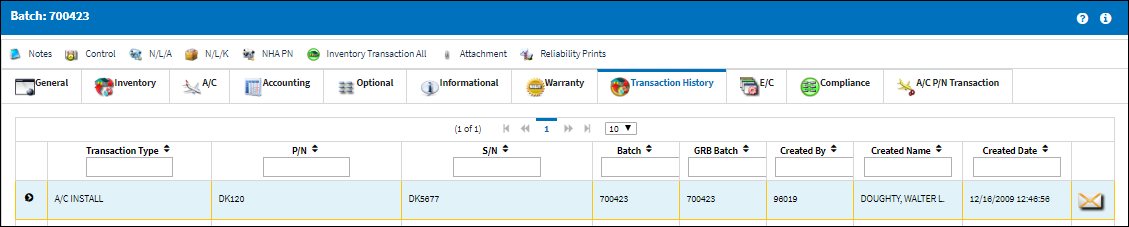
The following options/information is available in this window:
_________________________________________________________________________
P/N
The Part Number reference for the aircraft part.
S/N
The Serial Number for the specific serialized part.
Batch
The batch number that is associated with a part when introduced/received into the system.
Goods RCVD Batch
The original batch number when the part was initially introduced/received into inventory.
Note: This number is updated when a P/N Category is changed via the P/N Category Change Button located in the P/N Master of the Settings Training Manual.
W/O - S/O
The Work Order used to categorize, manage, and schedule work requirements for aircraft maintenance.
Ref.
The reference number for the transaction.
Location
The Location for maintenance events, inventory stores, orders, transactions, or training events.
Bin
The specific storage bin within the inventory Location.
Condition
The condition of the part.
QTY
The quantity of parts for the transaction.
Created By
The user who created the record.
Created Date
The date the record was created.
Ship Via
Ship Via code and method to be used.
E/C
The Engineering Control that specifies aircraft or component scheduled maintenance intervals.
A/C
The individual Aircraft tail number.
Order No
The type of order and the order number for the transaction.
To Location
Destination location code.
Custom Duty Document
Document used to verify that the part was accepted by customs.
To Bin
Destination bin code.
Issued To
The employee that the part is issued to. The Issue To may be configured to be mandatory and validate the employee’s status for issue.
Invoice
Applicable invoice number.
NHA P/N
The part’s Next Higher Assembly P/N (if applicable).
NHA S/N
Next Higher Assembly (NHA) serial number.
Transaction Sort Date
Applicable transaction sort date.
Tag No.
The tag number associated with the part.
Tag By
Vendor Tag By information.
Tag Date
Date of the Tag.
_________________________________________________________________________
Download Online Help
Print
|
©1997-2018 Trax USA Corp. All rights reserved. This manual may not be copied, photocopied, reproduced, translated, or converted to any electronic or machine-readable form, in whole or in part, without prior written approval from Trax USA Corp. |
 |