
 Share
Share
 Print
Print
|
|
|
|
|


Seat Mapping, Work Area

The Work Area allows the user to mark defects on images of the Aircraft Cabin. The image of Aircraft Cabin is generated through the A/C Type/Series Seat Configuration or A/C Seat Configuration. Defects can be added to specific Aircraft Cabin Types of Objects by first selecting the existing Defect from the Defect Area and then marking each object with the Mark Defect  button. Any Aircraft Cabin Type of Object with a Defect is indicated through the Seat Mapping Defect
  icon.
icon.
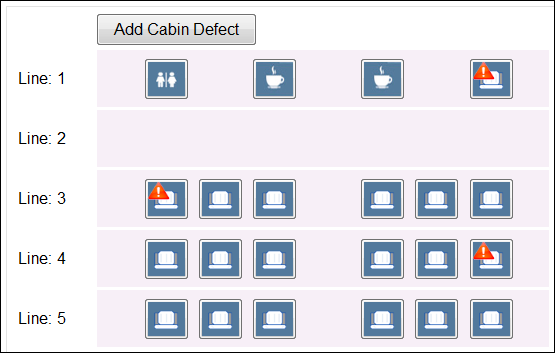
Additionally, Defects from an associated A/C Catalog can be assigned and mapped through simply selecting the appropriate Aircraft Cabin Type of Object and specifying the section, sub-section, and circumstance of the defect.
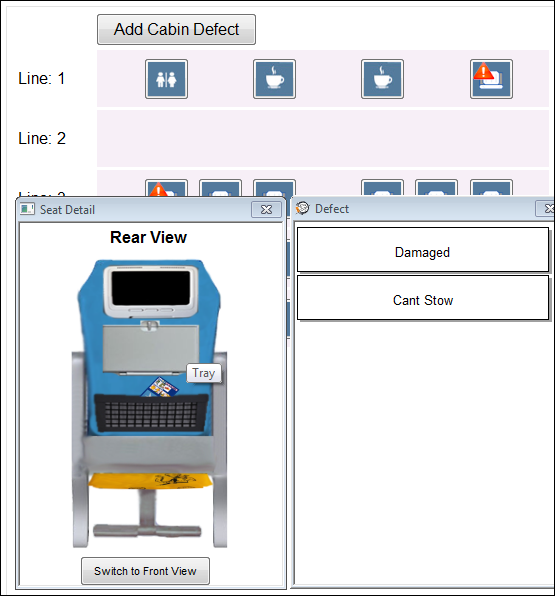
If a Defect must be added that does not correlate to one of the main objects created through the A/C Type/Series Seat Configuration, but still exists in the Cabin, select the Add Cabin Defect button and specify the section, sub-section, and circumstance, similar to the previous method.
If necessary, Defects that have been assigned and mapped can be removed through the Clear Defect Mark  button.
Share
Print
|
©1997-2026 Trax USA Corp. All rights reserved. This manual may not be copied, photocopied, reproduced, translated, or converted to any electronic or machine-readable form, in whole or in part, without prior written approval from Trax USA Corp. |
 |