
 Share
Share
 Print
Print
|
|
|
|
|


After a revision is created, it is possible that an E/C under revision is contained on a completed work order that is already issued but not yet completed. In order to inform the user of a revision version conflict, a configuration switch was created. If the Switch  PENDAUTH is set to Yes, the override is done in the Production program Pending Release. If the switch is set to NO, the work order conflict will show in a pop-up window after authorizing the new revision.

Please contact your system administrator for information about the setting of the switch based on your company's business process.
This manual will only discuss the switch setting to No. If the switch is set to yes the override is done in the Production program Engineering Pending Release and discussed in Production Training Manual.
After a new revision is entered into the system it will need to be authorized. For that purpose, TRAX will display the E/C in Engineering Authorization Management:
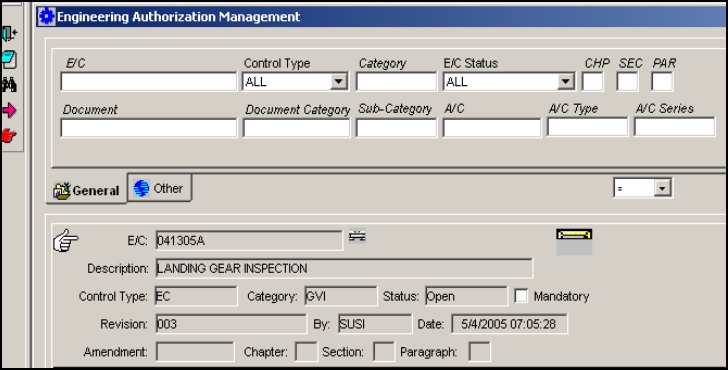
In this example, Revision 003 is added. At the same time, an open work order exists in the system that contains this E/C Revision 002:
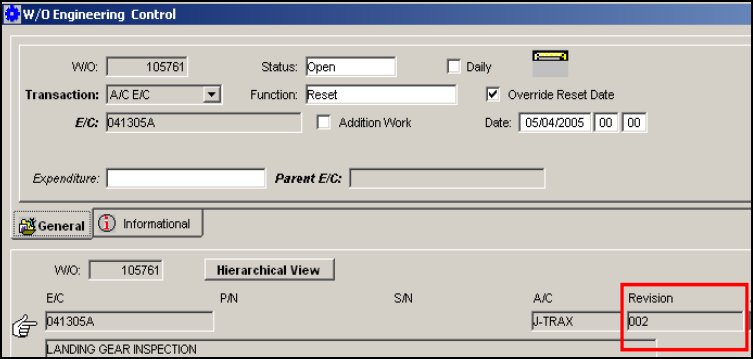
When the new E/C Revision is authorized, the following pop-up screen will open:
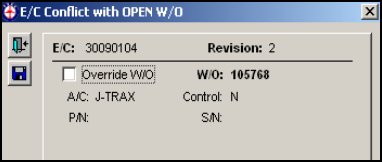
The system informs us that there is an open work order that contains the old revision. This screen can also be accessed by selecting the Conflict W/O  button at any time during the authorization process. The engineering department can then decide whether the work order with the old revision should be performed, or if a new work order should be issued with the new revision (Override W/O checkbox).
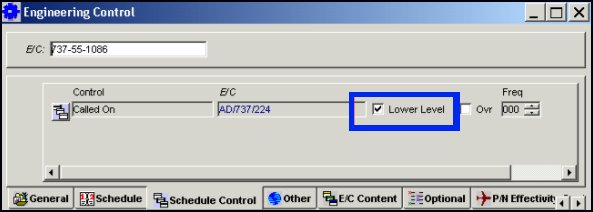
When this checkbox is selected, the system assumes that all lower level Task Card steps associated to a Child E/C are contained in the Parent E/Cs Task Cards. This feature is helpful when a Parent E/C includes tasks that are identical to tasks on the original or Child E/C. An engineering decision must be made to verify if the Parent E/Cs Task Cards contain the same steps of the Child E/C. No Task cards from the Child E/C will be added to the Work Order AT ALL.
Share
Print
|
©1997-2026 Trax USA Corp. All rights reserved. This manual may not be copied, photocopied, reproduced, translated, or converted to any electronic or machine-readable form, in whole or in part, without prior written approval from Trax USA Corp. |
 |