
 Share
Share
 Print
Print
|
|
|
|
|



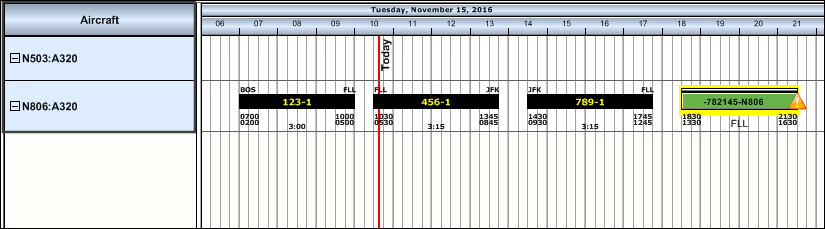
The Aircraft Area displays the Scheduled Flights as defined in the A/C Flight Schedule. For more information, please refer to the A/C Flight Schedule via the Technical Records Training Manual.
The Interactive planner will display scheduled flights up to a seven day forecast.
The flight information listed displays the Flight number and the Leg of the flight separated by a dash (ie: 012010-1). The origin and destination Locations are listed at the ends of the flight (ie: MIA - LAX). When the user points to the scheduled flight the below hypertext appears with the Flight, Flight Origin and Destination, Expected Time of Departure (ETD) and Expected Time of Arrival (ETA) information.
The user can also edit the display of the Aircraft Area by selecting the Select A/C  button. For additional information regarding this feature, refer to the Display Control Area.
Share
Print
|
©1997-2026 Trax USA Corp. All rights reserved. This manual may not be copied, photocopied, reproduced, translated, or converted to any electronic or machine-readable form, in whole or in part, without prior written approval from Trax USA Corp. |
 |