
 Share
Share
 Print
Print
|
|
|
|
|


TraxDoc Security Explorer
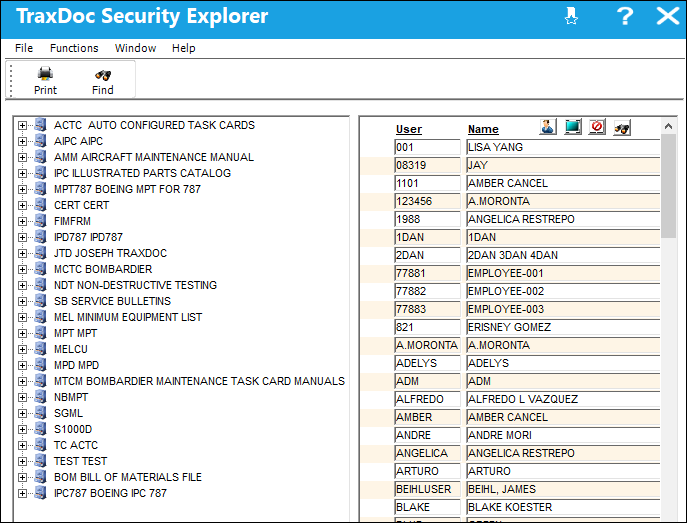
The TraxDoc Security Explorer is used to set security for the TraxDoc Categories. The TraxDoc security is used to control which users will have access to the TraxDoc Documents in that Category. The TraxDoc Security Explorer is also used to control what level of security a user will have in each category such as the ability to view, modify, print, export, or revise TraxDocs. A security profile (from Trax Security Explorer) or individual users can be added to the each TraxDoc Category.
TRAX displays the TraxDoc Security Explorer window. Select the Expand  button for one of the TraxDoc Categories.
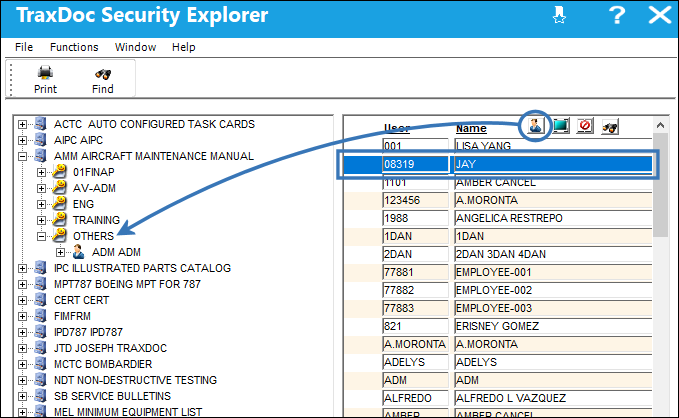
Highlight the name of the user in the right panel. Drag the User  button to the left panel and drop it in a group for a particular category.
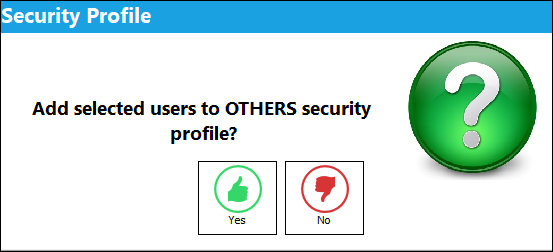
The following pop up will appear. Select 'Yes.'
The following pop up appears. Use the Select All  and Deselect All
  buttons to grant access to the following options and select the Save
  button. The Save prompt will appear. Select 'Yes.'
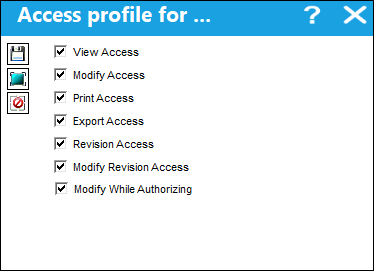
 Note: Select the Modify While Authorizing checkbox to allow the user to edit the TraxDoc Master record during the authorization process from the TraxDoc Authorization Explorer.

 Note: Select the Modify Revision Access to allow the user to edit PDFs during the authorization process using the Edit button. For more information on the Edit button, please refer to Edit Button, via TraxDoc Document Detail, TraxDoc Explorer Tab.
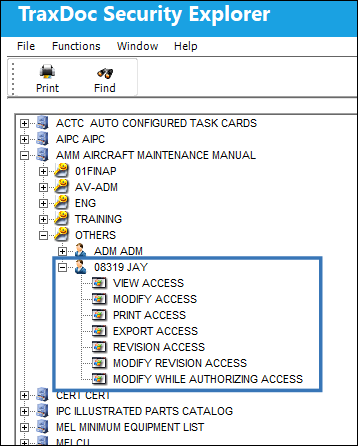
The user has been granted security for the following TraxDoc Category:
Refer to the following for additional information:
Share
Print
|
©1997-2026 Trax USA Corp. All rights reserved. This manual may not be copied, photocopied, reproduced, translated, or converted to any electronic or machine-readable form, in whole or in part, without prior written approval from Trax USA Corp. |
 |