
 Share
Share
 Print
Print
|
|
|
|
|


Order Type
The System Transaction Codes are displayed with both the Code Names and Descriptions. The Code Descriptions directly illustrate their functionality and role in the system, as fields are populated and tasks are performed.
Do not attempt to delete the Order Type System Transaction Code as it is a required system code.
General Description: |
The type of Order to be used; ie, Purchase Order (PO), Repair Order (RO) |
Are Authorization Steps Available? |
Yes |
Is System Notification Available? |
Yes |
Example Window Path(s): |
Orders/ Query/ Order Query |
Example Window(s): |
w_order_qry |
Related Switch(s): |
|
Functions: |
Order Type Code helps to sort orders by their functions, i.e. purchase order is to buy an inventory item or supply which may result in the creation of a fixed asset record. |
Reports: |
NA |
Available Functionality:
Order Type Code allows users to define the order by its function and helps to sort expenses from inventory. In addition, the Order Type allows users to define authorization processes. Order Types System Transactions are accessible via Settings/ Explorer/ System Transaction Codes. These Order Types are defined by TRAX and should not be deleted or modified. Each Order Type allows for the entry of different order authorization processes and/or a combination of Order Type and Order Category authorization processes.
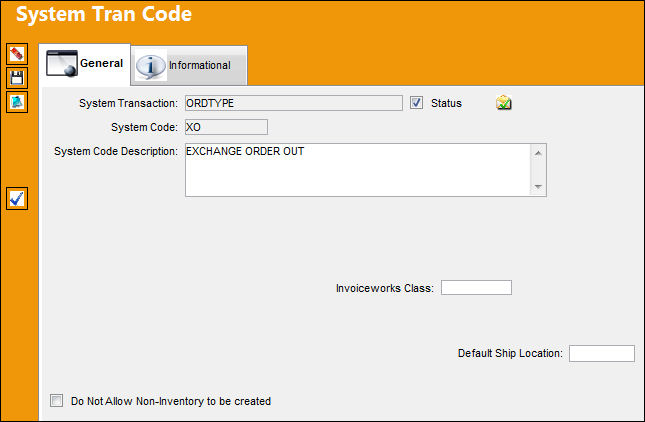
This example is the Order Type Transaction Code for Exchange Order Outs, but is applicable to all Order Types.
The following information/options are available in this window:
_____________________________________________________________________________________
Shelf Life Re-Certification checkbox
When selected, parts with Shelf Life Re-Certification can be queried in the Shop Tasks Detail Area via Shop Resource Task Planner which can be found in the Planning EVO Training Manual.
Invoiceworks Class
Invoiceworks Class code. This is informational only.
 This field is only for customers who have an Interface set up. For additional information, contact your TRAX Interface Administrator.
Default Ship Location
Select a default ship location to be auto populated when this System Transaction Code is selected when creating an Order.
Do Not Allow Non-Inventory to be created checkbox
When this checkbox is selected, users will be unable to create orders with non-inventory parts.
_____________________________________________________________________________________
Users may predefine order authorization processes by selecting the Authorization Step  button.
Share
Print
|
©1997-2026 Trax USA Corp. All rights reserved. This manual may not be copied, photocopied, reproduced, translated, or converted to any electronic or machine-readable form, in whole or in part, without prior written approval from Trax USA Corp. |
 |