
 Share
Share
 Print
Print
|
|
|
|
|


Repair Order Service Messages
The System Transaction Codes are displayed with both the Code Names and Descriptions. The Code Descriptions directly illustrate their functionality and role in the system, as fields are populated and tasks are performed.
Users must have the appropriate security to access the Repair Order Service Messages Transaction Code.
This Transaction Code is only available for customers who have an interface set up which can be configured via TRAX Profile Master.
Transaction Code: |
REPAIR ORDER SERVICE MESSAGES |
General Description: |
Priority levels for Orders and Requisitions |
Are Authorization Steps Available? |
N |
Is System Notification Available? |
Y |
Trax Control Panel Path(s): |
Order/Update/Exchange Order Order/Update/Repair Order |
Windows(s): |
w_ros_eu |
Related Switch(s): |
Not Applicable |
Functions: |
To determine if a vendor has the capability to send messages regarding EO's and RO's To set up system notifications. |
Reports: |
Not Applicable |
Available Functionality:
To set up ROS system notifications that are to be sent and received, select the System Notification  button.
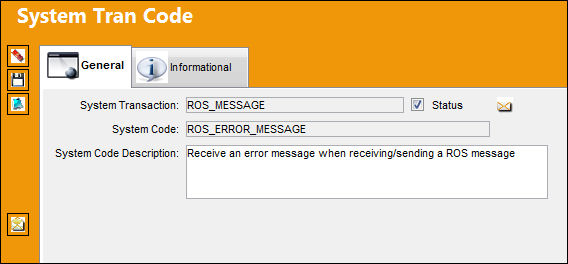
TRAX displays the System Notification window.
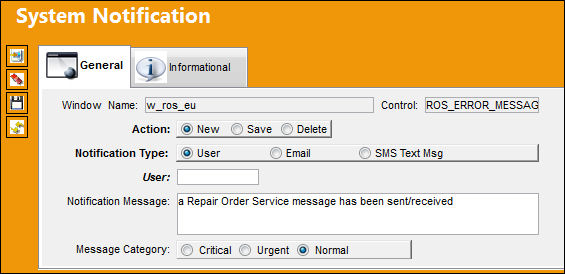
The following information/options are available in this window:
_____________________________________________________________________________________
Window Name
Screen/window affected by this functionality.
Control
Switch or Transaction Code that affects this functionality.
Action
How this functionality affects TRAX.
Notification Type
The method by which notification will reach the necessary individuals.
User Radio button
Select this radio button to have the notification sent through a user.
Email Radio button
Select this radio button to have the notification sent through email.
SMS Text Msg Radio button
Select this radio button to have the notification sent through an SMS Text Message.
User
The user to which the notification will be sent.
Email address of recipient of the email notification.
This field only appears when the Email Radio button is selected.
Notification Message
The actual text that will appear in the notification message. This may be edited by the user.
Message Category
The priority of the notification (i.e. Critical, Urgent, Normal). Select the appropriate Message Category Radio button.
_____________________________________________________________________________________
Share
Print
|
©1997-2026 Trax USA Corp. All rights reserved. This manual may not be copied, photocopied, reproduced, translated, or converted to any electronic or machine-readable form, in whole or in part, without prior written approval from Trax USA Corp. |
 |