
 Share
Share
 Print
Print
|
|
|
|
|


Customs Detail, General Tab
The Customs Detail, General tab allows the user to create a new Customs record or view details of previously created customs records and update information.
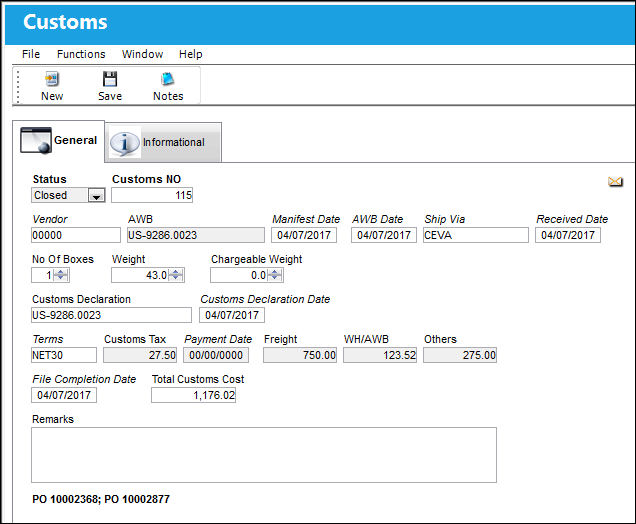
The Customs record is linked to an order through the AWB (Airway Bill) that tracks the delivery of the ordered part(s). For detailed information refer to Linking Orders to Customs Records via AWB.
The following information/options are available in this window:
_____________________________________________________________________________________
Status
The current status of the customs record. The options are Open or Closed; Open is selected by default. To close the record this Status must be manually set to Closed and then saved.
Customs NO
The unique system identification number for the Customs record. This number is applied automatically once the record is created.
Vendor
The system code for the service/part provider. The third party brokerage vendor that is clearing the order through customs.
AWB
The AWB is the official document issued by the carrier that contains the order's freight details. This number links the Customs record with Orders in the system. The AWB is pivotal for tracking the Customs process all the way through the invoicing process. To link this AWB to an order, go to that order's detail window then select the AWB/Expedite  button.
Manifest Date
The date that the process was started.
AWB Date
The date that the AWB was created.
Ship Via
The freight forwarder responsible for delivering the order to its destination.
Received Date
The date that the freight was received in the destination.
No Of Boxes
The number of boxes included in the delivery.
Weight - The weight of the delivered box(es).
Chargeable Weight  - If the freight cost is based on chargeable weight instead of net weight, it can be entered here. This field's value is reflected in the CUSTOMS QuickPrint table under the Chargeable_Weight column. This field is informational-only.
Customs Declaration
The customs declaration number used to itemize the goods being brought into the country through customs procedures. This is a free text field and informational only.
Customs Declaration Date
The date of the Customs Declaration document.
Terms
The terms of payment, including the amount of days in which the payment must be made, may be defined by selecting from the pre-defined listing established in the System Transaction Codes. Terms may be changed for a particular order as required. For additional information, please refer to the Terms section of the System Trans Codes Training Manual.
Customs Tax
The tax associated to the customs process.
Payment Date
The tax's payment date.
Freight
The associated freight cost/fees, if applicable.
WH/AWB
Fees associated to the Warehouse and Airway Bill.
Others
Any other associated fees. These fees would typically include the brokerage fees.
File Completion Date
The date that this Customs record was completed.
Total Customs Cost
The total fees for this record. This total cost is composed of the Customs Tax, Freight, WH/AWB, and Others fees.
Remarks
This field is used to enter additional information regarding this customs record. This is a free text field.
_____________________________________________________________________________________
Invoicing Customs Fees:
For detailed information on how Customs records are invoiced, refer to these topics:
- Customs Fees: Financial Tracking: How to create a Journal Entries and Link invoices for Customs records
- Customs Fees: Invoicing the Customer: How an MRO vendor can create Customer Invoices for the Customs records
Share
Print
|
©1997-2026 Trax USA Corp. All rights reserved. This manual may not be copied, photocopied, reproduced, translated, or converted to any electronic or machine-readable form, in whole or in part, without prior written approval from Trax USA Corp. |
 |