
 Share
Share
 Print
Print
|
|
|
|
|


Linking Orders to Customs Records via AWB
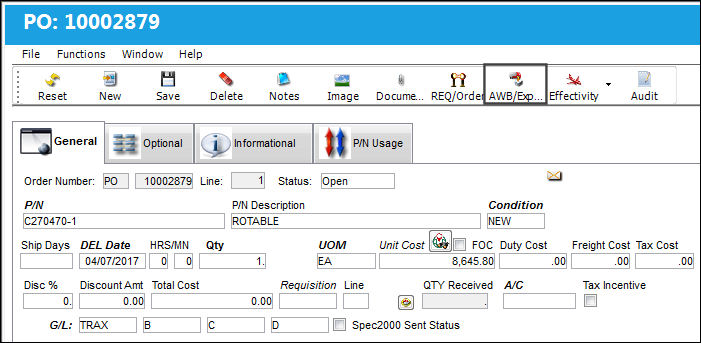
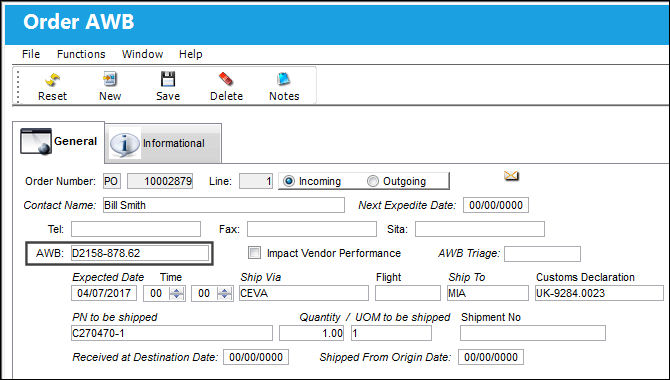
The Customs record is linked to an order through the AWB (Airway Bill) that tracks the delivery of the ordered part(s). The AWB number is listed on the Customs record and is associated to the delivered order by selecting the AWB/Expedite  button in the order details window.
For example, select the AWB/Expedite button from the order details window.
Enter the same AWB number from the Customs record along with all other necessary information.
From the Customs record detail, notice that the linked order is listed at the bottom of the window. They are linked through the same AWB number.
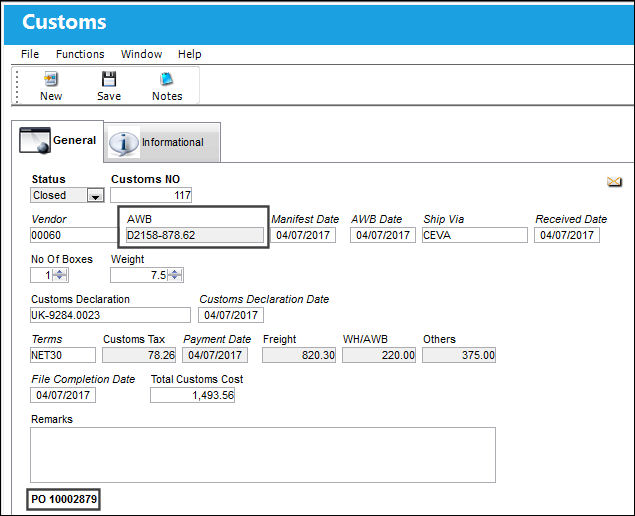
Multiple orders can be linked to the same Customs record. Each order will be listed at the bottom of the window.
Share
Print
|
©1997-2026 Trax USA Corp. All rights reserved. This manual may not be copied, photocopied, reproduced, translated, or converted to any electronic or machine-readable form, in whole or in part, without prior written approval from Trax USA Corp. |
 |