
 Share
Share
 Print
Print
|
|
|
|
|


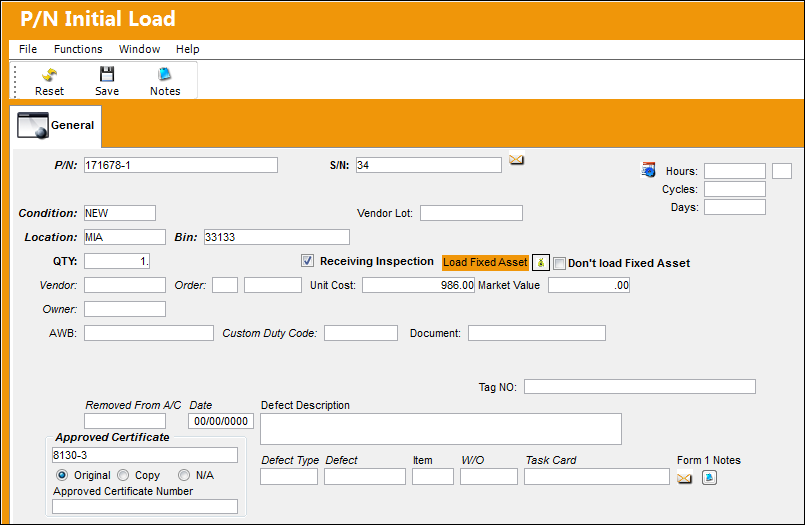
Fixed Assets are serialized or repairable inventory items that are subject to depreciation. The Fixed Asset Registry shows the detailed information for each inventory item that has been set up as a Fixed Asset. Items are added to the Fixed Asset Registry and assigned a Fixed Asset number when a purchased item is received via Receiving/Update/Order Receiving/Purchase Order Receiving, or when a part is loaded into the system using the P/N Initial Load option. To view the P/N Initial Load window, go to Inventory/ Update/ P/N Initial Load:
 The system maintains a Fixed Asset registry for Rotable (serialized) components if Switch F/A (Fixed Asset Information) is set to Yes via System Administration/ Explorer/ System Transaction Configuration.
Notice the Load Fixed Asset  button. When initially loading a Serialized or Repairable Part Number into the system using the P/N Initial Load window, select this button to have the system automatically create a Fixed Asset with the same Value as the Initial Load's Unit Cost. When selected, the following text will appear indicating that a Fixed Asset will be loaded.

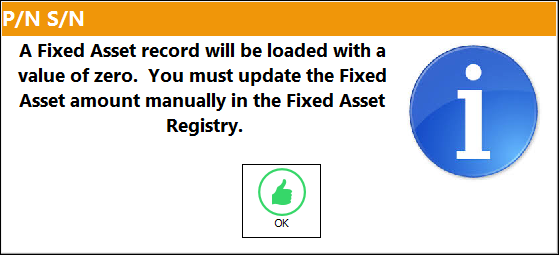
If this button is not selected when Initial Loading a part into inventory, the Fixed Asset will be created with a Value of 0.00; users would then have to go and manually enter a Value amount to the Fixed Asset at a later time. If not selected, the following informational prompt appears after the window is saved:
 This button is security controlled via Inventory/Update/P/N Initial Load/ Allow Load of Fixed Asset Value. For more information refer to the Security Explorer.
If the Unit Cost is null (not entered), Journal Entries will not be created for those P/N Categories which have Actual P/N Costing Methods. Journal Entries will be created for those P/N Categories which have Average P/N Costing Methods.
If the Don't Load Fixed Asset checkbox is selected (above), then a Fixed Asset record will not be created for the initially loaded part.
Items are removed from the register when they are sold or scrapped. The items in the register are managed using LIFO or FIFO.
- LIFO is an accounting principle (or method) in which the last items are always removed first from inventory. The acronym represents ‘Last In, First Out’.
- FIFO is an accounting method in which the first item placed into inventory is the first to be removed. The acronym represents ‘First in, First Out’.
The setting can be changed in System Administration/Explorer/System Transaction Configuration/GL Interface/ GLFIFO.
Share
Print
|
©1997-2026 Trax USA Corp. All rights reserved. This manual may not be copied, photocopied, reproduced, translated, or converted to any electronic or machine-readable form, in whole or in part, without prior written approval from Trax USA Corp. |
 |