
 Share
Share
 Print
Print
|
|
|
|
|


Select the Shop W/O Status  button to view a printable graphical representation of the current status of the selected Shop Work Order.
 This button is security controlled via Shop/ Update/ W/O/ Shop WO Sel Gantt Status Button. For more information, refer to the Security Explorer, via the System Administration Training manual.
The Status button also appears in the Work Order window located in the Production module. Its functionality is identical to the one described here.
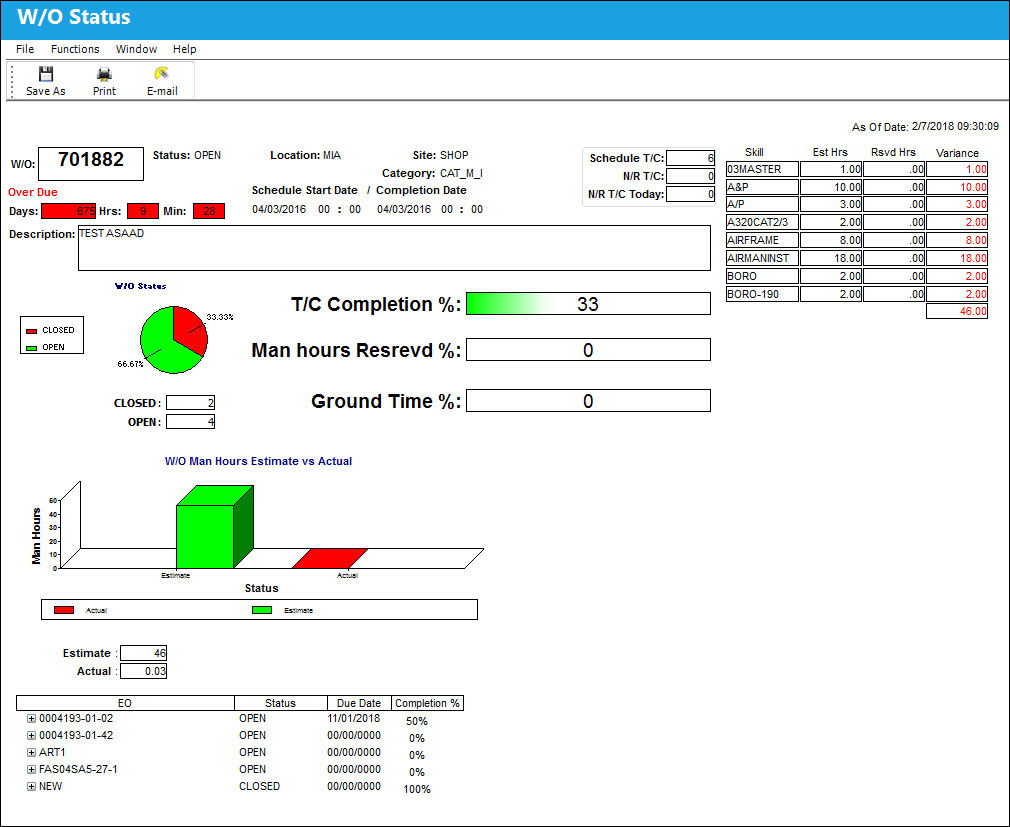
Users can also access the Shop Work Order Task Card window by double-clicking on the Shop Work Order number displayed at the top-left corner of the window.
From here, the user can Print  or E-Mail
  the information using the respective buttons located at the top of the window.
Share
Print
|
©1997-2026 Trax USA Corp. All rights reserved. This manual may not be copied, photocopied, reproduced, translated, or converted to any electronic or machine-readable form, in whole or in part, without prior written approval from Trax USA Corp. |
 |