
 Share
Share
 Print
Print
|
|
|
|
|


Select the IR (Incident Report) Creation  button. TRAX displays the IR Creation.
A user would select this button to create an IR. This is used to document that an incident has occurred during a specific stage of the flight. Incident Reports are for incidents that have already happened while SDRs (Service Difficult Reports) are more of a preventative measure taken.
 This button is security controlled via Shop/ Update/ Shop W/O / Shop W/O NRTC/TC IR Creation. For more information refer to the Security Explorer via the System Administration Training Manual.
From the W/O Task Card and/or W/O Non-Routine Task Card windows, select the IR Creation button:
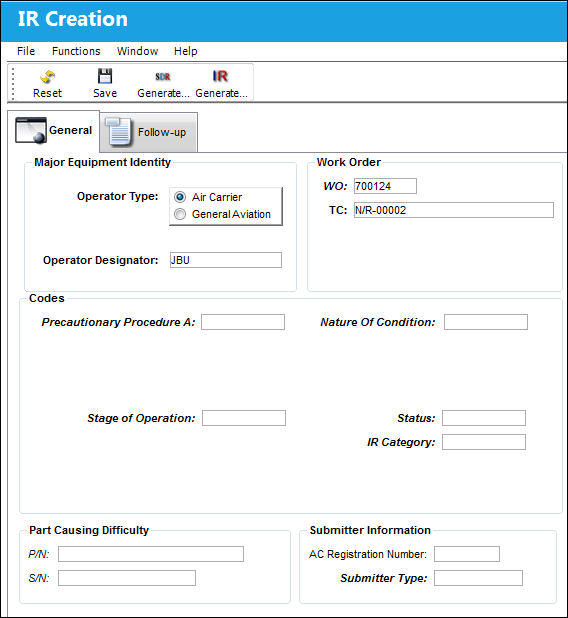
The following information/options are available in this window:
_____________________________________________________________________________________
Operator Type
Choose from either Air Carrier or General Aviation.
Operator Designator
The FAA assigned code for the entity operating the aircraft or the repair station.
This field will be automatically populated by the Operator Designator entered in the Company Profile window. For more information refer to the Company Profile, General Tab via the Settings Training Manual.
W/O
The Work Order used to categorize, manage, and schedule work requirements for aircraft maintenance.
T/C
The Task Card / Job Card that details the scheduled maintenance work.
Precautionary Procedure A
The Precautionary Procedure code associated with the SDR.
Nature Of Condition
The nature of condition associated with the Precautionary Procedure.
Precautionary Procedure B
The Precautionary Procedure code associated with the SDR.
Nature Of Condition #2
The nature of condition associated with the Precautionary Procedure.
Precautionary Procedure C
The Precautionary Procedure code associated with the SDR.
Nature Of Condition #3
The nature of condition associated with the Precautionary Procedure.
Precautionary Procedure D
The Precautionary Procedure code associated with the SDR.
Stage Of Operation
The stage of operation at which the difficulty was discovered.
Status
The status of the Incident Report
IR Category
The category of the Incident Report
P/N
The Part Number reference for the aircraft part.
S/N
The Serial Number for the specific serialized part.
A/C Registration Number
The registration number for the aircraft.
Submitter Type
The Submitter Type code associated with the operator.
_____________________________________________________________________________________
Additional information can be viewed in the IR Creation, Follow-Up Tab.
Share
Print
|
©1997-2026 Trax USA Corp. All rights reserved. This manual may not be copied, photocopied, reproduced, translated, or converted to any electronic or machine-readable form, in whole or in part, without prior written approval from Trax USA Corp. |
 |