 Download Online Help
 Print
|
|
|
|
|


Detail Tab, via W/O
The Detail tab contains the W/O's general information (such as Location, schedule, etc.).
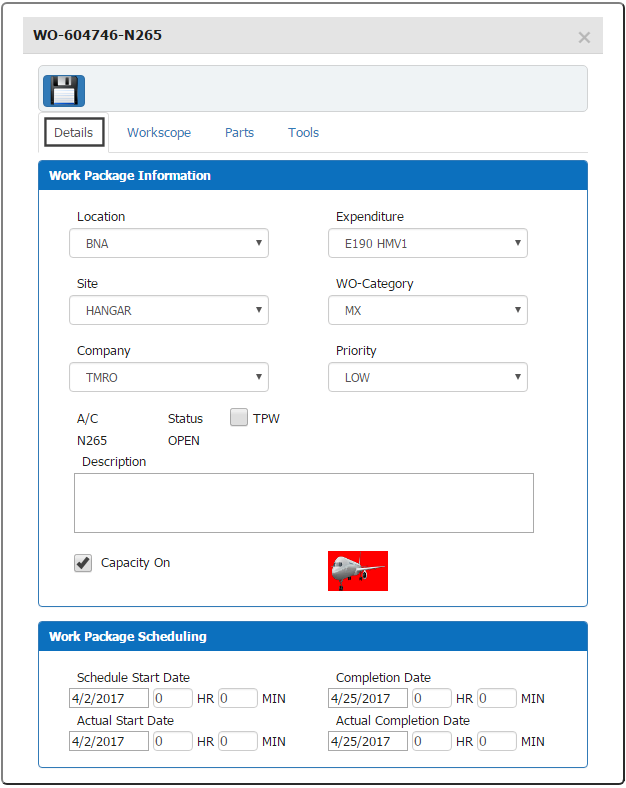
The following options/information is available in this window:
_________________________________________________________________________
Work Package Information
Location - The location where the maintenance event will be scheduled.
Expenditure - The expenditure code associated to the W/O and all related costs. All material issues, labor actuals, and expenses against this W/O impacts this expenditure code financially.
Site - The site where the work should be carried out (if applicable).
WO-Category - Work Order Category code.
Company - The company the Work Order was created for.
Priority - The priority of the Work Order (e.g., Urgent).
A/C - The individual Aircraft tail number.
Status - The current status of the Work Order.
TPW checkbox - If the W/O is for a Third Party, then the TPW checkbox should be selected.
Description - The description of the Work Order.
Capacity On checkbox - Select to see the scheduled capacity for the W/O's Site. Sites that have available capacity are flagged in green, while Sites that are occupied are flagged in red. Users can hover over the icons to see which W/O is scheduled for that Site. 
Work Package Scheduling
Schedule Start/Completion Date - The dates that the W/O is scheduled to start and be completed.
Actual Start/Completion Date - The dates that the W/O is actually started and completed. These may be different than the scheduled dates above.
_________________________________________________________________________
Select the Save  button to save any changes to the W/O.
Download Online Help
Print
|
©1997-2018 Trax USA Corp. All rights reserved. This manual may not be copied, photocopied, reproduced, translated, or converted to any electronic or machine-readable form, in whole or in part, without prior written approval from Trax USA Corp. |
 |