 Download Online Help
 Print
|
|
|
|
|


Workscope Tab, via W/O
The Workscope tab lists all maintenance items assigned to the W/O.
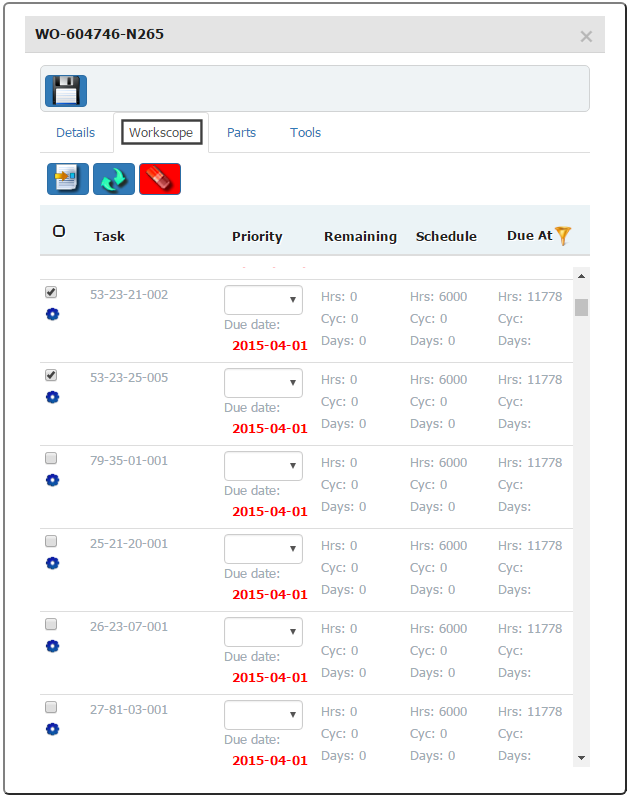
The following options/information is available in this window:
_________________________________________________________________________
Add Task  button
Select the Add Task button to add additional maintenance events to the current W/O.
Transfer  button
Select the Transfer button to transfer the selected maintenance event(s) from the currently assigned to W/O to another existing W/O.
Remove  button
Select the Remove button to unassign the selected maintenance event(s) from the assigned W/O.
Select All  button
Click this to select all maintenance events listed.
Select Item  button
Click this to select an individual maintenance event.
Priority
Planners can specify the priority of the maintenance event.
Task
The maintenance event that is due and must be scheduled on a W/O. These include Defects, E/Cs, P/N E/Cs, and P/N Controls. The task's description is listed when applicable.
Due Date
The date that the maintenance item was due.
Remaining
The time remaining on the item's schedule before it is due. The figures include flight hours/cycles and days. Maintenance events that are overdue will be negative (example: '-2').
Schedule
The schedule Hours, Cycles, and/or Days of the maintenance item.
Due At
The schedule of Hours, Cycles, and/or Days intervals where the maintenance item is due.
Filter  button
Click on this button to utilize filters for the columns in this table.
_________________________________________________________________________
Select the Save  button to save any changes to the W/O.
Download Online Help
Print
|
©1997-2018 Trax USA Corp. All rights reserved. This manual may not be copied, photocopied, reproduced, translated, or converted to any electronic or machine-readable form, in whole or in part, without prior written approval from Trax USA Corp. |
 |