 Download Online Help
 Print
|
|
|
|
|


Parts Tab, via W/O
The Parts tab lists all parts required for the W/O and their availability.
From this tab planners can see which parts are needed for each Task Card, the required quantity, and the availability status.
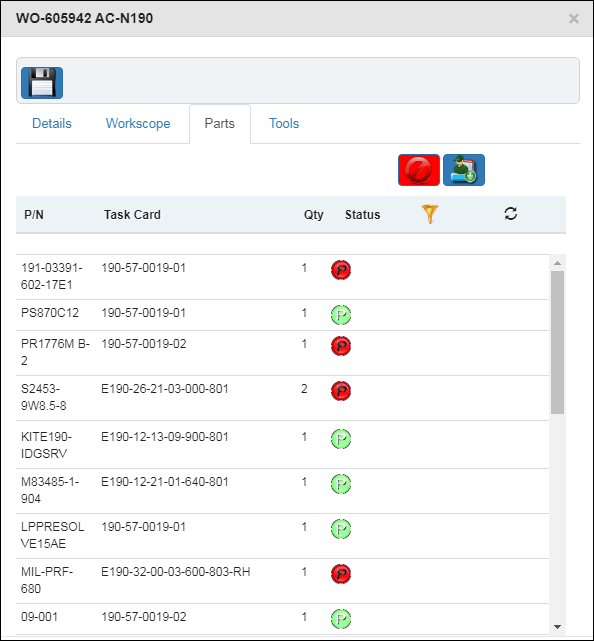
The following options/information is available in this window:
_________________________________________________________________________
P/N
The Part Number reference for the aircraft part. This is the part required for the task.
Task Card
The Task Card / Job Card that details the scheduled maintenance work.
Qty
The quantity of items/parts required.
Status
The part's availability status.
Part Status Indicator  icon - Part is available
Part Status Indicator  icon - Part is unavailable
Filter  button
Click on this button to utilize filters for the columns in this table.
Cancel  button
Select this button to cancel all part Picklists and Requisitions associated to the W/O.
Picklist All  button
Select this button to create a Picklist for all parts required for the W/O.
_________________________________________________________________________
Select the Save  button to save any changes to the W/O.
Download Online Help
Print
|
©1997-2018 Trax USA Corp. All rights reserved. This manual may not be copied, photocopied, reproduced, translated, or converted to any electronic or machine-readable form, in whole or in part, without prior written approval from Trax USA Corp. |
 |