 Download Online Help
 Print
|
|
|
|
|


Security Options
Various options in the Line Control application are security-controlled via the main application. The following options can be configured via Line Control/ Update in the Security Explorer.
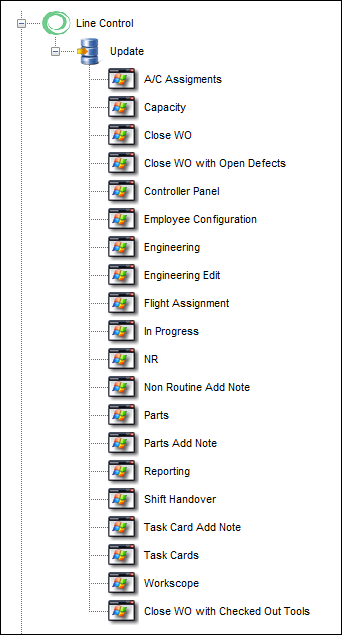
The following security options are available in the Line Control application:
_________________________________________________________________________
A/C Assignments
Provides access to the A/C Assignments tab via the W/O View.
Capacity
Provides access to the Capacity tab.
Close WO
Provides access to the Close WO button via the W/O View.
Close WO with Checked Out Tools
Provides access to the Save button when the Close W/O button is selected via the W/O View. The Save button will be available even if tools are still checked out against the Work Order.
Close WO with Open Defects
Provides access to the Save button when the Close W/O button is selected via the W/O View. The Save button will be available even if there are open defects against the Work Order.
Controller Panel
Provides access to the Controller Panel tab.
Employee Configuration
Provides access to the Employee Configuration button via the Resources tab.
Flight Assignment
Provides access to the Flight Assignment button via the Resources tab.
In Progress
Provides access to the In Progress tab via the W/O View.
NR
Provides access to the NR tab via the W/O View.
Non Routine Add Note
Provides access to the Add Note button in the NRs tab.
Parts
Provides access to the Parts tab via the W/O View.
Parts Add Note
Provides access to the Add Note button in the Parts tab.
Reporting
Provides access to the Reporting tab.
Shift Handover
Provides access to the Shift handover tab.
Task Card Add Note
Provides access to the Add Note button in the Task Card tab.
Task Cards
Provides access to the Task Card's tab via the W/O View.
Workscope
Provides access to the Workscope tab.
_________________________________________________________________________
Download Online Help
Print
|
©1997-2018 Trax USA Corp. All rights reserved. This manual may not be copied, photocopied, reproduced, translated, or converted to any electronic or machine-readable form, in whole or in part, without prior written approval from Trax USA Corp. |
 |