 Download Online Help
 Print
|
|
|
|
|


Login
If utilizing the application, logging into Line Control is similar to the main application login. Users can enter their basic username and password, or users can utilize their LDAP login credentials.
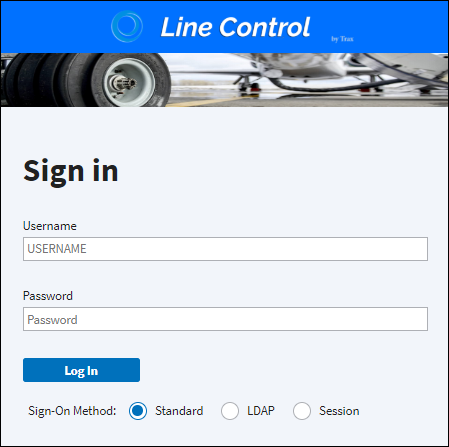
The following options/information is available in this window:
_________________________________________________________________________
Username
Enter the pertinent username of the employee attempting to access the application. The username is created via the Security Explorer.
Password
The password linked to the above username. The Password is also linked to the username via the Security Explorer.
Log In button
Select this button to enter the application with the Username and Password entered.
Standard Sign-On Methods
Standard radio button - The Standard Sign On Method is the basic username/password method to signing into TRAX. A record must be created for all users in the Employee Master in order to be able to successfully sign on the TRAX using the Standard Sign On Method. In addition, the user name and password must be set up via the Security Explorer in order to be able to successfully sign on the TRAX using the Standard Sign On Method.
For additional information, refer to the Employee Master which can be found in the Settings Training manual and the Security Explorer, New User Option via Security Explorer which can be found in the System Administration Training manual.
LDAP radio button - Select the LDAP sing-on method to log in using LDAP credentials. The LDAP functionality connects the user's username with their PC's domain name and other technical specifications. When selected, the user will not enter their TRAX username and password but their domain's login username (i.e., 'firstname.lastname') and password. The LDAP credentials must be set up for the individual user attempting to log in via the Employee Master, Optional Tab and the general LDAP system must be adequately configured for the entire company via the LDAP Configuration  button of the Company Profile window. For more information refer to the LDAP Sign-On Method via the System Standards Training Manual.
Session radio button - Select the Session option to log in using the domain and password credentials. The Session Username and Session Domain fields must be set up via the Employee Master. In addition, the employee must also be set up in the Security Explorer. Once this initial set-up is complete, when the Session option is selected, the domain will auto populated in the Username field.
For additional information, refer to the Employee Master Optional Tab, which can be found via the Employee MAster of the Settings Training manual, and the Security Explorer, Session Tab via the Security Explorer which can be found in the System Administration Training manual.
Note: The Session Sign-On Method is the default method to sign-on to the application.
_________________________________________________________________________
Once logged in, the Line Control homepage is displayed.
Download Online Help
Print
|
©1997-2018 Trax USA Corp. All rights reserved. This manual may not be copied, photocopied, reproduced, translated, or converted to any electronic or machine-readable form, in whole or in part, without prior written approval from Trax USA Corp. |
 |