 Download Online Help
 Print
|
|
|
|
|


Location Status
At the top half of the homepage, the Location's task assignments are displayed in helpful graphs and incoming scheduled flights for the specified Location are available.
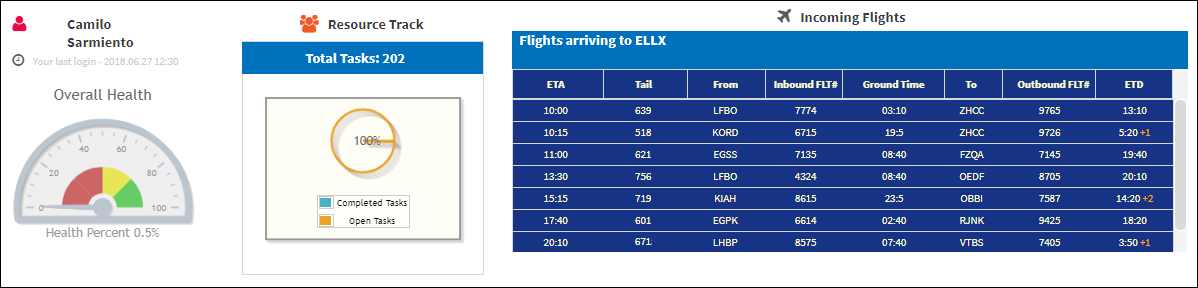
The Location Status section is composed of the following sections:
_________________________________________________________________________
User Information 
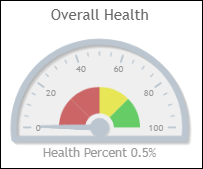
The User Information section lists the currently logged in user, their Position (from Employee Master, General tab), and their latest login information.
The following graph is also displayed:
Overall Health - This graph shows the overall performance for the Location on that particular day. The gauge indicates the current percentage of completed tasks.
 = less than 50% complete
 = 50% - 75% complete
 = 75% - 100% complete
Resource Track 
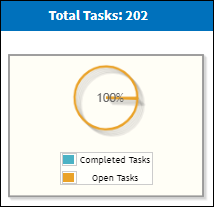
The Resources Track section displays the current day's task assignments in up-to-the-minute graphs. Users can click on the graph to view the graph in a larger pop-up window.The following graph is available:
Total Tasks - This graph displays the total amount of tasks currently required in the Location/Sites and lists the current percentage of Completed versus Open tasks.
 = Completed
 = Open
Incoming Flights 
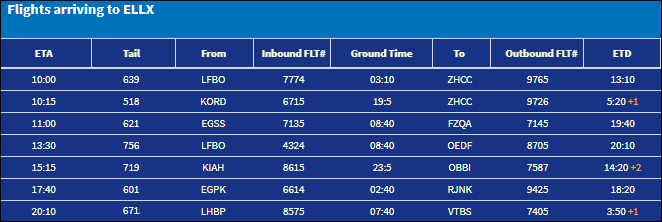
The Incoming Flights section displays incoming scheduled flights for the selected Location. Only flights that are scheduled to arrive up to three hours prior to the current time and current day will be displayed. +1/+2 indicates that a flight departure is 1 or 2 days after the time shown.
_________________________________________________________________________
Download Online Help
Print
|
©1997-2018 Trax USA Corp. All rights reserved. This manual may not be copied, photocopied, reproduced, translated, or converted to any electronic or machine-readable form, in whole or in part, without prior written approval from Trax USA Corp. |
 |