
 Share
Share
 Print
Print
|
|
|
|
|



The Removal History button allows users to view records of past removals of a part from existing aircraft when receiving or loading that part into the system.
 This option is security controlled via Security Explorer/ Inventory/ Query/ Inventory Detail Transaction Removal History. For more information refer to the Security Explorer via the System Administration Training Manual.
Note: This button will only appear for records that have existing Removal History. The window is informational-only. The data shown in this window has been entered either during the Order Receiving process, or during a P/N Initial Load. For more information, refer to either the Removal History button, via Order Receiving Detail, or the Removal History button, via P/N Initial Load.
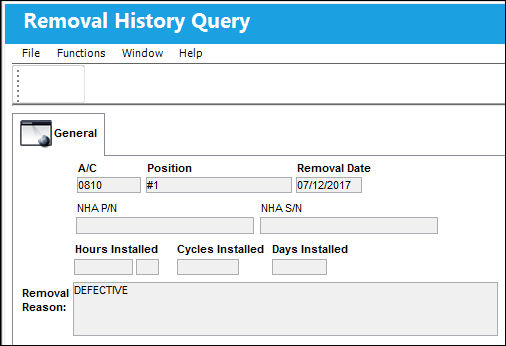
The following information/options are available in this window:
_____________________________________________________________________________________
A/C
The individual aircraft tail number.
Position
The aircraft position reference.
Removal Date
The date of removal.
NHA P/N
The part’s Next Higher Assembly P/N (if applicable).
NHA S/N
Next Higher Assembly (NHA) serial number.
Hours/Cycles/Days Installed
The amount of hours/minutes/cycles/days of the current installation. The hours and cycles are dependent on the flight times accumulated during the current installation.
Removal Reason
The reason for the removal.
_____________________________________________________________________________________
Share
Print
|
©1997-2026 Trax USA Corp. All rights reserved. This manual may not be copied, photocopied, reproduced, translated, or converted to any electronic or machine-readable form, in whole or in part, without prior written approval from Trax USA Corp. |
 |