 Download Online Help
 Print
|
|
|
|
|


Multi Company Configurations: Security Explorer
Each user/user group can be assigned company-specific security controls through the General tab of the New User Button / Update User Button in the Security Explorer. Based on these controls, each user/user group can be limited to query/create records or transactions only for specific companies. Similarly, a user can be granted access to records/transactions for ALL companies.
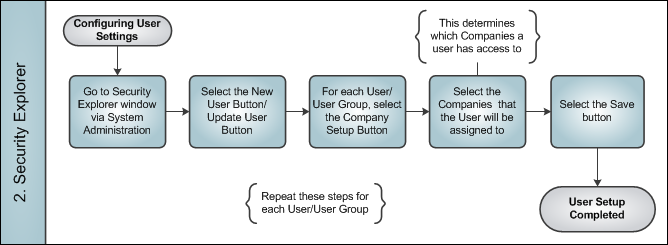
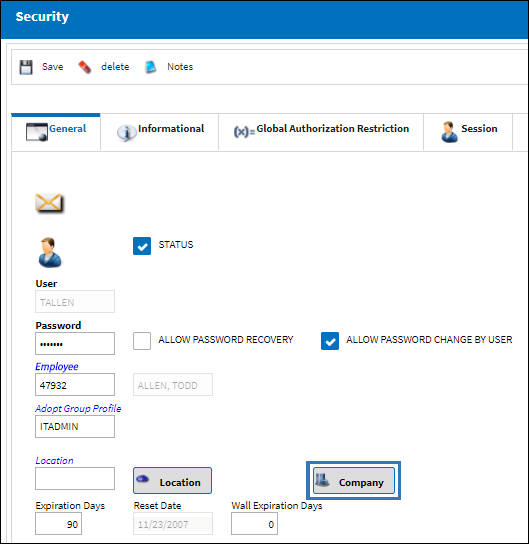
Click the Company Setup  button for each user/group profile.
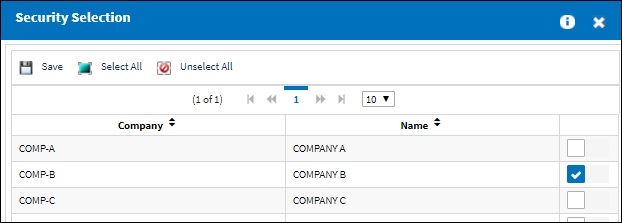
Select the companies that apply to the user/group. The user(s) will be limited to only select from these companies when creating or querying records.
Download Online Help
Print
|
©1997-2018 Trax USA Corp. All rights reserved. This manual may not be copied, photocopied, reproduced, translated, or converted to any electronic or machine-readable form, in whole or in part, without prior written approval from Trax USA Corp. |
 |