
 Share
Share
 Print
Print
|
|
|
|
|


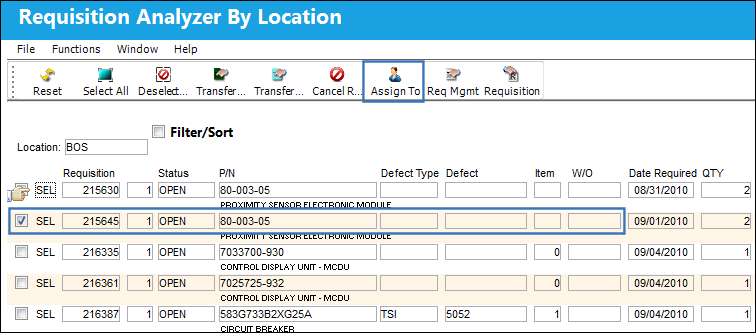
The Assign To  button allows the user to assign a Requisition to an employee (buyer).
From the Requisition Analyzer By Location window, select a Requisition to be assigned to a buyer and select the Assign To button.
The following pop up window appears. Select a buyer from the Assign To field and continue with the transaction.
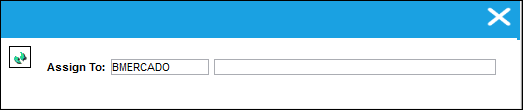
The Save prompt will appear. Select 'OK'.
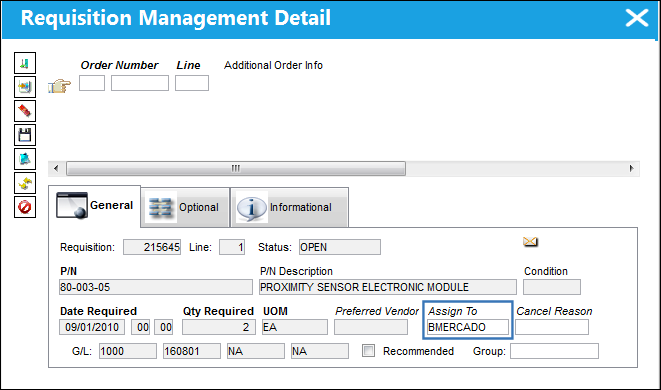
When the user selects the Requisition Management  button, we can see that the Requisition has been assigned to a buyer.
Share
Print
|
©1997-2026 Trax USA Corp. All rights reserved. This manual may not be copied, photocopied, reproduced, translated, or converted to any electronic or machine-readable form, in whole or in part, without prior written approval from Trax USA Corp. |
 |