
 Share
Share
 Print
Print
|
|
|
|
|



The Requisition Analyzer by Location  button in the Requisition Management window is a tool that allows the user to fulfill open requests from inventory. This window is mainly intended to be used when procuring from a centralized inventory location. Inventory can then be transferred to other locations by request.
The screen consists of four primary regions: requisition information, inventory summary information, packing and shipping information, and picklist information. In addition the screen features a lower-screen display of open Transfer Orders.
Select the Requisition Analyzer button. TRAX displays information about the requisition as follows:
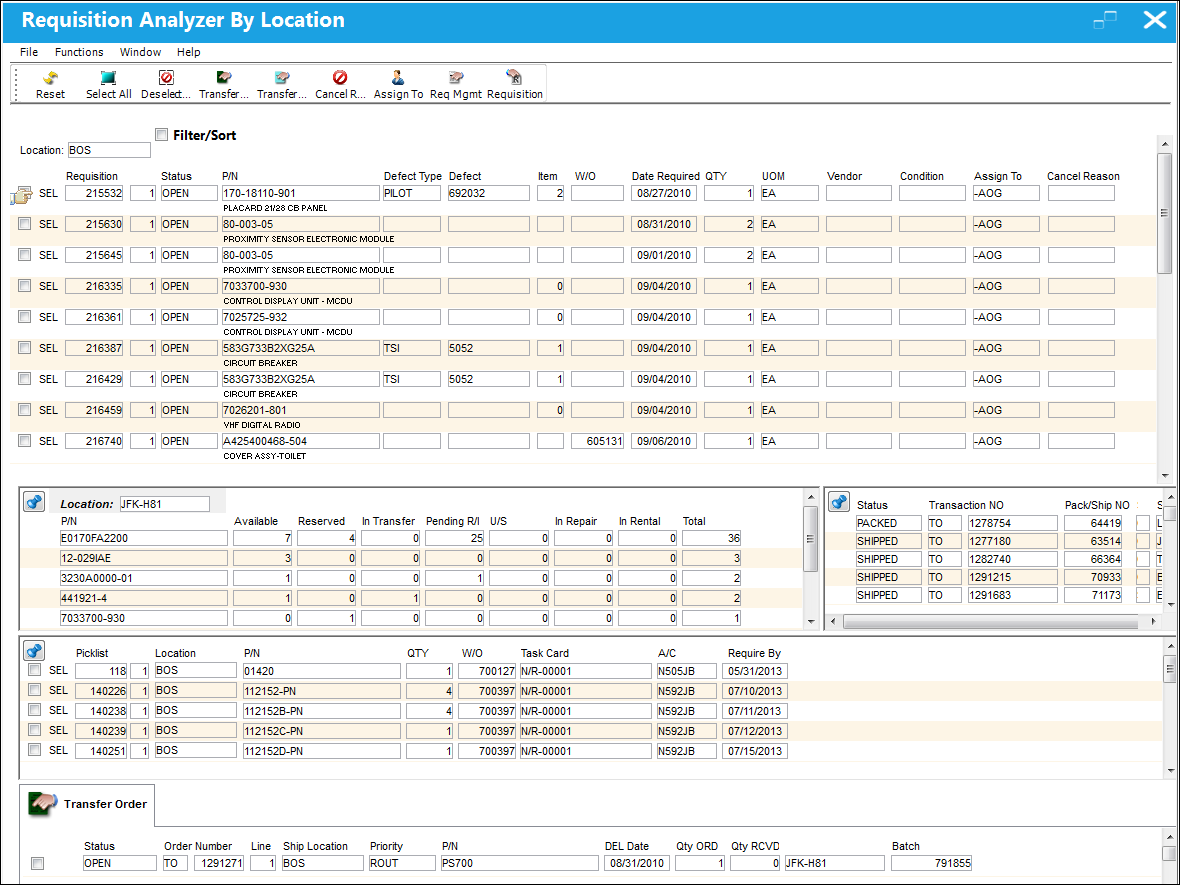
This section includes open requisitions that are in the system for the part number selected:
The following information/options are available in this window:
_____________________________________________________________________________________
Location
The Location for maintenance events, inventory stores, orders, transactions, or training events.
Requisition
List of required parts for either a maintenance item or for restocking.
Status
The current status of the Requisition. The Status options are 'Open', 'Order', and 'Closed.'
P/N
The Part Number reference for the aircraft part.
Defect Type
The type of defect found on the aircraft (for example, Pilot Report, MX Report). For additional information, refer to the Defect Type Transaction Code, via the Technical Records Transaction Code Manual.
Defect
The defect number (or log book number).
Item
The defect log item number.
W/O
The Work Order used to categorize, manage, and schedule work requirements for aircraft maintenance.
Date Required
The date that the item(s) is/are required by.
QTY
The quantity of items/parts required.
If this value is updated via in the Requisition Detail, the updated value will be reflected when the Requisition is re-printed. In addition, if the requisition is associated to a Purchase Order, the updated QTY will auto populate in the QTY field of the Purchase Order Detail, General tab.
UOM
The Unit of Measurement for the part(s) required.
Vendor
The system code for the service/part provider.
Condition
The condition of the part.
Assign To
The employee (buyer) that this Requisition is assigned to. This can only be edited on ‘Open’ Requisitions. This field is auto populated with the value that appears via Settings/ Update/ P/N/ Inventory Levels button/ General Tab/ Buyer field. The Assign To Buyer will be populated if the part has been previously set up with an assigned buyer. An assigned buyer is defined via Settings/ Update/ P/N/ Inventory Levels button/ General Tab/ Buyer field.
Cancel Reason
The Reason code associated with any cancellation of this requisition. This code will be mandatory once the Cancel  button is selected against the requisition for the save of the transaction.
_____________________________________________________________________________________
This section includes all parts of that part number that are currently in stock:
The following information/options are available in this window:
_____________________________________________________________________________________
Location
The Location for maintenance events, inventory stores, orders, transactions, or training events.
P/N
The Part Number reference for the aircraft part.
Available
Quantity of the part available.
Reserved
Quantity of the part reserved.
In Transfer
Quantity of the part in transfer.
Pending R/I
Quantity of the part pending receiving inspection.
U/S
Quantity of the part that is unserviceable.
In Repair
Quantity of the part in repair.
In Rental
Quantity of the part in rental.
Total
The total number of parts.
_____________________________________________________________________________________
This section includes the packing and shipping information for Transfer Orders that are currently in progress.
The following information/options are available in this window:
_____________________________________________________________________________________
Status
Enter the current status of the shipment:
Open - This shipment is neither shipped nor packed. Only the shipping header is created.
Packed - The items to be shipped are already added to the shipment, but the boxes have not been shipped out.
Received - The items have been received by the recipient of the Packing and Shipping record.
Transaction NO
The sequential transaction number for the shipment.
Shipped
The shipment is complete and the boxes are shipped out.
Pack/Ship NO
The Packing and Shipping Reference Number.
Ship Via
Ship Via code and method to be used.
AWB
The airway bill number related to the part.
Shipped Date
The date that the items were shipped.
Ship From
Location from which order has been shipped.
Ship To
The receiving customer, vendor, location or owner.
_____________________________________________________________________________________
This section includes all Picklists that have been created for the Part Number including the Picklist's basic information:
The following information/options are available in this window:
_____________________________________________________________________________________
Picklist
List of reserved components for a maintenance event or for transfer.
Location
The Location for maintenance events, inventory stores, orders, transactions, or training events.
P/N
The Part Number reference for the aircraft part.
QTY
The number of parts for the transaction.
W/O
The Work Order used to categorize, manage, and schedule work requirements for aircraft maintenance.
Task Card
The Task Card / Job Card that details the scheduled maintenance work.
A/C
The individual aircraft tail number.
Require By
The date that the picklisted parts are required by.
_____________________________________________________________________________________
Share
Print
|
©1997-2026 Trax USA Corp. All rights reserved. This manual may not be copied, photocopied, reproduced, translated, or converted to any electronic or machine-readable form, in whole or in part, without prior written approval from Trax USA Corp. |
 |