
 Share
Share
 Print
Print
|
|
|
|
|


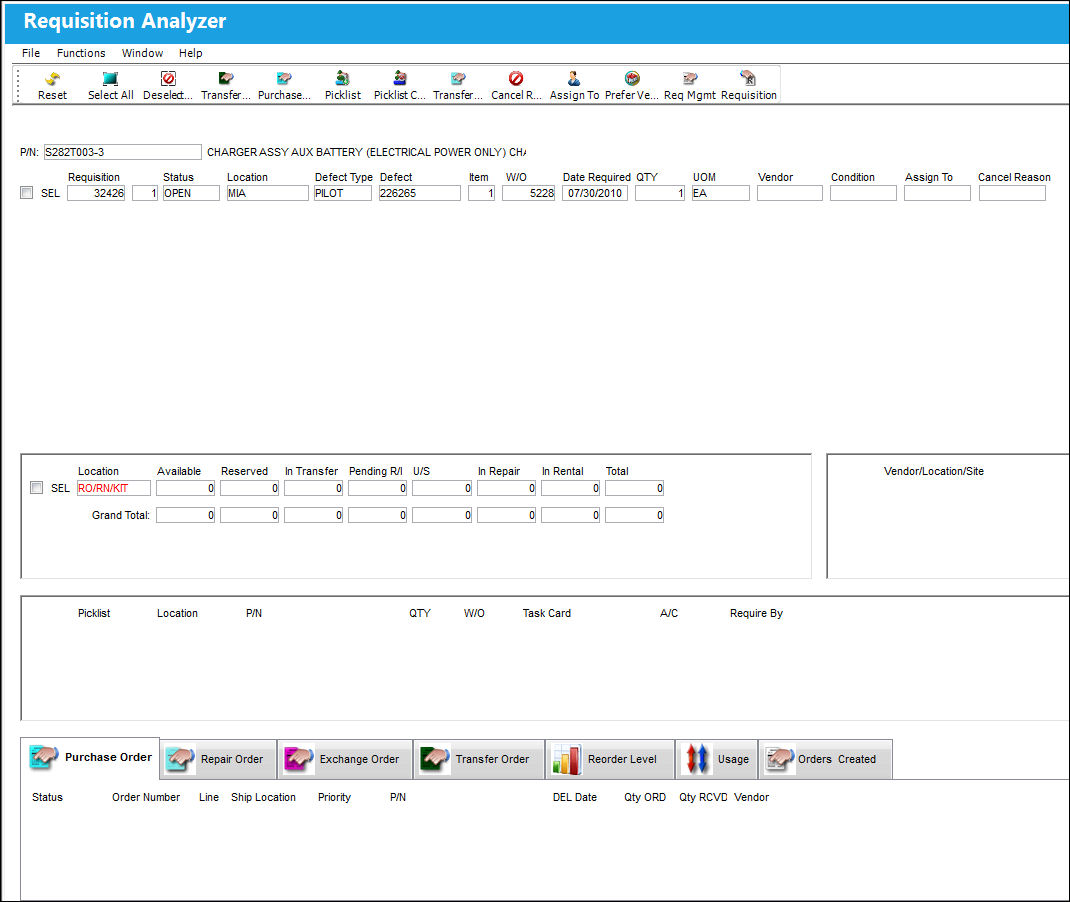
The Requisition Analyzer  button in the Requisition Management is a tool that matches open requisitions with available stock at either the same location that the requisition was issued from or at a different location.

The screen consists of four primary regions: requisition information, summary information, vendor information, and picklist information. In addition the screen features a lower-screen display of multiple tabs that reflect various types of order types, Re-Order Level information, and usage information.
Select the Requisition Analyzer button. TRAX displays information about the requisition as follows:
The Requisition Analyzer button is available from the Requisition Management and Buyer Queue windows.
This section includes open requisitions that are in the system for the part number selected:
_____________________________________________________________________________________
P/N
The Part Number reference for the aircraft part.
Requisition
List of required parts for either a maintenance item or for restocking.
Requisition Line
The line item number for the specific Requisition.
Status
The current status of the Requisition. The Status options are 'Open', 'Order', and 'Closed.'
Location
The Location for maintenance events, inventory stores, orders, transactions, or training events.
Defect Type
The type of defect found on the aircraft (for example, Pilot Report, MX Report). For additional information, refer to the Defect Type Transaction Code, via the Technical Records Transaction Code Manual.
Defect
The defect number (or log book number).
Item
The defect log item number.
W/O
The Work Order used to categorize, manage, and schedule work requirements for aircraft maintenance.
Date Required
The date that the item(s) is/are required by.
QTY
The quantity of items/parts required.
If this value is updated via in the Requisition Detail, the updated value will be reflected when the Requisition is re-printed. In addition, if the requisition is associated to a Purchase Order, the updated QTY will auto populate in the QTY field of the Purchase Order Detail, General tab.
UOM
The Unit of Measurement for the part(s) required.
Vendor
The system code for the service/part provider.
Condition
The condition of the part.
Exchange Pool  button
This button allows users to create an Exchange Order for a pooled part via the P/N Pool window. For detailed information refer to the Auto Exchange Order Functionality (via the P/N Pool) via the Inventory Training Manual.
_____________________________________________________________________________________
The Requisition Status will not close but will instead remain 'Open' upon receipt of an order (E/X, L/O, P/O, T/O, S/V) with a Quantity that is less than the Requisition Quantity. For example, if the Requisition Quantity is 100 and a Transfer Order with a Quantity of 10 is linked to that Requisition, the Requisition will remain Open after the T/O is completed.
This section includes all parts of that part number that are currently in stock:
_____________________________________________________________________________________
Location
The Location for maintenance events, inventory stores, orders, transactions, or training events.
Available
Quantity of the part available.
Reserved
Quantity of the part reserved.
In Transfer
Quantity of the part in transfer.
Pending R/I
Quantity of the part pending receiving inspection.
U/S
Quantity of the part that is unserviceable.
In Repair
Quantity of the part in repair.
In Rental
Quantity of the part in rental.
Total
The total number of parts.
Grand Total
The grand total of available, reserved, in-transfer, pending receiving inspection, unserviceable, in repair, and in rental.
_____________________________________________________________________________________
This section includes all vendors set up in the P/N Master, Vendor P/N information window, and any Vendor for which that Part Number was previously purchased. If the Prefer box is checked, the Vendor is the preferred vendor for that Part Number.
This section includes all Picklists that have been created for the Part Number including the Picklist's basic information:
_____________________________________________________________________________________
Picklist
List of reserved components for a maintenance event or for transfer.
Location
The Location for maintenance events, inventory stores, orders, transactions, or training events.
P/N
The Part Number reference for the aircraft part.
QTY
The number of parts for the transaction.
W/O
The Work Order used to categorize, manage, and schedule work requirements for aircraft maintenance.
Task Card
The Task Card / Job Card that details the scheduled maintenance work.
A/C
The individual aircraft tail number.
Require By
The date that the picklisted parts are required by.
_____________________________________________________________________________________
New Picklists can be created by selecting the Picklist button or these existing Picklists can be deleted by selecting the Picklist(s) then clicking the Picklist Cancel button.
Tabs Section:
This section features multiple tabs that reflect various types of order types (P/O, R/O, E/X, T/O), reorder level information, and usage information.
_____________________________________________________________________________________
Status
The current order status.
Order (Order Type)
Type of Order. By order type, certain receiving and financial behaviors will be assigned to the order at receiving of the various Order Types. These order types exist under the Orders or Customer Orders Modules exclusively. All Order Types are Hard Coded into the programming syntax.
Number (Order Number)
An auto-generated unique sequential number is assigned to each order. All Order Types which exist under the Order Module will receive their number for the following configuration:
 POSEQ - (Orders Next Sequence Number) - Next number for an Order. The start number is set at implementation. The Config Number field is used.
 The Order Number, when selected, will link the user to the Query view of the Order Header window.
Line
The specific Line item of the Order. Each Line item could represent a different part included in the same order.
Ship Location
The location where the transaction will be shipped to. All locations are defined in the Location Master. All Ship Locations must be identified as an Inventory Location in the Location Master, if a physical part or item is to be received. If the Location is not identified in Inventory a warning will be received upon entry and the user will not be able to save the order header.
Priority
The priority placed on the transaction (e.g., routine, AOG, etc.). For additional information and functionality, refer to the Priority transaction code via the Orders Transaction Codes.
P/N
The Part Number reference for the aircraft part.
DEL Date
The date when the part(s) is/are expected to be received.
Qty ORD
The number of parts for the transaction.
Qty RCVD
The quantity of parts that were received.
Vendor
The system code for the service/part provider.
_____________________________________________________________________________________
This section features the Part Number reorder level.
_____________________________________________________________________________________
P/N
The Part Number reference for the aircraft part.
Location
The Location for maintenance events, inventory stores, orders, transactions, or training events.
Maximum
The maximum in stock quantity allowed. The maximum stock level is used by businesses to control the number of goods in a warehouse, which takes into account demand while preventing overstock. This number should be the upper limit for a location to have available before storage costs or loss of value negatively affect expenses.
Minimum
The minimum in stock quantity required (Safety Stock). The minimum stock level can be used to report on items that require urgent action.
Reorder Level
The Re-Order point for the Part. The Re-Order point is established so that the system can automatically create Requisitions for parts that have reached a certain stock quantity level. (Requisitions are triggered based on whole numbers only.) Purchasing actions can then be considered. Please refer to the Inventory manual (section “P/N Re-Order Level”) for additional related information. The Re-Order Level  button is used to reset the Re-Order Level based on past usage (the system automatically calculates this figure). This field triggers a Re-Order Level Requisition. Once the available parts in inventory are less than the (whole number) value specified in the Re-Order Level field, a requisition will automatically be created. If the Reorder Level quantity is less than the Order Minimum Quantity, then the Requisition that is triggered will be for the Order Minimum quantity instead of the Reorder Level quantity. For more information refer to the Order Minimum field.
EOQ
The “Economic Order Quantity” field is used to store a value that is calculated outside of the system. The value is usually calculated by materials managers and used to determine the quantity that is the optimum (lowest) total variable cost (unit costs that depend on volume) required to Order and hold inventory.
_____________________________________________________________________________________
This section features all orders created for the Part Number.
_____________________________________________________________________________________
Order (Order Type)
Type of Order. By order type, certain receiving and financial behaviors will be assigned to the order at receiving of the various Order Types. These order types exist under the Orders or Customer Orders Modules exclusively. All Order Types are Hard Coded into the programming syntax.
Number (Order Number)
An auto-generated unique sequential number is assigned to each order. All Order Types which exist under the Order Module will receive their number for the following configuration:
- POSEQ - (Orders Next Sequence Number) - Next number for an Order. The start number is set at implementation. The Config Number field is used.
Vendor
The system code for the service/part provider.
Name
The name of the vendor who was selected in the vendor field will appear here as defined in the Vendor Master.
Order Total
The total cost of the order, which includes all line items' quantity multiplied by any additional fees or cocts, such as Freight, Duty, Tax, etc.
Currency
The currency that will be used for the order transaction. Currencies may be defined for the Customer/Vendor in the Customer/Vendor Master and overridden at the order level. For additional information, please refer to the Currency section of the G/L Interface, System Transaction Code Training Manual.
Priority
The priority placed on the transaction (e.g., routine, AOG, etc.).
Confirmation
The confirmation reference along with applicable information.
_____________________________________________________________________________________
The following buttons offer additional functionality:
- Transfer Order button
- Purchase Order button
- Picklist button
- Picklist Cancel button
- Transfer Picklist button
- Cancel Requisition button
- Assign To button
- Prefer Vendor button
- Requisition Management button
- Requisition button
- Exchange Pool button
 Share
Print
Share
Print
|
©1997-2026 Trax USA Corp. All rights reserved. This manual may not be copied, photocopied, reproduced, translated, or converted to any electronic or machine-readable form, in whole or in part, without prior written approval from Trax USA Corp. |
 |