
 Share
Share
 Print
Print
|
|
|
|
|


From the Requisition Analyzer button, users can select the World Part Locator  button to access the WPL marketplace in order to fulfill the part requirement. Through TRAX's World Part Locator, TRAX operators can connect seamlessly to a global marketplace of part suppliers through a business-to-business interfacing system. For more information refer to the World Part Locator.
From the Requisition Analyzer window, multiple Requisitions (for the same part) can be selected and fulfilled through the same vendor and through as few Purchase Orders as possible. In this example, various requisitions are selected. A preferred Vendor is then selected. Then select the World Part Locator button to search for the required part in the WPL marketplace.
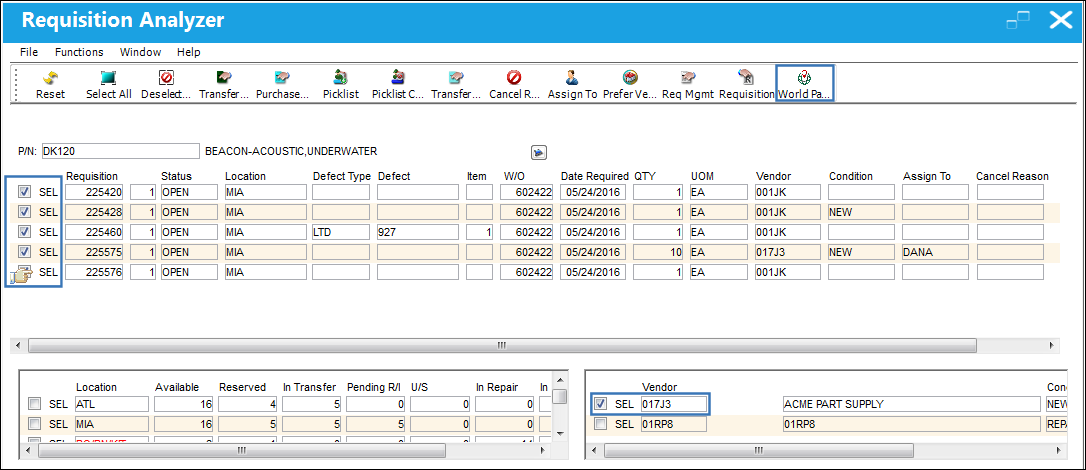
This button is only available for Requisitions that have been authorized.
When selected, the World Part Locator pop-up window appears as follows. The search fields (P/N, A/C, and Preferred Vendor) are auto-populated based on the information selected in the Requisition Analyzer window.
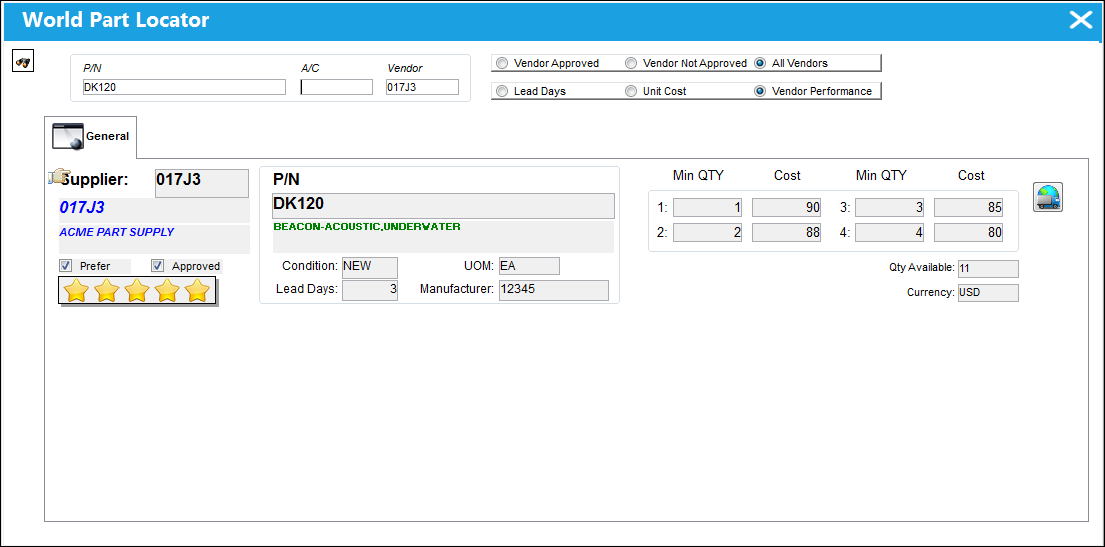
For more information on all of the fields available in this window, refer to the World Part Locator via the Inventory module.
However, the search fields can be edited to search for other options in the marketplace. For example, remove the Vendor and click the Find button to search for all vendors that are selling the required part.
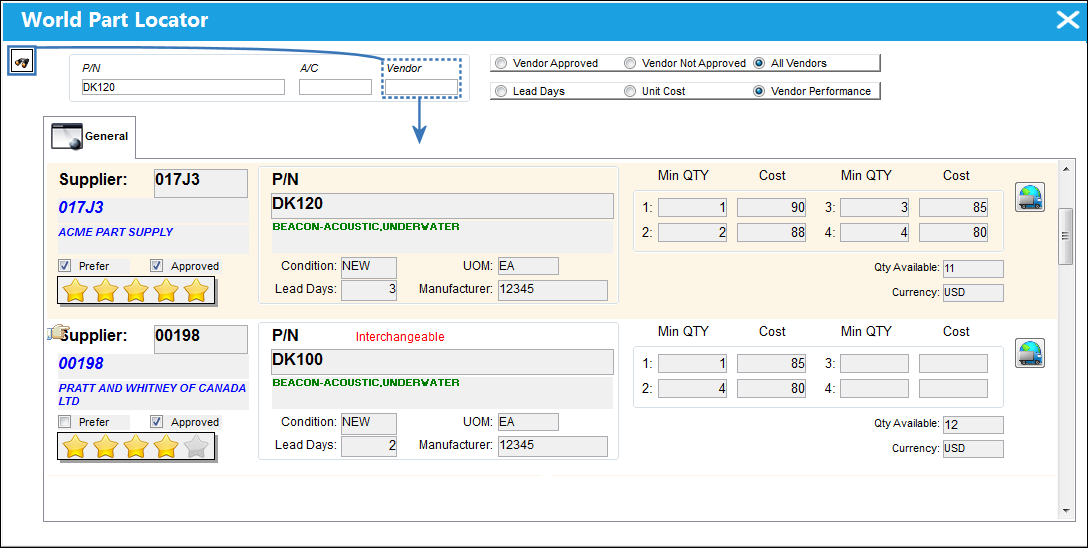
Interchangeable parts are also listed.
Once a selection is made, select the Purchase  button to create a Purchase Order. Notice that the P/O has the P/N, Vendor, Unit Cost, Condition, etc., from the WPL entry. The World Part Locator Purchase Order pop-up window has all of the same fields from the basic Purchase Order functionality, including the header and detail windows. Because the P/O is created from the Requisition module, notice that the Requisition/Line number is also included.
In this example, only one P/O is created because all of the selected Requisitions (above) share the same Location, W/O, Date Required, and UOM. Therefore notice that the P/O's quantity combines the quantity (14) for all of the selected Requisitions. If any of the Requisitions' details were not the same, then the adequate amount of P/Os would be created.
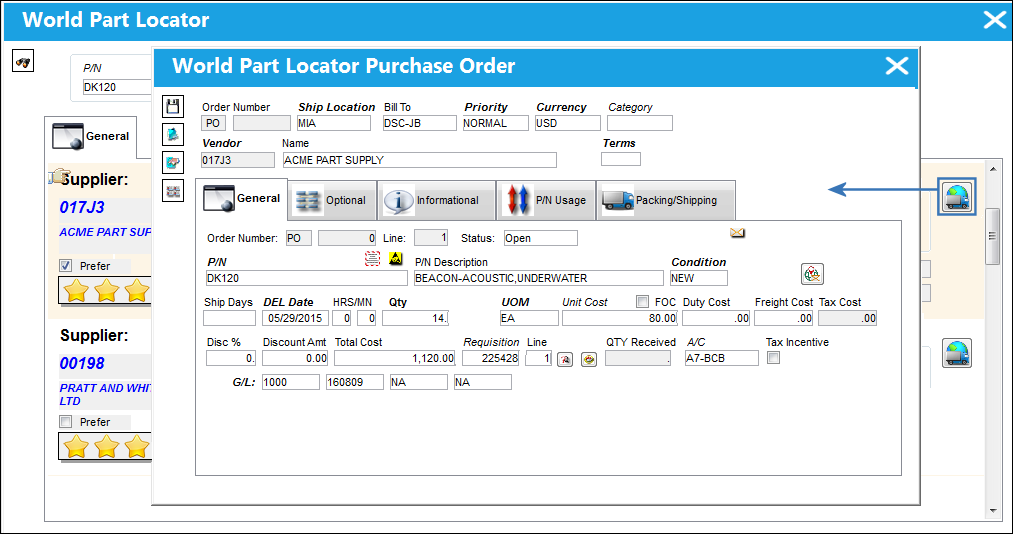
Once the window is saved, an order number is generated for the P/O. The P/O is subject to the same authorization and receiving functionality as found in the main Purchase Order functionality.
- Select the P/O Header
 button to access the order's header window with all of the header level tabs and fields.
 - Select the Order Detail Notes
 button to add or view notes against the order detail.
 - Select the World Part Locator Messages
 button to view interface messages sent between TRAX and the World Part Locator.
For information on all of the fields included in the World Part Locator Purchase Order window, refer to Purchase Orders via the Orders module.
When the Vendor is not approved, the Purchase button is not available. Instead, the Request Vendor Approval  button is available. The Request Vendor Approval button is only available for Vendors that either do not exist in the Vendor Master, have a Vendor Master record that is not in 'Active' status, or have a Vendor Master record that is not registered as a 'Supplier'. Because purchases can only be made from Active status suppliers, when this button is selected, a system notification is sent to the necessary personnel requesting that the vendor be added to and/or made Active in the Vendor Master. The System Notification is called 'VENDOR APPROVAL REQUEST NOTIFICATION'. For information on how to configure a system notification, refer to the System Notification window.
Share
Print
|
©1997-2026 Trax USA Corp. All rights reserved. This manual may not be copied, photocopied, reproduced, translated, or converted to any electronic or machine-readable form, in whole or in part, without prior written approval from Trax USA Corp. |
 |