
 Share
Share
 Print
Print
|
|
|
|
|


Multi Company Configurations: G/L Accounts
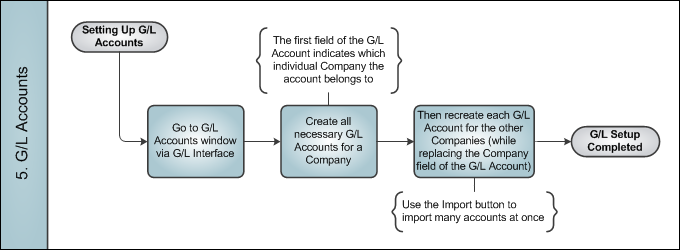
G/L Accounts must be created for each Company in the system. Ideally, each company should have the same G/L Accounts, just with their own unique company code in the first field.
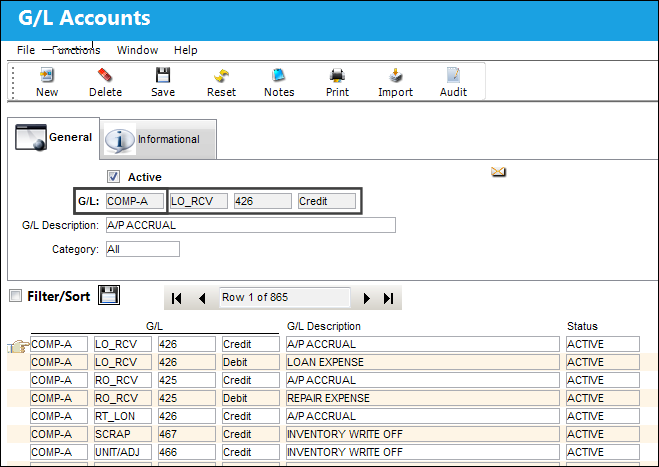
The first field in the G/L Account is reserved for the Company code.
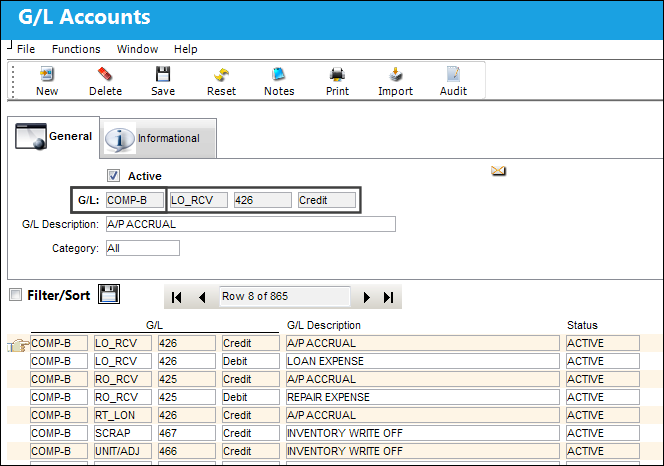
Notice the same G/L Accounts listed above for 'COMP-A' were created for 'COMP-B'.
Instead of creating one G/L Account at a time, users can use the Import button in the G/L Account window.
Once the G/L Accounts are created for all companies, the Company field for the G/L Accounts will behave dynamically in certain windows throughout the system. For example:
- When an order is placed for a part, the G/L Account that is linked to the P/N through the P/N Category transaction code will be brought into the order. But the Company field in the G/L Account for the order line item will be set to the Company linked to the order.
- When performing a P/N Initial Load, the G/L Account that is linked to the P/N through the P/N Category transaction code will be brought into the initial load record. But the Company field in the G/L Account for the part will be left blank. It is up to the user to specify the Company for the G/L.
Share
Print
|
©1997-2026 Trax USA Corp. All rights reserved. This manual may not be copied, photocopied, reproduced, translated, or converted to any electronic or machine-readable form, in whole or in part, without prior written approval from Trax USA Corp. |
 |