
 Share
Share
 Print
Print
|
|
|
|
|


The W/O Task Card, Task Card Sell tab allows the user to update the below information. This window is accessed from the Work Order Header, via the Task Card  button.
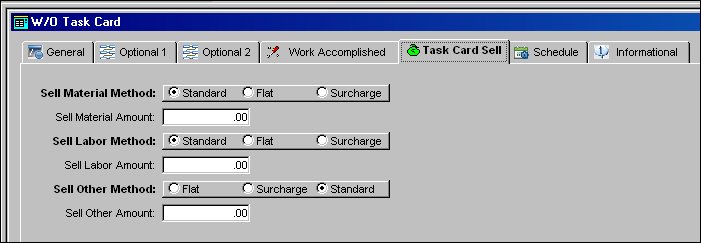
The following information/options are available in this window:
_____________________________________________________________________________________
Sell Material Method
The method to cost the material selling price.
Standard radio button - Material is calculated at the Standard price from the P/N Master.
Flat radio button - Material is flat rated at the Sell Material Amount.
Surcharge radio button - Material is calculated at the Standard price from the P/N Master plus the Sell Material Amount.
Sell Material Amount - The Flat rate and surcharge amount (if applicable).
Sell Labor Method
The method to cost the Labor selling price.
Standard radio button - Labor is calculated at the Standard price from the Skill Master.
Flat radio button - Labor is flat rated at the Sell Labor Amount.
Surcharge radio button - Labor is calculated at the Standard price from the Skill Master plus the Sell Labor Amount.
Sell Labor Amount - The Flat rate and surcharge amount (if applicable).
Sell Other Method
The method to cost 'other' selling prices (additional billing items).
Standard radio button - Other is calculated at the actual costs.
Flat radio button - Other (additional billing) item costs are flat rated at the Sell Other Amount.
Surcharge radio button - Other (additional billing) item costs are calculated at the additional billing amount plus the Sell Other Amount.
Sell Other Amount - The Surcharge amount (if applicable).
_____________________________________________________________________________________
Share
Print
|
©1997-2026 Trax USA Corp. All rights reserved. This manual may not be copied, photocopied, reproduced, translated, or converted to any electronic or machine-readable form, in whole or in part, without prior written approval from Trax USA Corp. |
 |