
 Share
Share
 Print
Print
|
|
|
|
|


The W/O Non-Routine Task Card, Employee Stamp tab displays the stamp of the mechanic, inspector, etc. at the time a Non-Routine Task Card is completed. This is beneficial in the case that an employee changes positions, this tab will reflect the current stamp and not the historical stamp of the employee.
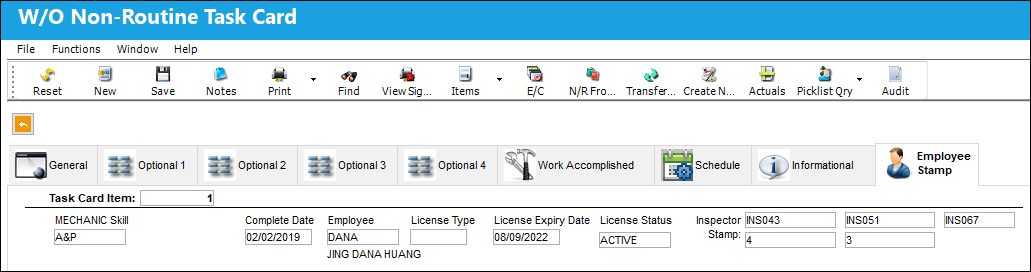
The following information/options are available in this window:
_____________________________________________________________________________________
Task Card Item
The Task Card's specific Item number.
Skill
The Skill of the employee required for this item. Skills are set up via the Skill Master. The Skills listed for Mechanic or Inspector are validated against the Mechanic/Technician checkboxes associated to the specific Skill via the Skill Master, General tab. For more information, refer to the Skill Master, General Tab via the Settings Manual.
Complete Date
The date the Task Card was closed.
Employee
The Employee number or code representing the employee.
License Type
The license type.
License Expiry Date
The expiration date of the license.
License Status
The status of the license (active or inactive).
Inspector Stamp
The employee's inspector stamp (as many as five).
_____________________________________________________________________________________
Share
Print
|
©1997-2026 Trax USA Corp. All rights reserved. This manual may not be copied, photocopied, reproduced, translated, or converted to any electronic or machine-readable form, in whole or in part, without prior written approval from Trax USA Corp. |
 |