
 Share
Share
 Print
Print
|
|
|
|
|


The Warranty Schedule for a part can be in the form of Hours/Cycles/Days, A/C Days, or a specific date. Default warranty schedules can be set up for a vendor via Settings/ Update/ Vendor/ Warranty Information tab. The Warranty Actual information is the accumulation of A/C flight Hours/Cycles and A/C Days. The warranty schedule and warranty actuals can be overridden in this window, if required.
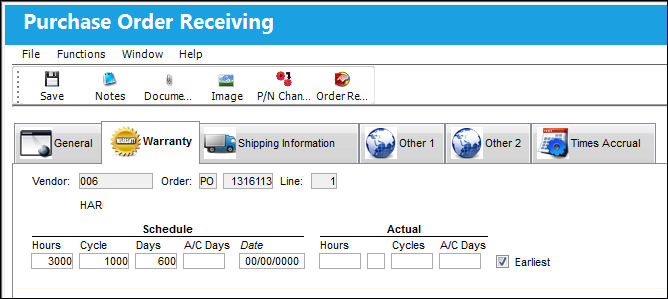
The above example of the Order Receiving Detail is that of a Purchase Order. However, all order types contain the same fields and tabs when being received, with the exception of Repair Orders. For details on the receiving of a R/O, refer to Repair Order Receiving.
The following information/options are available in this window:
_____________________________________________________________________________________
Vendor
The system code for the service/part provider.
Order
The type of order and the order number for the transaction.
Line
The specific Line item of the Order. Each Line item could represent a different part included in the same order.
Schedule Hours/Cycles/Days
The scheduled number of installed hours/cycles or calendar days for warranty to be applied to a part.
Schedule A/C Days
The scheduled number of installed days for warranty to be applied to a part.
Schedule Date
The warranty expiration date for the part.
Actual Hours/Cycles
The actual number of hours/cycles a component has been installed on an aircraft.
Actual A/C Days
The actual number of installed days the part has accumulated.
_____________________________________________________________________________________
Share
Print
|
©1997-2026 Trax USA Corp. All rights reserved. This manual may not be copied, photocopied, reproduced, translated, or converted to any electronic or machine-readable form, in whole or in part, without prior written approval from Trax USA Corp. |
 |