
 Share
Share
 Print
Print
|
|
|
|
|


The Times Accrual Tab tracks Total Actual Times (TAT) accumulated against a part built from the manufactured date. The benefit of this feature is that there is no possibility for these TAT to be reset once entered.
The Times Accrual tab is available for the following order types: EX, LO, XO, RN, and RO.
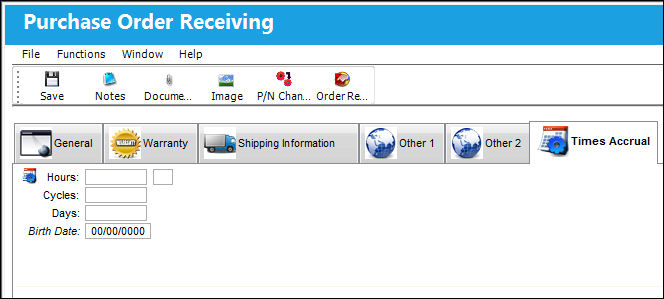
The above example of the Order Receiving Detail is that of a Purchase Order. However, all order types contain the same fields and tabs when being received, with the exception of Repair Orders. For details on the receiving of a R/O, refer to Repair Order Receiving.
The following information/options are available in this window:
_____________________________________________________________________________________
Hours
The number of hours accrued against a serialized part.
Cycles
The number of cycles accrued against a serialized part.
Days
The number of days accrued against a serialized part.
Birth Date
The Birth Date will be used to calculate the Calendar Days of a part number. If the Birthdate field is not populated, the system will default to using the Order Receiving date to calculate the Calendar Days. The Birth Date field will only appear if Switch  PNBIRTHDAY is set to Yes. For additional information, refer to Switch PNBIRTHDAY via the Receiving Switches Manual.
 Note: When a P/N E/C is planned using the Calendar Days option and Total Days (via the Engineering Control, Schedule Tab), the applicable part's Birth Date is used to track the P/N E/C's due date.
_____________________________________________________________________________________
Share
Print
|
©1997-2026 Trax USA Corp. All rights reserved. This manual may not be copied, photocopied, reproduced, translated, or converted to any electronic or machine-readable form, in whole or in part, without prior written approval from Trax USA Corp. |
 |