
 Share
Share
 Print
Print
|
|
|
|
|


The Order Receiving Detail, Other 1 tab is used to enter relevant information related to the order being received.
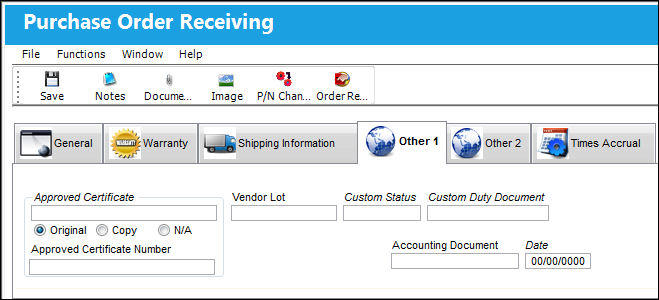
The above example of the Order Receiving Detail is that of a Purchase Order. However, all order types contain the same fields and tabs when being received, with the exception of Repair Orders. For details on the receiving of a R/O, refer to Repair Order Receiving.
The following information/options are available in this window:
_____________________________________________________________________________________
Approved Certificate
The type of certificate approving the part (ie. Form 1, EASA etc.). The user may choose from a pre-defined transaction code, or enter the Approval Certificate manually.
 APCERTVAL - (Approved Certification validation at Order Receiving). If set to Yes, the system will not validate an Approved Certificate in the Order Receiving window that is not registered in the System Transaction Codes. If set to No, the system will validate an Approved Certificate in the Order Receiving window that is not registered in the System Transaction Codes.
Original radio button - Select this radio button to indicate that the certificate is an original.
Copy radio button - Select this radio button to indicate that the certificate is a copy.
Approved Certificate Copy - The type of certificate copy.
Depending on the setting of the Switch RIAPCRMN, this field will or will not be mandatory.
N/A radio button - Select this radio button to indicate that the certificate is not available.
Approved Certificate Number
The Approved Certificate Number. This is a free text field.
Vendor Lot
Vendor batch number of the part entered upon receiving or initial load, as applicable. This field can contain up to 20 characters. By checking the Lot Control box via the Part Number Master/Inventory Tab, the user is able to enter vendor lot numbers when the part is received. This will assist in determining if the part is part of a vendor lot. This information can usually be found on the packaging when the part is received from the manufacturer.
If the received component is lot controlled, the lot number must be entered before receiving.
Custom Status
Customs status that applies to the part in the transaction, as applicable.
Custom Duty Document
Document used to verify that the part was accepted by customs.
Weight
The weight of the component being received. This information is being pulled from the Optional Tab of the P/N Master.
Unit
The unit of weight for the component being received. This information is being pulled from the Optional Tab of the P/N Master.
Accounting Document
The name of the related accounting document.
 Note: When switch ACCDOCMAND is set to Yes, the system will prevent the receiving of P/O, E/X, and L/O orders if this field isn't populated with the details of a corresponding Invoice that has been Closed and Paid. Furthermore, this field will be automatically completed when a corresponding invoice is posted. For more information, refer to Order Invoicing Prior to Receiving Functionality, via ACCDOCMAND.
Date
The date the related accounting document was submitted.
Note: When switch ACCDOCMAND is set to Yes, the system will prevent the receiving of P/O, E/X, and L/O orders if this field isn't populated with the details of a corresponding Invoice that has been Closed and Paid. Furthermore, this field will be automatically completed when a corresponding invoice is posted. For more information, refer to Order Invoicing Prior to Receiving Functionality, via ACCDOCMAND.
_____________________________________________________________________________________
Share
Print
|
©1997-2026 Trax USA Corp. All rights reserved. This manual may not be copied, photocopied, reproduced, translated, or converted to any electronic or machine-readable form, in whole or in part, without prior written approval from Trax USA Corp. |
 |