
 Share
Share
 Print
Print
|
|
|
|
|


Field Sensitive Tips
Field Sensitive Tips can appear within defined windows. Field Sensitive Tips are created via System Administration/Update/TRAX Field-Sensitive Tips.
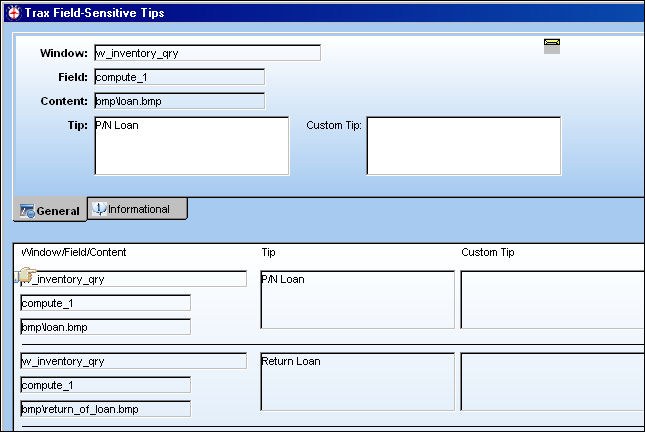
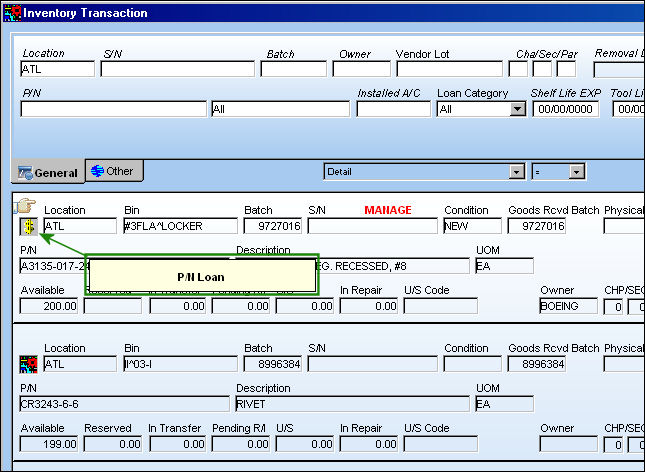
The pre-existing tip appears along with the ability to customize the tip in the Custom Tip field. Tips are listed by Window/Field/Content. If additional field sensitive tips are required, please contact TRAX with your custom programming requests. Once the tips have been customized as desired, they will appear within the appropriate windows in the system. The following example displays the tip via Inventory/Update/Inventory Transaction:
Share
Print
|
©1997-2026 Trax USA Corp. All rights reserved. This manual may not be copied, photocopied, reproduced, translated, or converted to any electronic or machine-readable form, in whole or in part, without prior written approval from Trax USA Corp. |
 |