
 Share
Share
 Print
Print
|
|
|
|
|


Engineering Control Shop, E/C Content Tab
The E/C Content Shop Tab allows the user to enter additional information regarding the E/C.
If the Switch  ADDCONT is set to Yes, the lower portion of the E/C Content Tab will automatically populate with 1 of each of the categories that are defined in Settings/Explorer/System Transaction Code/Engineering/Engineering Content. If set to No, no categories will appear by default. However, the user can manually add as many categorized notations as desired.
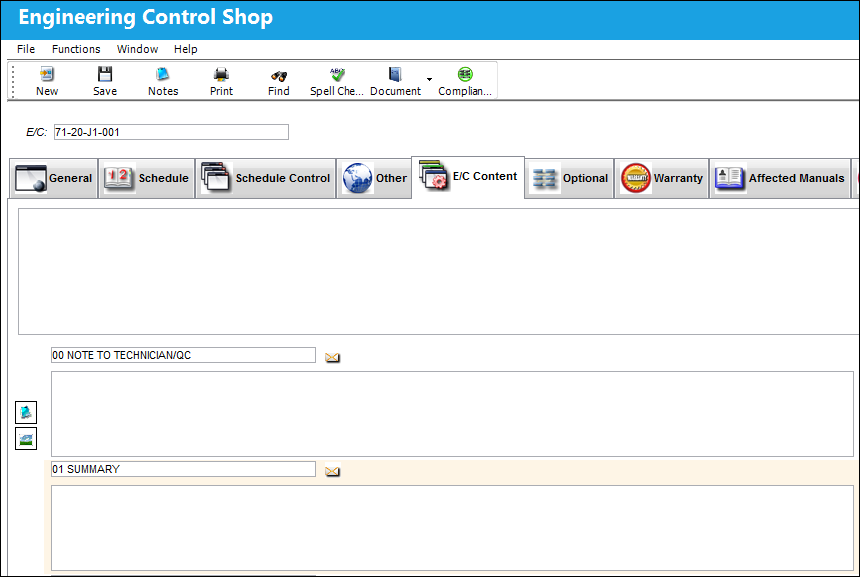
The user may enter general information regarding this E/C, such as a long description of the E/C content, in the upper box on this window. The user may also add additional categorized content regarding an E/C on the lower portion of the E/C Content Tab based on the configuration of Switch ADDCONT and tran codes as explained above.
To choose a specific category. Select the New  button, then right click the field and select a category. Once an Engineering Content category has been selected, the user has the option to enter any descriptive notation in the field below the code.
The default categories are defined in Settings/Explorer/System Transaction Code/Engineering/Engineering Content. Others can be defined based on user requirements.
The Notes  and Image
  buttons are available to include relevant information.
Share
Print
|
©1997-2026 Trax USA Corp. All rights reserved. This manual may not be copied, photocopied, reproduced, translated, or converted to any electronic or machine-readable form, in whole or in part, without prior written approval from Trax USA Corp. |
 |