
 Share
Share
 Print
Print
|
|
|
|
|


Engineering Control Shop, Schedule Tab
For regular Engineering Controls, the Schedule tab allows users to create or edit the E/C's schedule details. But from the E/C Shop window, the Schedule tab is available to edit certain features of the Shop E/C.
The only changes that can be made to the Shop E/C schedule is the Next E/C functionality, the Effective Date, and the Repeat Number (see below). The First and Repeat Schedules are not meant to be utilized by Shop E/Cs; these fields are only meant for regular E/Cs.
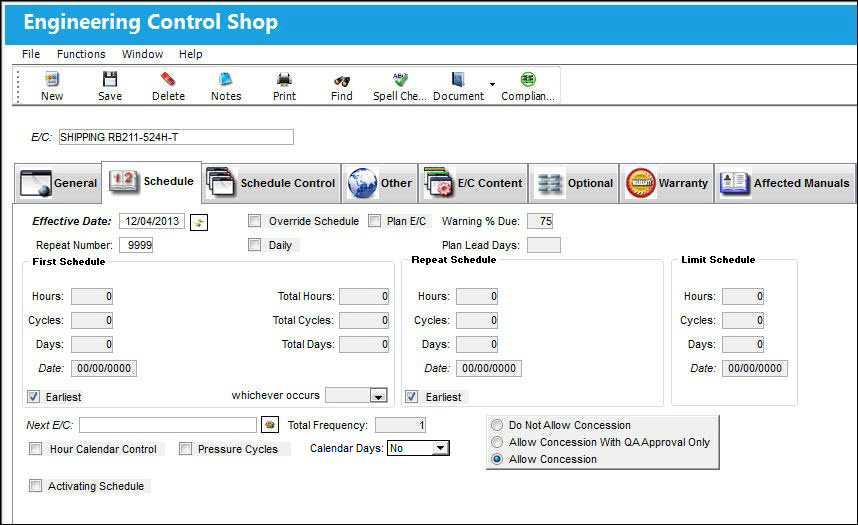
The following information/options are available in this window:
_____________________________________________________________________________________
Effective Date
Entered as the date from which the user requires to track time on the E/C being set up unless a Total Schedule has been defined. Once the effective date is entered and the A/C or P/N Effectivity for the E/C is applied, changing the effective date on this Tab will not change the effective dates on each individual aircraft or component that the E/C is effective to. Either the Effectivity will need to be removed and re-applied, or the effective date field will need to be changed individually in the Effectivity Override window for each tail number or component.
If the effective date is greater than the current date, planning will not forecast for this E/C until the effective date has been met.
Reset Date for all Effective Items  button
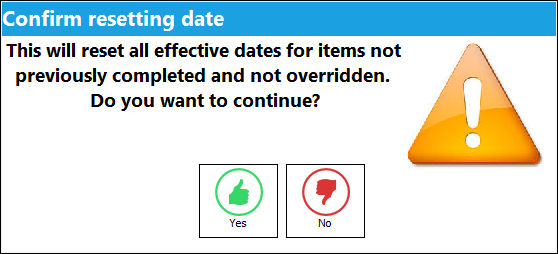
Select the Reset Date button to reset the effective dates for items not previously complied with and/or not overridden. The following window will appear upon resetting the effective dates:
Repeat Number
The number of occasions the E/C will be repeated. If the Repeat Number is set to 1, the E/C is a one time only E/C and only the First Schedule is applicable. If the Repeat Number is set to 9999, the E/C will be carried out on the First Schedule 1 time and then the Repeat Schedule indefinitely. If the Repeat Number is a specific number, such as 5, the E/C will be carried out on the First Schedule 1 time and then be repeated 4 times according to the parameters configured on the Repeat Schedule (and then terminated).
If the Repeat Number is set to 1, the Redo checkbox appears.
Next E/C
Used to set up a dependency between a group of E/Cs that will follow each other at the time of compliance. For example, if an A-Check has four phases (A1, A2, A3, A4) with each phase having its own requirements, each phases can be set up independently and then associated to the next E/C in sequential order. For the functionality to work the first E/C (A1) requires its effective date to be set and then each of the subsequent E/Cs (A2, A3, A4) must have their effective date set to 00/00/0000. The E/Cs repeat number should be set to 9999 so the cycle continues.
Once the initial E/C (A1) is complied with, the system will automatically change the next E/C’s (A2) effective date to the initial E/C’s (A1) compliance date. For example, E/C A1 has been set up with an effective date of 11/21/2017, and E/C A2, A3, and A4 have be set up with an effective date of 00/00/0000. At the time of A1’s compliance – which, in this example is 04/28/2018 – A2’s effective date automatically changes to 04/28/2018 while A1’s effective date reverts to 00/00/0000; A2 is now the next E/C due and will show in a Planning Query.
The Select Next E/C Query  button will display the next E/C subsequent to the current E/C being viewed.
The Schedule Control Tab is a preferred method of creating E/C relationships and dependencies.
It is important to select the the current phase of the Next E/C when deferring a defect. For additional information, refer to How to Query for the Current Phase of the Next E/C via Troubleshooting Tips of the Engineering - E/C Training Manual.
Daily checkbox
When the Daily checkbox is selected, actual hour/cycles (time) are reset and a compliance record is written for this E/C upon the completion of the Task Cards on an 'Open' Work Order rather than at the closing of the W/O. This feature is useful for the scheduling of recurrent daily E/Cs. Note that a Daily E/C should only have one Task Card linked to it. And once that one T/C is closed on the Work Order, the Daily E/C's compliance is recorded.
 Note: Engineering Compliance can be recorded when the Daily checkbox is selected.
_____________________________________________________________________________________
Share
Print
|
©1997-2026 Trax USA Corp. All rights reserved. This manual may not be copied, photocopied, reproduced, translated, or converted to any electronic or machine-readable form, in whole or in part, without prior written approval from Trax USA Corp. |
 |