
 Share
Share
 Print
Print
|
|
|
|
|


Engineering Control Shop, Schedule Controlled By Tab
The Schedule Control tab and Schedule Control By tab are used to set up parent/child relationships between shop P/N E/Cs. Compliance against the parent shop P/N E/C triggers transactions against the child shop P/N E/C, and the child P/N E/C follows and reacts to the transactions that occur against the parent P/N E/C; the child P/N E/C must be effective to the part that the parent P/N E/C is complied with. The child P/N E/C can also be track independently from its parent P/N E/C.
Each control can be used to build different types of parent/child relationships between 2 P/N E/Cs. When the New  button is selected and the control chosen from the drop down menu, the applicable fields appear for that control. The New button can be selected to create multiple relationships under the same P/N E/C. Records can be removed by selecting the Delete
  button
It is important to understand how the Schedule Control and Schedule Control By tabs work based on the control selected. The control and tab used to create the relationship determines if the P/N E/C entered will be the parent P/N E/C or the child P/N E/C to the currently selected P/N E/C.
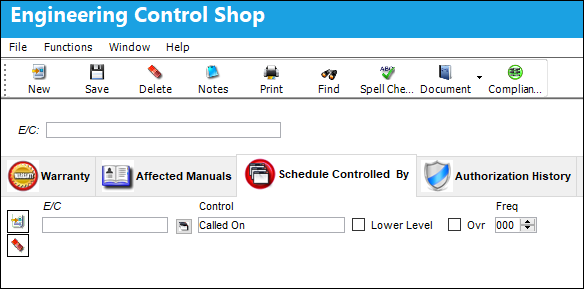
The following information/options are available in this window:
_____________________________________________________________________________________
Control
Under the Schedule Control By tab, when the following controls are used the E/C entered will behave as a child E/C to the currently selected E/C:
Called On - The Called On control allows users to specify at which parent E/C frequency a child E/C is to be called on and complied with. The Called On control works in conjunction with the Total Frequency field of the parent E/C's Schedule tab. For additional information, refer to Called On, via Engineering Control Schedule Control Tabs via the Engineering - E/C Training Manual.
Called On 1st - The Called On 1st and Called On Repeat controls are meant to be used together, where an E/C is activated by one E/C (Called On 1st) and then repeated on another E/C (Called On Repeat). For additional information, refer to Called On 1st, via Engineering Control Schedule Control Tabs via the Engineering - E/C Training Manual.
Called On At - The Called On At control is used to specify when a child E/C will start a called on relationship to its parent E/C, and at what interval the child E/C will be called on afterwards. For additional information, refer to Called On At, via Engineering Control Schedule Control Tabs via the Engineering - E/C Training Manual.
Called On Repeat - The Called On Repeat and Called On 1st controls are meant to be used together, where an E/C is activated by one E/C (Called On 1st) and then repeated on another E/C (Called On Repeat). For additional information, refer to Called On Repeat, via Engineering Control Schedule Control Tabs via the Engineering - E/C Training Manual.
Terminate E/C If Terminated - The Terminate E/C If Terminated control allows users to set up multiple parent/child relationships where multiple parent E/Cs need to be terminated before terminating the child E/C. For additional information, refer to Terminated E/C If Terminated, via Engineering Control Schedule Control Tabs via the Engineering - E/C Training Manual.
 Float - The Float control is similar to the Called On control, however the float control relies on a formula instead of a set frequency number to determine when the child E/C will follow the parent E/C. It is designed to combat the loss of potential child E/C yields due to the constraints of the set frequency. For additional information, refer to Float, via Engineering Control, Schedule Control Tabs via the Engineering - E/C Training Manual.
Under the Schedule Control By tab, when the following controls are used the E/C entered will behave as a parent E/C to the currently selected E/C:
E/C To Be Activated - The E/C To Be Activated control is used where upon compliance to the parent E/C the child E/C is activated. For additional information, refer to E/C To Be Activated, via Engineering Control Schedule Control Tabs via the Engineering - E/C Training Manual.
E/C To Be Complied With  - The E/C To Be Complied With control is used where upon compliance to the parent E/C the child E/C also receives a compliance record. For additional information, refer to E/C To Be Complied With, via Engineering Control, Schedule Control Tab via the Engineering - E/C Training Manual.
E/C To Be Terminated - The E/C To Be Terminated control is used where upon compliance to the parent E/C the child E/C is terminated. For additional information, refer to E/C To Be Terminated, via Engineering Control Schedule Control Tabs via the Engineering - E/C Training Manual.
When the status of the E/C is Open, or Applicable/ Not Embody, and compliance is manually written, the functionality of termination will still occur.
Called On  button
Displays the child E/Cs called onto the parent E/C entered in the E/C field.
Lower Level checkbox
When this checkbox is selected it indicates that all of the task card steps for the child E/C are contained within the parent E/Cs task card. When the parent E/C is added to a work order, the child E/C follows but any task cards related to the child E/C will not be attached to the work order.
 Do not select this checkbox if you want the Task Cards to follow the Child E/C.
When Switch  MANLLOR is set to Yes, and the E/C is classified as 'Mandatory', the Lower Level and Override checkboxes will be disabled.
Ovr checkbox (Override checkbox)
This checkbox is not in use; it was designed for a specific customer.
Frequency
The frequency number indicates the interval the child E/C is to be called on to the parent E/C. For example, if the frequency number is 2, every second time the parent E/C is added to a work order the child E/C will follow.
E/C Called On Schedule Exceptions  button
Indicates that there are differences between the child E/C and parent E/C schedules. When the button is selected the system displays the E/C Called On Schedule Exceptions popup window displaying the fields where the schedule values are different.
_____________________________________________________________________________________
Additional Information:
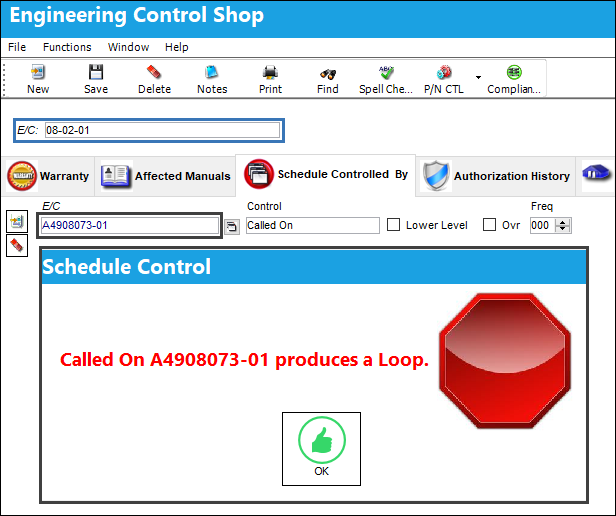
The system will prevent users from creating a loop between 2 E/Cs.
For example, parent E/C 'A4908073-01’ calls on child E/C ’08-02-01’.
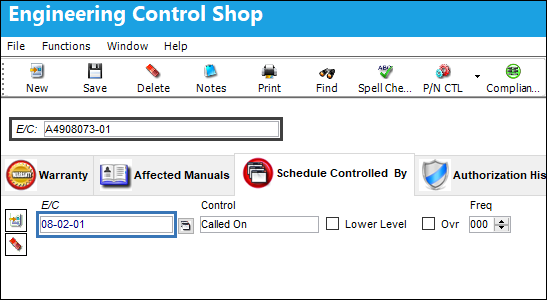
If the user tries to create a called on relationship where E/C '08-02-01' is the parent to E/C 'A4908073-01', a hard warning appears.
Share
Print
|
©1997-2026 Trax USA Corp. All rights reserved. This manual may not be copied, photocopied, reproduced, translated, or converted to any electronic or machine-readable form, in whole or in part, without prior written approval from Trax USA Corp. |
 |