
 Share
Share
 Print
Print
|
|
|
|
|


The Task Card Work in Progress option (shop floor data collection for hangars) contains the Wall password as a mandatory requirement. This is also linked to the employee skills to check if they have a valid license to perform the work.
Go to System Administration/Update/Control Panel.
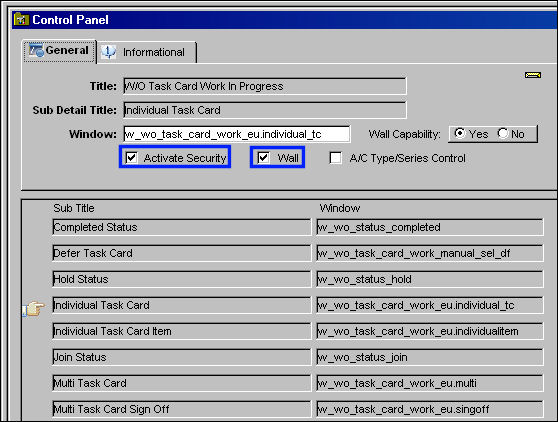
Place the Hand  pointer in front of the desired Module (Productions) and double click. In the next window, place the Hand pointer in front of the desired Category Title from where the user would like to control security/wall password. Double click on selection (i.e. W/O Task Card Work In Progress). In the next window, select the Activate Security and Wall checkboxes. Select the Sub Title and select the Save
  button. In this example the user has selected the Individual Task Card Sub Title as shown below:
For more information about the above process, please refer to the Control Panel section of this manual.
Go to Production/Update/Work Order Task Card Work in Progress
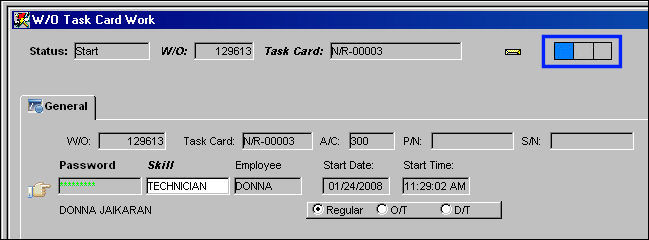
Select the Individual Task Card option. TRAX displays the W/O Task Card Work window. The window is the same, but now the Biometric indicator appears, showing that the employee may use their fingerprint instead of an actual typed password.
Share
Print
|
©1997-2026 Trax USA Corp. All rights reserved. This manual may not be copied, photocopied, reproduced, translated, or converted to any electronic or machine-readable form, in whole or in part, without prior written approval from Trax USA Corp. |
 |