
 Share
Share
 Print
Print
|
|
|
|
|


MEL Master, Conflict MEL Tab
The MEL Conflict Tab is used to link MELs that cannot be opened simultaneously. If a Defect Report is being deferred using an MEL that already has its conflict MEL open from another Defect Report a pop up is displayed to warn the user of the conflict.
Set up a conflict MEL as follows:
- Select an MEL and go to the Conflict Tab.
- Select the New
 button.
 - Select into the field and select an MEL from the Drop Down Selection window.
The Drop Down Selection window only displays MELs for the same Aircraft Type and Series.
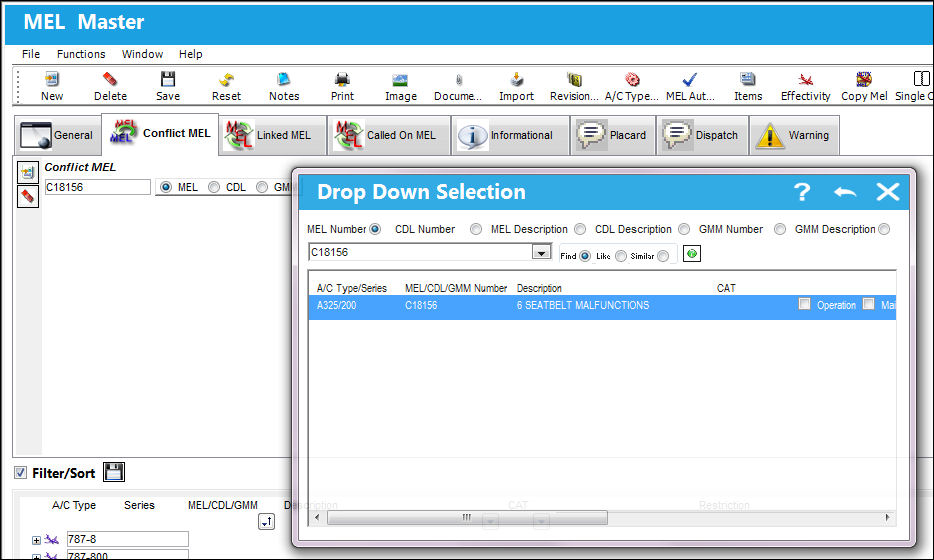
A Two Way Relationship Conflict is established between the MELs.
 Note: When the switch
  DEFCONFLICT is set to Yes, the system does not allow the user to save an MEL that has been applied to a Defect Report if the A/C has an existing Defect Report that has a conflicting MEL. Additionally, the system prevents the user from applying an MEL to a Defect report if a conflicting MEL already has already been applied to the Defect Report. When set to No, the system allows the user to save an MEL that has been applied to a Defect Report if the A/C has an existing Defect Report that has a conflicting MEL. The system will display a soft warning. Additionally, the system allows the user to apply an MEL to a Defect report when a conflicting MEL already has already been applied to the Defect Report. For more information, refer to DEFCONFLICT.
Share
Print
|
©1997-2026 Trax USA Corp. All rights reserved. This manual may not be copied, photocopied, reproduced, translated, or converted to any electronic or machine-readable form, in whole or in part, without prior written approval from Trax USA Corp. |
 |