
 Share
Share
 Print
Print
|
|
|
|
|


Engineering Explorer
The Engineering Explorer allows users to search and view Engineering Controls that are in the TRAX database using a variety of search criteria.
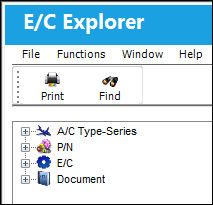
The User has the option to select the method by which they can find a specific E/C or group of E/Cs by A/C Type-Series, P/N, E/C (Number), or Document.
The following information/options are available in this window:
_____________________________________________________________________________________
A/C Type-Series  icon
icon
Select this option to view Engineering Controls by A/C Type-Series.
P/N  icon
icon
Select this option to view Engineering Controls by P/N.
E/C  icon
icon
Select this option to view Engineering Controls by E/C.
Document  icon
icon
Select this option to view Engineering Controls by EO Document.
_____________________________________________________________________________________
Share
Print
|
©1997-2026 Trax USA Corp. All rights reserved. This manual may not be copied, photocopied, reproduced, translated, or converted to any electronic or machine-readable form, in whole or in part, without prior written approval from Trax USA Corp. |
 |