
 Share
Share
 Print
Print
|
|
|
|
|


Manufacturer Electronic Data Supervisor
The Manufacturer Electronic Data Supervisor shows all documents that have been loaded via the Manufacturer Electronic Data Load option into TRAX.
Note: This functionality has been moved to TraxDoc.
Go to TRAX Control Panel/Engineering/Explorer/Manufacturer Electronic Data Supervisor.
TRAX displays the Manufacturer Electronic Data Supervisor Screen as follows:
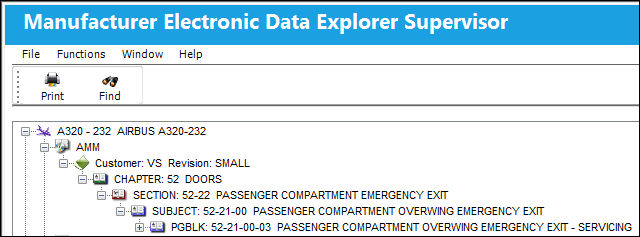
This screen displays manufacturer documents or information that has been electronically uploaded into TRAX.
Select the plus Expand  icon next to the item or its components. TRAX displays further details about the item.
Note: Documents that are displayed in the Manufacturer Electronic Data Supervisor are uploaded to TRAX via the Manufacturer Electronic Data Load option in Engineering/Update. Select this option and TRAX displays a screen where document information may be entered/updated for the purpose of uploading this information to TRAX.
The Manufacturer Electronic Data Supervisor Screen allows supervisors to review uploaded information and allows other users, regardless of their department or authorization group, to view (in query mode) uploaded information as well. The Manufacturer Electronic Data Explorer limits access to users with authorized access to this TRAX menu option.
Share
Print
|
©1997-2026 Trax USA Corp. All rights reserved. This manual may not be copied, photocopied, reproduced, translated, or converted to any electronic or machine-readable form, in whole or in part, without prior written approval from Trax USA Corp. |
 |