
 Share
Share
 Print
Print
|
|
|
|
|


The Work Accomplished tab displays the text that documents the actual work accomplished in relation to this Task Card Item.
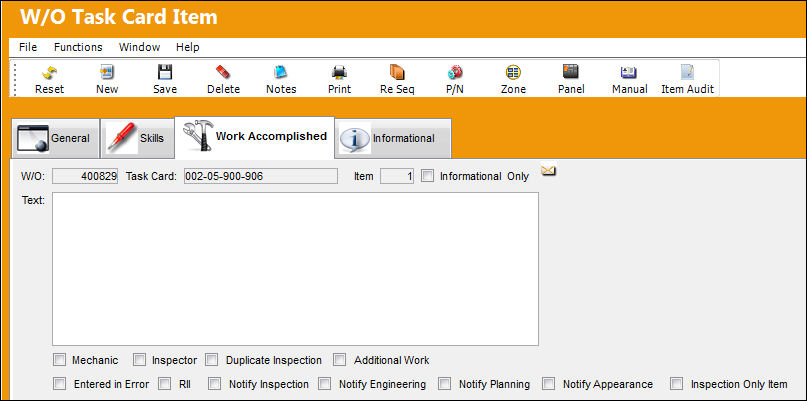
The following information/options are available in this window:
_____________________________________________________________________________________
W/O
The Work Order used to categorize, manage, and schedule work requirements for aircraft maintenance.
Task Card
The Task Card / Job Card that details the scheduled maintenance work.
Item
The item number required to accomplish a Task Card.
Information Only checkbox
Select if this item is for an informational step only (no labor required). When selected, the Main Skill checkbox will be removed from this window.
Text
Enter the text to document the actual work accomplished in relation to this Task Card Item.
The user will not be able to edit/update any information in the Text field if switch  TCWORKACC is set to Yes.
Mechanic checkbox
Select this option to enter any code number related to the mechanic (i.e. skill level). The code field only appears when the checkbox is checked.
Inspector checkbox
Select this option to enter any code number related to the inspector (i.e. skill level). The code field only appears when the checkbox is checked.
Duplicate Inspection checkbox
Select this option if the Task Card requires a duplicate inspection.
Additional Work checkbox
This informational checkbox is selected when the invoiced Task Card (Routine or Non-Routine) was designated as additional work. For this to appear, the Task Card must have the Additional Work checkbox selected. For more information refer to the W/O Task Card, Optional 2 Tab via the Task Card Button of the Production Training Manual.
Entered in Error checkbox 
Select this checkbox if the Item was entered in error.
Item entries cannot be deleted. Items entered in error will still be visible by supervisors after the N/R T/C Item work is accomplished.
RII checkbox
Indicates if the Item requires inspection. This is only available for Items following the first Item.
Notify Inspection checkbox
Allows users to notify the Inspection department which is assigned the N/R T/C. This checkbox is only available for the first Item.
Notify Engineering checkbox
Allows users to notify the Engineering department which is assigned the N/R T/C. This checkbox is only available for the first Item.
Notify Planning checkbox
Allows users to notify the Planning department which is assigned the N/R T/C. This checkbox is only available for the first Item.
Notify Appearance checkbox
Allows users to notify the Appearance department which is assigned the N/R T/C. This checkbox is only available for the first Item.
Inspection Only Item checkbox
Indicates that any Item after the first Item does not require to be signed-off by an inspector. The same person can complete the Item and the Work Accomplished for the Item, The first Item cannot be selected as Inspection Only.
_____________________________________________________________________________________
Share
Print
|
©1997-2026 Trax USA Corp. All rights reserved. This manual may not be copied, photocopied, reproduced, translated, or converted to any electronic or machine-readable form, in whole or in part, without prior written approval from Trax USA Corp. |
 |