
 Share
Share
 Print
Print
|
|
|
|
|


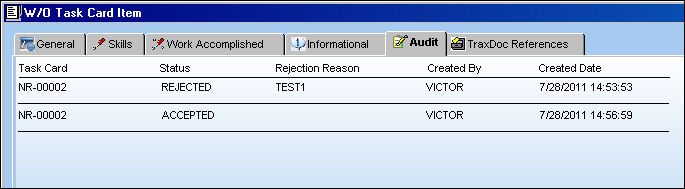
The Audit tab lists all Accepted and Rejected entries for the Item. Items are accepted and/or rejected via the W/O Task Card Assignment Workshop. Items can only be accepted or rejected when Production Switch  TKCIWS is set to Yes.
This tab is only available when Production Switch TKCIWS is set to Yes. For more information refer to Switch TKCIWS via the Production Switches Manual.
 The Item Audit Button, via the W/O Task Card Item Buttons has replaced the W/O Task Card Item, Audit tab in TRAX Version 11 and all later releases of TRAX.
The following information/options are available in this window:
_____________________________________________________________________________________
Task Card
The Task Card / Job Card that details the scheduled maintenance work.
Status
The Status of the Task Card Item.
Rejection Reason
The reason why the work performed on the Item was rejected. This field is controlled through a System Transaction Code via Production/ Update/ Accept/Reject Task Card Item.
Created By
The inspector who rejected or accepted the Item.
Created Date
The date and time that the Item was accepted or rejected.
_____________________________________________________________________________________
Share
Print
|
©1997-2026 Trax USA Corp. All rights reserved. This manual may not be copied, photocopied, reproduced, translated, or converted to any electronic or machine-readable form, in whole or in part, without prior written approval from Trax USA Corp. |
 |