
 Share
Share
 Print
Print
|
|
|
|
|


The W/O Task Card Item, General tab is used to enter the text instructions (steps) to carry out the work required for the task.
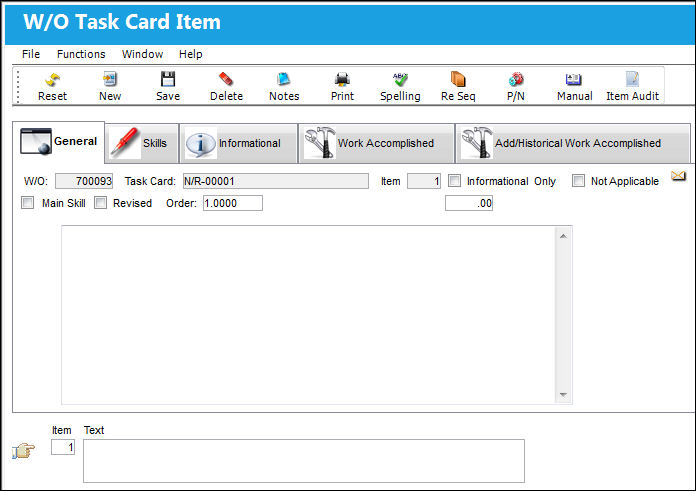
The following information/options are available in this window:
_____________________________________________________________________________________
W/O
The Work Order used to categorize, manage, and schedule work requirements for aircraft maintenance.
Task Card
The Task Card / Job Card that details the scheduled maintenance work.
Item
The Task Card's specific Item number.
Informational Only checkbox
Select if this item is for an informational step only (no labor required). When selected, the Main Skill checkbox will be removed from this window.
Not Applicable checkbox
When selected, the Informational Only checkbox also becomes selected and the skills in the Skills tab no longer become available. Also the Items in the Task Card print become grayed out when the Not Applicable checkbox is selected.
Main Skill checkbox
Select this checkbox if this is the primary skill of the Task Card. The user can then organize the Task Cards by primary skill (using filter and sort functionality via the related modules such as Production Work Orders.)
Revised checkbox
If the item has been revised selecting this checkbox would flag the Task Card item with a revision bar on the left of the item on the Task Card print when printed out. For additional information refer to Switch  RMVRVBAR via the Engineering Switches Manual.
Order
When the sequential order is changed for the Item number, via the Re-Sequence button, the Items are re-ordered on the list at the bottom of the window. While the Item number will reflect the change, the Order number will reflect the original sequential order. For additional information, refer to the Re-sequence button.
Op Hrs
Operation Hours. When the sequential order is changed for the Item number, the Items are re-ordered on the list at the bottom of the window. But notice that the Item number has not changed.
MPD
The Maintenance Planning Document reference for this Task Card.
Text
The instructional text for this item. This text can be copied to the Defect Report if this Task Card is deferred. See the following switch description for additional related information. The switch can be set via System Administration/ Explorer/ System Transaction Configuration/ Production.
- DERTCTSH (Deferred TC Items to Defect Trouble-shooting) - If set to YES, if a Task Card is deferred (transferred to Defect Report) and the Task Card contains individual Task Card Items, those items will become individual troubleshooting items on the Defect Report/ Troubleshooting Tab.
_____________________________________________________________________________________
Share
Print
|
©1997-2026 Trax USA Corp. All rights reserved. This manual may not be copied, photocopied, reproduced, translated, or converted to any electronic or machine-readable form, in whole or in part, without prior written approval from Trax USA Corp. |
 |