|
TRAX MANUALS > TraxDoc > TraxDoc Module > TraxDoc, Update Menu > TraxDoc Master > TraxDoc Document Detail > TraxDoc Document Detail, TraxDoc Explorer Tab > Folder Content View Buttons, via TraxDoc Document Detail, TraxDoc Explorer Tab > New Folder Button, via TraxDoc Document Detail, TraxDoc Explorer Tab
New Folder Button, via TraxDoc Document Detail, TraxDoc Explorer Tab
The New Folder  button allows the user to create a new folder within the TraxDoc record. button allows the user to create a new folder within the TraxDoc record.
From the TraxDoc Explorer tab, navigate to the location in the TraxDoc manual where the new folder will be located. Select the New > Folder button.
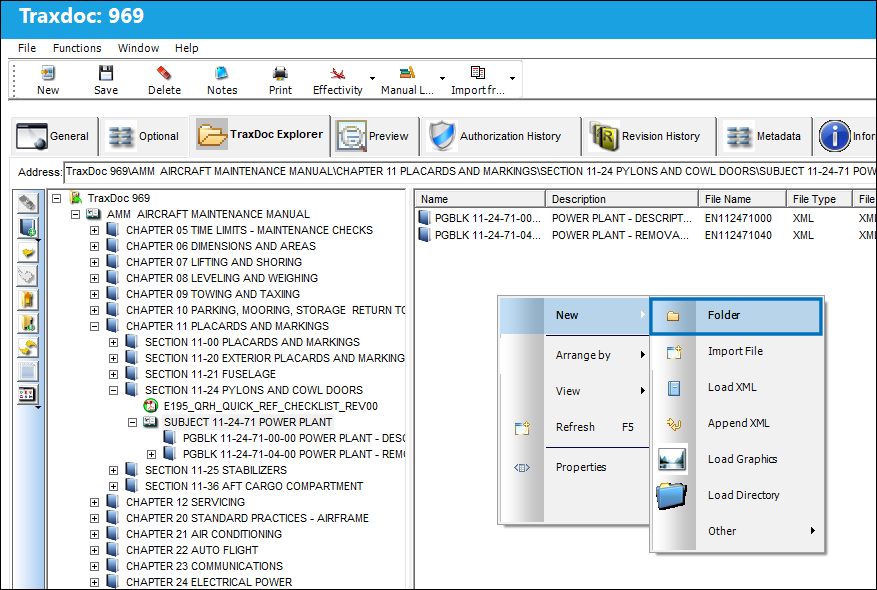
In TRAX versions prior to 15, the new folder is automatically created and named with the user who created the folder. The folder name can then be edited.
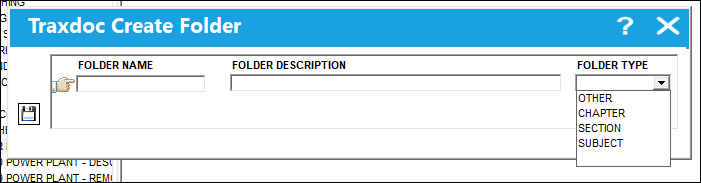
 But in TRAX Version 15, the TraxDoc Create Folder window opens where the File Name, Folder Description, and Folder Type can be specified. The Folder Type options are hierarchical: But in TRAX Version 15, the TraxDoc Create Folder window opens where the File Name, Folder Description, and Folder Type can be specified. The Folder Type options are hierarchical:
Select the Save  button when ready. button when ready.
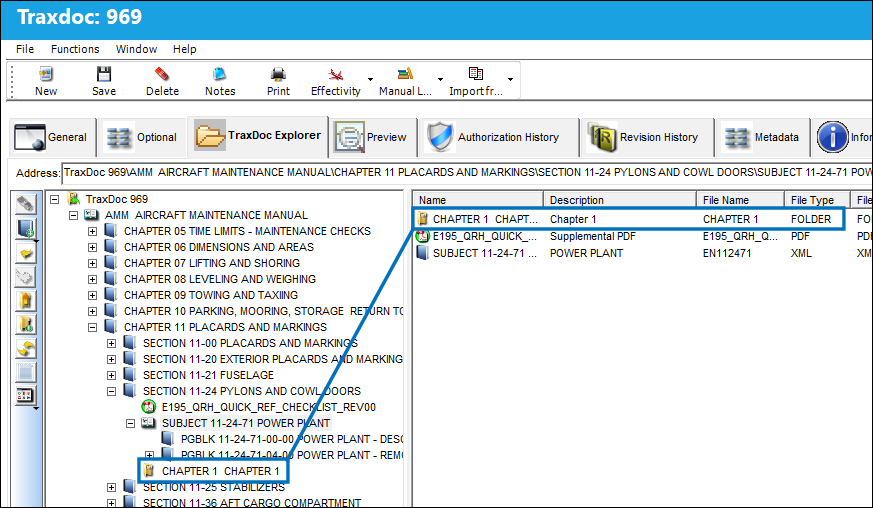
The folder is then created within the TraxDoc's contents and listed in the TraxDoc Explorer tab.
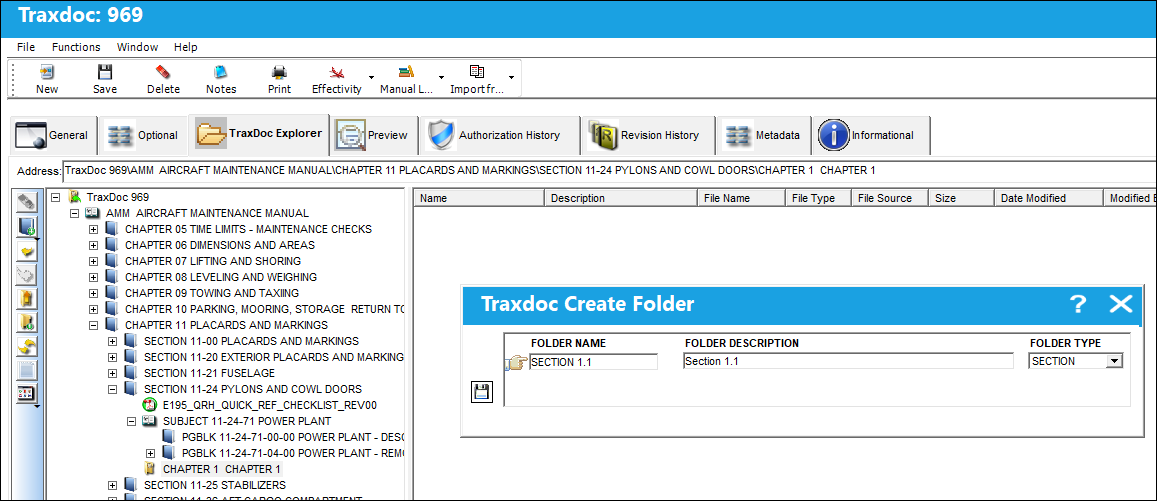
Additional files and folders (and sub folders) can be created following the same steps above.
|
See Also Folder Content View Buttons, via TraxDoc Document Detail, TraxDoc Explorer Tab Import File Button, via TraxDoc Document Detail, TraxDoc Explorer Tab Load XML Button, via TraxDoc Document Detail, TraxDoc Explorer Tab Append XML Button, via TraxDoc Document Detail, TraxDoc Explorer Tab Load Graphics Button, via TraxDoc Document Detail, TraxDoc Explorer Tab Load Directory Button, via TraxDoc Document Detail, TraxDoc Explorer Tab Arrange By Name Button, via TraxDoc Document Detail, TraxDoc Explorer Tab Arrange By Size Button, via TraxDoc Document Detail, TraxDoc Explorer Tab Arrange By Type Button, via TraxDoc Document Detail, TraxDoc Explorer Tab Arrange By Modified Button, via TraxDoc Document Detail, TraxDoc Explorer Tab Open Button, via TraxDoc Document Detail, TraxDoc Explorer Tab Preview Button, via TraxDoc Document Detail, TraxDoc Explorer Tab Edit Button, via TraxDoc Document Detail, TraxDoc Explorer Tab Rename Button, via TraxDoc Document Detail, TraxDoc Explorer Tab Cut/Paste Button, via TraxDoc Document Detail, TraxDoc Explorer Tab Delete Button, via TraxDoc Document Detail, TraxDoc Explorer Tab Import Button, via TraxDoc Document Detail, TraxDoc Explorer Tab Export Button, via TraxDoc Document Detail, TraxDoc Explorer Tab Properties Button, via TraxDoc Document Detail, TraxDoc Explorer Tab Edit File Properties Button, via TraxDoc Document Detail, TraxDoc Explorer Tab |
|

 Share
Share
 Print
Print


