
 Share
Share
 Print
Print
|
|
|
|
|


Exchange Order Out, Audit Tab
Go to the Audit tab:
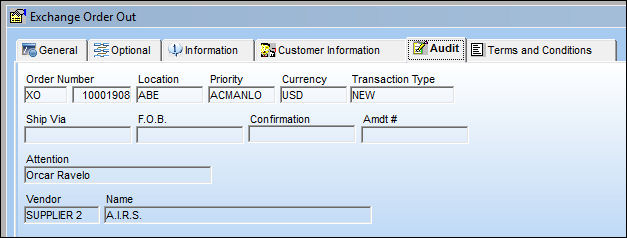
 This tab has been replaced with the Audit
  button in Version 11 and all later releases. For more information, refer to the Audit button, via Standard Buttons.
The following information/options are available in this window:
_____________________________________________________________________________________
Order Number
The type of order and the order number for the transaction.
Location
The location from which the order's items will be shipped.
Priority
The priority placed on the transaction (e.g., routine, AOG, etc.). For additional information and functionality, refer to the Priority transaction code via the Orders Transaction Codes.
Currency
The currency that will be used for the order transaction. Currencies may be defined for the Customer/Vendor in the Customer/Vendor Master and overridden at the order level. For additional information, please refer to the Currency section of the G/L Interface, System Transaction Code Training Manual.
Ship Via
Shipping-related information. This information may be pre-defined by customer, but may be changed for a particular order, as required. For additional information refer to the Contract Order, General Tab via the Orders Training manual.
F.O.B.
Freight On Board information (sometimes referred to as Free On Board). This information may be pre-defined by vendor. For additional information refer to the Contract Order, General Tab via the Orders Training manual.
Confirmation
The confirmation reference along with applicable information.
Attention
Identifies the intended recipient of the order. This field may be pre-defined in the Main Contact field on the Vendor Master, Mailing Address Tab.
Vendor
The system code for the service/part provider. For additional information refer to the Contract Order, General Tab via the Orders Training manual.
Name
The name of the vendor who was selected in the vendor field will appear here as defined in the Vendor Master.
_____________________________________________________________________________________
Share
Print
|
©1997-2026 Trax USA Corp. All rights reserved. This manual may not be copied, photocopied, reproduced, translated, or converted to any electronic or machine-readable form, in whole or in part, without prior written approval from Trax USA Corp. |
 |