
 Share
Share
 Print
Print
|
|
|
|
|


The TC Closing Detailed  button allows users to close individual Task Cards using individual employees.
For information regarding the utilization of this functionality for Non-Routine Task Card, refer to Closing a Non-Routine T/C, via W/O Task Card (Closing Detailed).
 This button is security controlled via Production/ Update/ W/O /W/O Task Card Status Update - Closing Detailed. For more information refer to the Security Explorer via the System Administration Training Manual.
From the W/O Task Card window, place the Hand  pointer on an open Task Card. Select the TC Closing Detailed button.
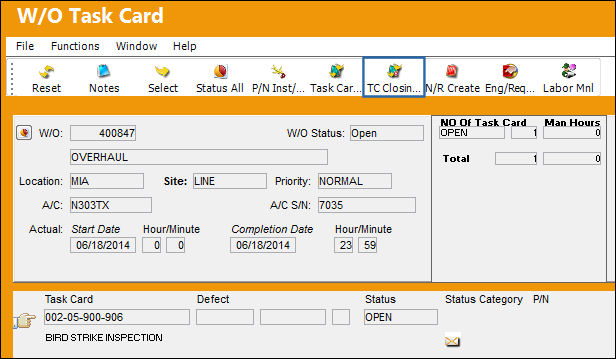
TRAX displays the following window.
Right-click in the Employee field and select an employee from the drop down menu. Do the same for the Task Card field. Select the Save  button.
When one Task Card has two or more occurrences in the Work Order, the SEQ field opens up.
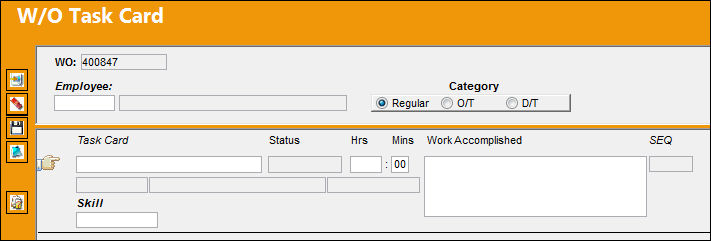
The following information/options are available in this window:
_____________________________________________________________________________________
Work Order
The Work Order used to categorize, manage, and schedule work requirements for aircraft maintenance.
Employee
The employee who is closing the Task Card.
Regular/O/T (Over Time)/D/T (Double Time) radio buttons
The type of hourly work schedule being applied: Regular, Overtime, or D/T (Double time).
Task Card
The Task Card / Job Card that details the scheduled maintenance work.
Status
The current status of the Task Card. The status of the Task Card is helpful in determining the stage the Task Card is at with regard to it's completion. Ultimately, the completion of the Task Cards will result in the closing of the Work Order.
Hrs/Mins
The hour/minute the Task Card was closed.
Work Accomplished
The actual work that was accomplished against the W/O Task Card / Non-Routine Task Card.
SEQ
The Sequence Number. This number is generated from the number of times the Work Order (or Shop Work Order) Pack Print is printed and/or when the Sequence/Resequence buttons are selected through the Work Pack Print>Task Card button. (I.e., if there are ten Task Cards on a Work Order, and the Work Order has been printed twice from the Work Order Pack Print, for the first occurrence of the Work Order Pack Print, the Task Card would have a SEQ of one. For the second occurrence, the Task Card would have a SEQ number of 11.)
_____________________________________________________________________________________
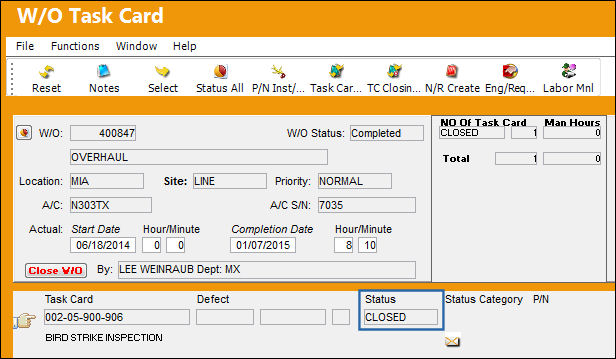
The Task Card goes to 'Closed' status as shown below:
Share
Print
|
©1997-2026 Trax USA Corp. All rights reserved. This manual may not be copied, photocopied, reproduced, translated, or converted to any electronic or machine-readable form, in whole or in part, without prior written approval from Trax USA Corp. |
 |