
 Share
Share
 Print
Print
|
|
|
|
|


Task Card, Quick Resolution Tab
The Task Card, Quick Resolution tab allows users to edit the Work Accomplished via the quick resolution buttons available for the specific Task Card when it is being closed. The Quick Resolution tab is only available when Engineering Switch  TCQUICKRES is set to Yes. For more information refer to Switch TCQUICKRES via the Engineering Switches Manual.
The configuration of switch TCWORKACC will affect the functionality of switch TCQUICKRES.
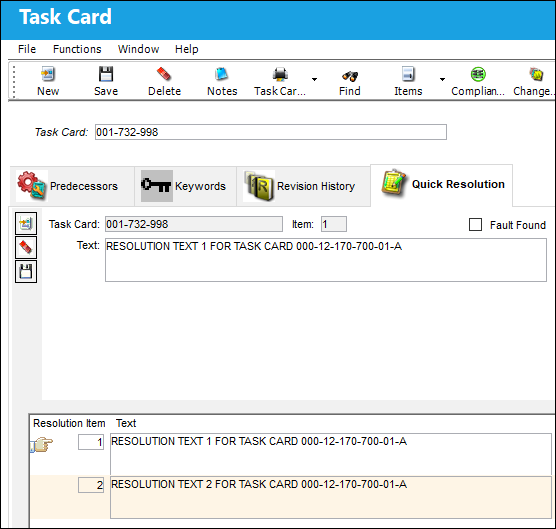
The following information/options are available in this window:
_____________________________________________________________________________________
Task Card
The Task Card / Job Card that details the scheduled maintenance work. The Task Card that the Quick Resolution is being created for.
Item
The Resolution Item number. Multiple line Items can be entered for each Task Card.
Fault Found checkbox 
Allows the Task Card to be flagged as having a fault found during the work after it has been completed through the TaskControl application.
 This checkbox is informational only in the system, but is functional in Trax's TaskControl Application. Faults being found during the work can only be flagged as such through the application for Task Cards that have this checkbox selected in the system. For more information, contact the appropriate administrator.
Text
The text containing the Quick Resolution entry for the specific Task Card. This text will be available in the Work Accomplished field for this Task Card.
_____________________________________________________________________________________
Select the New  button to enter multiple Items, the Delete
  button to delete them, and/or the Save
  button to save the Item.
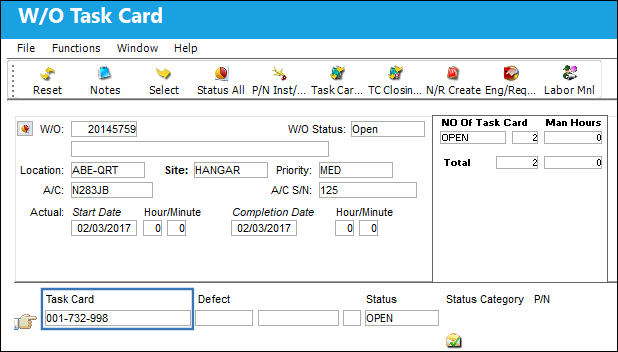
Once the Quick Resolutions are entered they can be selected when closing a Task Card via the Work Accomplished field. For example, via the T/C Work  button of the W/O window, notice the above T/C is associated to the W/O. Select into the T/C to close it.
Notice the Quick Response buttons available for the Work Accomplished field contain the text entered against the T/C via the Task Card, Quick Response tab (above).
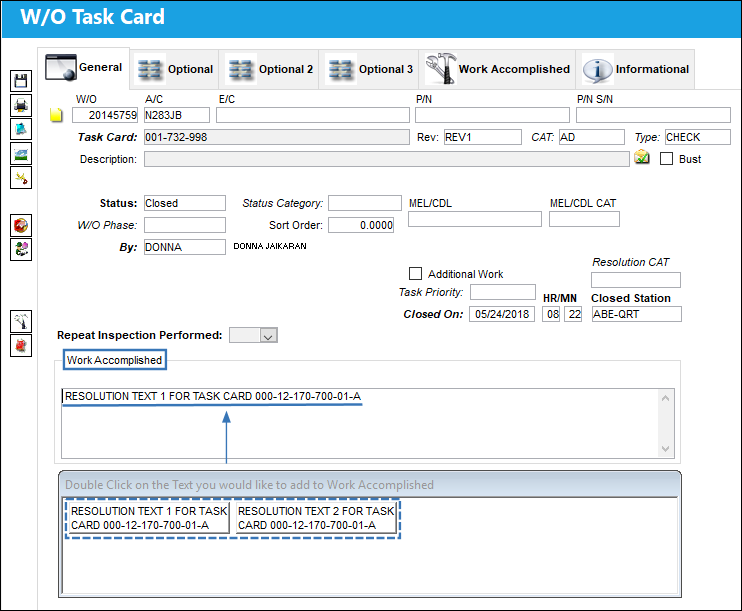
These Quick Response buttons are available where the Work Accomplished field is available for this Task Card.
Share
Print
|
©1997-2026 Trax USA Corp. All rights reserved. This manual may not be copied, photocopied, reproduced, translated, or converted to any electronic or machine-readable form, in whole or in part, without prior written approval from Trax USA Corp. |
 |