
 Share
Share
 Print
Print
|
|
|
|
|


The Trainer Class Control  button is used to set up/specify which classes an employee is authorized to train.
From the Employee Master, Optional tab, select the Trainer Class Control button. This Employee Trainer Control button is only available when the Training Instructor checkbox is selected in the Optional tab.
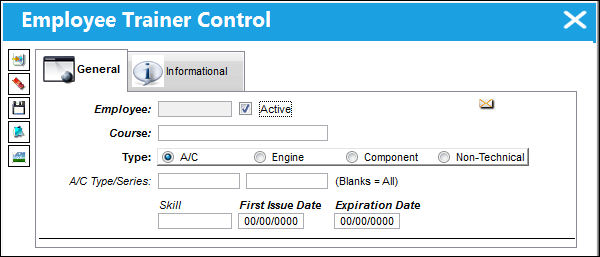
TRAX displays the Employee Trainer Control window.
The following functionality works in conjunction with Switch  CHKTRAINERCOURSE. For additional information, refer to Switch CHKTRAINERCOURSE, via the Training Switches Manual.
Select the New  button to enter add a course to the employee record. Populate all mandatory and desired information and select the Save
  button.
 The Trainer Class Control button is security controlled via Settings/Update/Employee/Trainer Control. When security is applied to this button, this window is only informational; the New , Save , and Delete
  buttons are not available. For more information refer to the Security Control via the System Training Manual.
Share
Print
|
©1997-2026 Trax USA Corp. All rights reserved. This manual may not be copied, photocopied, reproduced, translated, or converted to any electronic or machine-readable form, in whole or in part, without prior written approval from Trax USA Corp. |
 |