
 Share
Share
 Print
Print
|
|
|
|
|


The Delete  button is used to delete folders or images within the TraxDoc Explorer tab.
The system does not allow users to delete TraxDoc records that are linked to Engineering records. Stylesheets can still be deleted.
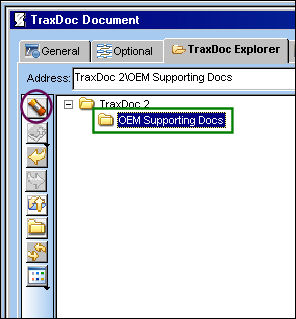
From the TraxDoc Explorer Tab, Folder Explorer View, select the folder and select the Delete button.
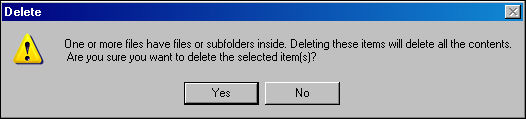
The following pop up appears. Select 'Yes' to delete the highlighted selection.
Additional Functionality:
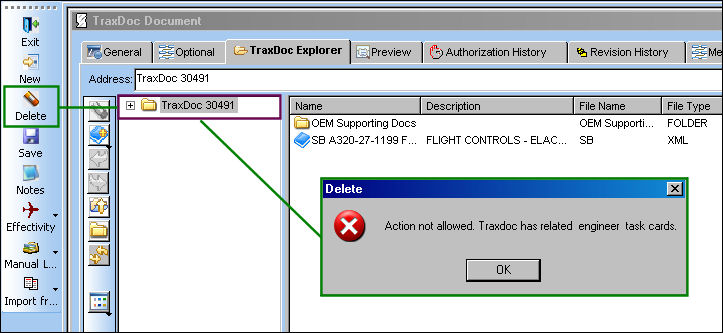
The system does not allow users to delete TraxDoc records that are linked to Engineering records.
Engineering records have been created for the following TraxDoc. Select the Delete button. The system will generate the following error:
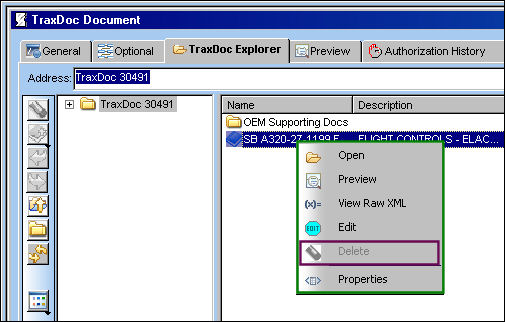
The Delete option is grayed out (disabled) for use for TraxDoc that have Engineering records to them:
Stylesheets can still be deleted.
Share
Print
|
©1997-2026 Trax USA Corp. All rights reserved. This manual may not be copied, photocopied, reproduced, translated, or converted to any electronic or machine-readable form, in whole or in part, without prior written approval from Trax USA Corp. |
 |