
 Share
Share
 Print
Print
|
|
|
|
|


The Folder Explorer View displays all folders within the selected TraxDoc:
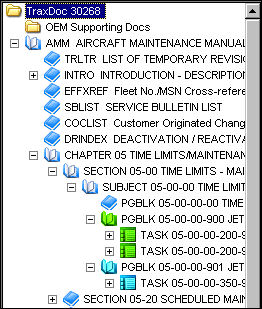
View/verify the following information:
_____________________________________________________________________________________
Element  icon
icon
The different colored Element icons indicate that status of each element within the Temporary Revision (TR).
 - The yellow icon indicates that this element was present in the original manual, was modified by the TR, but has not been authorized yet.
 - The orange icon indicates that this element was present in the original manual, was modified by the TR and has been authorized.
 - The red icon indicates that this element was present in the original manual and has since been deleted in the TR.
 - The blue icon indicates that this element was NOT present in the original manual that was created by the TR, but has not been authorized yet.
 - The green icon indicates that this element was NOT present in the original manual that was created by the TR and has been authorized.
_____________________________________________________________________________________
The following buttons are available in this section of the tab:
- Delete button
- File Multi buttons
- Back/Forward buttons
- Up button
- Folders button
- Refresh button
- View Change Report button
- View Multi buttons
Share
Print
|
©1997-2026 Trax USA Corp. All rights reserved. This manual may not be copied, photocopied, reproduced, translated, or converted to any electronic or machine-readable form, in whole or in part, without prior written approval from Trax USA Corp. |
 |