TRAX MANUALS > Production > Production Switches > WOHRSBLANK - Populate W/O Task Card Hour/Minute field
Populate W/O Task Card Hour/Minute field
Affected Window: w_wo_task_card_update_sel
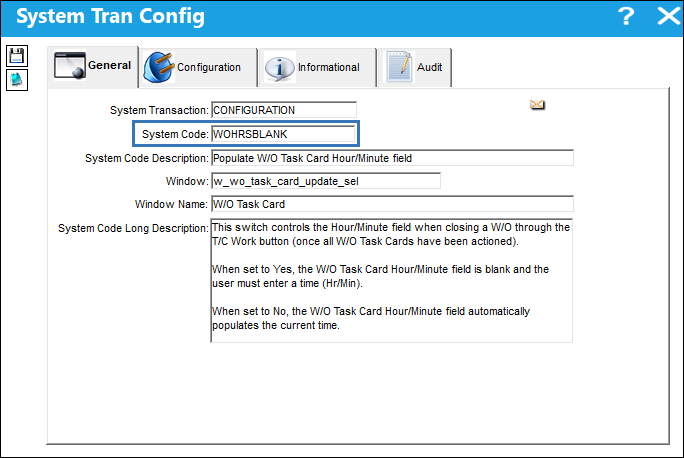
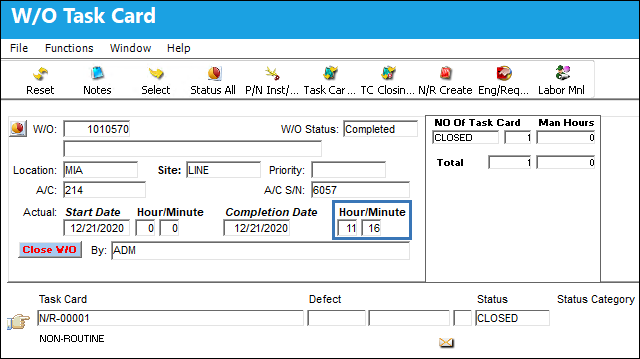
Note: This switch controls the Hour/Minute field when closing a W/O through the T/C Work button (once all W/O Task Cards have been actioned).
Note: The configuration of switches WOHRSBLANK and WOAUDITM affect the Completion Date and Hour/Minute fields in the W/O Task Card window.
WOAUDITM
Config Other
WOHRSBLANK
W/O Completion Date
Hour/Minute
Yes
No
Current System Date
Current System Time
ACTIVE
Blank
es
W/O Actual Completion Date(defined in W/O General tab)
Switch Set to Yes:
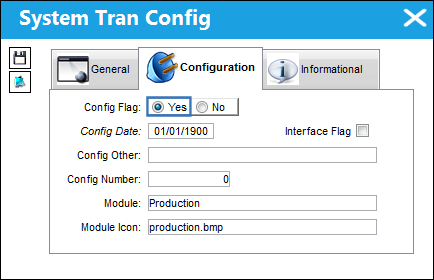
When set to Yes, the W/O Task Card Hour/Minute field is blank and the user must enter a time (Hr/Min).
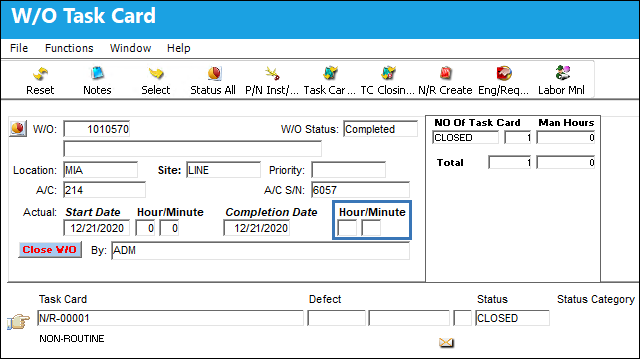
Once the W/O is completed, the Hour/Minute field is empty.
Switch Set to No:
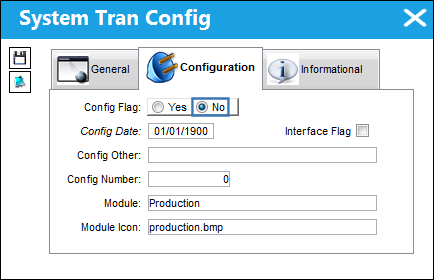
When set to No, the W/O Task Card Hour/Minute field automatically populates the current time.
Once the W/O is completed, the current time populates the Hour/Minute field.
See Also
Production Switches
3PTACVAL - Third Party W/O E/C Effectivity
ACTWOPUB - Activation of W/O Publish
ADDECNOT - Add E/C With No Task Cards
ADDECNTC - Add Child E/Cs with no Task Cards
ADDEFTCLEC - Allow to Add Defect to Multiple W/Os through Called On E/C
ADDNONEFPN - Add Non-Effective Parts as Part Number Requirements for W/O Task Card
ADDNXTDUE - Add Next Most Due information to the W/O Closing Notification
ALLWOPACKP - Ability to Print All W/Os from a specific date range
ASSIGNSEQ - Automatically Sequence W/O T/Cs Once the W/O Status Changes from Generation to Open
ATOPRNWO - Auto Print Invoice On W/O Closing
AUDITMOVE - Save the Reason for Moving in W/O Task Card Gantt
AUTOCREATENRTCITEM - Auto create an item by default for a NRTC
AUTONRLINE - Auto-Line W/Os will automatically add a N/R
AUTOPAMP - Auto populate AMP information from A/C Type/Series to W/O
AUTOPENDEF - Auto Populate Open On Time and Station From Defect Report Associated to Non-Routine Task Card
AUTOPICKLIST - Generate Picklist from W/O Task Card P/N Window
AUTOPNTC - Auto Create P/N Control Task Card through W/O Pack Print
AUTOTCLINE - Prevent the Automatic Creation of a New (blank) Line Item in W/O Task Card Closing
AVMSTR - Aviation Management Systems Export To File
BLOBCLEAN - Cleans Blob files from closed W/Os
CASCADCOMP - Parent W/O Completion Date Cascaded Down to Sub W/Os
CCLISTCOND - Default X/O's Exchange Fee, R/N's Unit Cost, and S/O's Unit Cost
CCPRODLOCOPT - Customer Contract Location Optional (Production)
CCSHOPLOCOPT - Customer Contract Location Optional (Shop)
CHOMITWOCA - Characters to Omit in Contractor Authorization Request Description
CHECKTROUBLE - Do Not Display Ongoing Trouble Shooting Checkbox
CHOMITWONOTE - Omit Characters in Trax Notes
CLXECTERM - Cancel Terminated E/C on Open or Generation Status W/O
CLOSEALLPOSTCOM - Activate the Database Job to Close All W/Os in Post Complete Status Monthly
COATR - COA Import From Table
COMPTECHLOGWOTC - Completed OnTech Log field Made Available in the W/O Task Card Window
CONTRACTWO - Contract Work Order Billing Sequence
CPCPIDNUM - Corrosion Prevention and Control Program Next Sequence Number
CPCPVISIB - Make Corrosion Prevention and Protection Tab Visible/Invisible
CRSCOMPATIBILITY - Checks if the Part's Certificate is Compatible with CRS Type of the W/O
CUSTAUTHSEQ - Customer Authorization Sequence
DAILYEOARCHIVE - Daily EO Will Be Archived at Compliance
DEF3PTY - Default New Work Orders to Third Party
DEFECTRT - Only Add Work Accomplished to Defect Resolution when Repeat is Complete
DEFECTTC - Load Defect Text Into The Work Order Non-Routine Task Card
DEFECTTS - Add Trouble Shooting to Non-Routine Task Card as Item
DEFNRTCITEM - Default New Work Orders to Require having N/R T/Cs Items Before Printing
DEFPROD - Default Work Order Task Card Defect Report Defect Type Code
DERTCTSH - Deferred TC Items to Defect Trouble-shooting
DFTCFMTC - Task Card Item from Deferred Task Card
DONETGROVE - Use .NET version of GroveBuilder Entities Parser
ECCBCDO - E/C Controlled by Calendar Days Override Reset Flag
ECCBCDW - E/C Controlled By Calendar Days Warning
ECCHLDTRC - Set One Time Plan to Checked status if Transferred/Canceled from a W/O
ECCOMPRESEQ - Auto Re-sequence Compliance In Sequential Order by E/C
ECMANTCR - Reset E/C If All Mandatory Task Cards Have Been Closed
ENABLEPW - Enable fields in W/O, Paperwork tab
GENCONTRACT - Validate Generic Customer Contract When Closing Work Order
GENRECALTWO - Generate Recurrent Alert From Work Order
HIDEDEFWARN - Hide Warning for Defects not linked to a Task Card or Work Order
HIDENOTAPPTC - Hide Not Applicable Task Cards from Stylesheet
INVORDTP - Customer Order Invoice Print Custom Datawindows
LABORDATEVAL - Stop Validation of W/O Date on Manual Labor
LABORTIM - Maximum Work Hours Allowed In The Work Order Manual Labor
LABORTIMECTRL - Prevent Concurrent Man Hour Entry For The Same Time Interval and Set A Limit Per User Per Day
LABORTIMEMAND - Defaults the Manual Labor's Time(hrs/min) based on the Start and End Times
LBTCPRFX - Label Task Card Prefix and Sequential Number
LIMITFURCRITERIA - Set First Schedule Parameter Limits for Follow Up Requirements (FUR)
LINEMANDLOG - Log Page and Item # Mandatory for Line Work Orders
LOCDAMAGEEDITCHK - Corrosion/Damage & Repair Location of Damage fields Validation
MAINSKILLTOTC - Copy Main Skill From T/C Item To Skill Field On T/C
MANDATAMP - AMP, Revision and Date Fields Mandatory
MANTCDT - Mandatory Closing Time For W/O Task Cards
MKLVLMD - Make Level Field Mandatory if the Corrosion is Selected
MNWORKACC - Mandatory Work Accomplished at T/C and Item Level for Stop or Completed Status
MSGRIID - 'Is RII required?' message appears when closing a W/O Task Card
MULTITASKASSIGN - Select And Assign Multiple Task Cards In W/O Task Card Assignment
NONRWOTCUPD - Prevent Closing of N/R T/Cs Using W/O Task Card Closing
NR/TC-REF - Non Routine Task Card Reference
NREDITOR - Defaults the W/O N/R Task Card Editor
NRHDU - Multiple Users Cannot Edit same W/O Task Card Item Record at Same Time
NRHWAC - W/O T/C Status Check in Add/Historical Work Accomplished Tab
NRITEMDEFSKILL - Create Blank Line Item With Default Skill For NR TCs
NRPRINTPROTECT - Prevent the Printing of a N/R T/C in Closed Status
NRRELCATMD - Make Resolution Category Mandatory when Closing T/Cs (scheduled and NR)
NRSELFASSIGN - Self Assign N/R T/C
NRSVPAUTO - Non-Reserved Items Auto Print at Picklist Location Set Up Printer
NRTCASC - ASC Field Mandatory in W/O N/R T/C, Optional 2 tab
NRTCATA - ATA Chapter and Section (fields) Mandatory on Non-Routine Task Cards
NRTCDEF - Auto Populate The Defect Description To The Task Card Description
NRTCFRNO - Load Non-Routine Task Card from Issue W/O Not Parent
NRTCPRAP - Non-Routine Task Card Protect After Printing
NRTCPRFX - Non Routine Task Card Prefix
NRTCTYPEMAND - Make Type Field Mandatory for W/O Non-Routine Task Card
NRTCWAMP - Non-Routine Task Card Work Accomplished Mandatory
NRTFRDEC - Allow Transfer of N/R T/C when Linked to E/C
NR_MPD - W/O Non-Routine Task Card - MPD field Mandatory
ONLYPEFFTCITEM - Only Print Effective Task Card Items
PCWOFBR - Prevent Closed W/Os From Being Re-Opened
PENDINGRII - Add Pending RII Status to W/O Task Cards at Task Card Completion
PKLCANCEL - Picklists and Requisitions Canceled When Closing a Completed or Post Completed W/O
PNLABORRESE - Auto Re-reservation Of Part And Labor If W/O Changes
PNMANAGEDISSUE - Do Not Delete Managed P/Ns Once W/O Is Closed
PNTCACVALIDATE - Validate A/C Effectivity Against P/N Task Cards
POSTCMPLINEWO - Activate the Database Job MONTHLY_POSTCOMPLETE_WO
PPCWOFBR - Prevent Post-Completed W/Os From Being Re-Opened
PPONEJOB - Print W/O Pack Prints as a Single Print Job
PREVASKTORESET - Prevent E/C Prompt 'Do you want to Put E/C at Do Not Reset' At Status Cancel And Automatically 'RESET' Linked E/C
PREVDEFERTC - Prevent Message Regarding the Closing of a Child E/C
PREVENTTASKCLOSE - Prevent Closing T/Cs When Un-sequenced T/Cs Are Against The W/O
PRINTPDFJOB - Send one job to the printer when printing from the W/O Print
PRTSKLTC - Protect Skill in Work Order Task Card Item Work
RESEQWARN - Re-Sequence Warning When Opening Workpack Print
RESETCEC - Update Reset Flag on Child E/Cs with No Task Cards
RPTINSPP - Repeat Inspection Performed
SCORECARDING - (No Longer in Use)
SCTCMAN - Schedule Task Card Mandatory For Non-Routines Of Specified Defect Type
SEPARATETCDOC - Print Task Card and Its Attachments in Individual Files When Using Email Function in Work Pack Print
SIGNBREAK - To capture break and/or lunch for employee
STOWOTASKONDB - Store The W/O T/C XML On Database
SUBWOEDT - Sub WO Location/Site/Date Same as Parent WO
SWACK - Shop Work Order Show Acknowledgment Button
TCBIDSHT - Load Task Card Bid Sheet Notes
TCCONFLICT - Conflict Task Card
TCDEFBLB - Attach Task Card Images to Related Defect Reports
TCDEFER - Work Order Task Card Defer Default Defect Type Parameter
TCDEFEREXI - Exit Buttons removed from Defer Task Card Transfer To Defect Reports Window
TCDESCRIP - Description field Open for W/O T/Cs and N/R T/Cs
TCDFRSTS - Defer W/O Task Card Authorization Status
TCDFTOPN - Keep Defect Open When Closing T/Cs Associated To W/O
TCDFTOPNY - Completed_no on a Defect Report will be increased
TCDUEPRT - Load Due Date into Task Card Print
TCHMAP - Default Closed On (field) to Current Time of PC
TCITEMCLOSEMDRY - Mandatory Item Select with W/O Task Card Item Close
TCNRTCQTY - Default the Task Card P/N Quantity to 1
TCSTCHG - Change the Default Status at the Manual Task Card Closing
TCVALMECHINSP - Same User Cannot Complete Mechanic and Inspector Work on a T/C Item
TCWAMN - Task Card Work Accomplished Mandatory
TCWORKACC - W/O TC/NRTC, Add/Historical Work Accomplished Tab
TCWORKOOS - Work can be accomplished non-sequentially via W/O T/C Assignment Workshop
TKCIWS - Accepted/Rejected prompt in W/O Task Card Assignment Workshop
TRAXEOPARENTTAG - Generate TRAXEOPARENTTAG Tag When Printing STYLESHEET/TRAXDOC Task Cards
UPDTDELPNREQ - Warning That Removal Of P/N Requirements With Active Picklist/Requisition Will Not Be Reflected On NRTC
VALAUTONR - Validate Mandatory Fields For NR TC When Auto Created
VLDGRDTM - Validate ground time for Work Orders
WALLBEFTCCLW - Prompt Wall Password for Task Card Closing Window
WARNIFPNRESERVED - Prevents Reserved P/Ns from being removed through W/O Task Card P/N
WOACCOMPNOTEMPTY - Prevent The Post Completion Of A W/O That Has T/Cs With No Work Accomplished
WOACTPW - W/O Verify A/C For Third Party Work Orders
WOACTSEQ - W/O Actual Next Sequential Number
WOACTSNG - Check if the Employee is Signed On
WOACTUALOBJECT - W/O Actuals Calculation Function
WOACTYPEMAN - A/C Type Mandatory in Work Order
WOADTREC - Work Order Audit Recording
WOAECDF - Defer E/C When Task Card is Deferred
WOATHREL - Work Order Authorization By Step
WOAUDITM - Populate W/O Task Card Completion Date
WOAUTOSO - W/O Employee Auto Sign Off
WOBIDNO - Work Order Bid Next Sequence Number
WOCHECKSK - Validates Main Skill For TC Completion
WOCHGAUTH - Re-Authorize W/O When Changes are Made to Mandatory Fields or Tasks are Added to W/O
WOCHILDECDEL - Allow Deletion of Child E/C on a W/O
WOCLOCHB - Make Print W/O E/C Checkbox Unchecked
WOCLOSENR - Do Not Allow Edit of Non-Routine When W/O is in 'Closed' Status
WOCLOSEPENDTOOL - Prevent Closing the W/O If Tools Are Not Returned
WOCOMPSWP - Perform Sweep Function At W/O Post Completed Status
WOCSTEXT - W/O Control Sheet Print Add Footer Description
WOCUSTLOGO - Use Customer Logo for Third Party Work Order Task Card Prints
WODDPLEC - Do Not Create a W/O Defer Defect When Deferring a Planned E/C
WODEFER - Change Status of Parent E/C When Child E/C Is Deferred
WODUEDATE - Display The Due Date Information For The W/O
WOECCOMP - Write E/C Compliance from W/O Defer Defect
WOECNORESETCANCELTC - W/O E/CS will be set to Do Not Reset on shared cancelled T/C
WOECRESTDT - W/O Reset Date use W/O Start Date/ Time
WOECXMLTAG - Generate TRAXWORKEOS Tag When Printing STYLESHEET/TRAXDOC Task Cards
WOINSPRII - W/O and Task Card Inspection and RII check item and Route
WOIRSDR - Do Not Display SDR and IR Creation Buttons in W/O N/R T/C Window
WOLABOREFFEMP - Filter W/O Man Labor Efficiencies Report by Employee/User
WOLABTCOPEN - Only Allow Labor For Open Task Cards
WOLCSTEOPT - Make W/O Location/Site fields Mandatory
WOLINEMULTI - Soft Warning when Multiple Line Status Work Orders are created
WOLOCEMP - User's Location Must Match the W/O Location or T/C Closed Station when Closing
WOMANHRSPRTFIELD - Allows for Query by A/C, Location, Site, and Date fields in W/O Print
WOMNLINVREF - Manual Customer Invoice Reference
WONRMANDSC - NRTC Source Code Field Mandatory
WONRMAP - Populate Open On Time/Location from Server Time and W/O Location
WONRPROD - Make the Open On, Hour/Minute, By, and Open Station fields Mandatory
WONRSCHDEF - Make Schedule Task Card and/or Defect field Mandatory
WONRTCAP - Append Accomplished Work Entries for W/O Non-Routine Task Cards via Add/Historical Work Accomplished Tab
WONRTCRII - W/O N/R Task Card RII Checkbox Selection
WONRTDISPATCH - W/O Non-Routine T/C Dispatcher Notified Resolution Mandatory
WOPICK1 - Create One Picklist Per W/O On Reservation
WOPICKPRIO - Picklist Priority Updated when W/O Priority Changed
WOPKLNLA - Automatic Picklist/Requisition Creation for Missing NLA Components
WOPOSCMINSERV - Set the A/C OOS status to 'In Service' when W/O is set to Post-Completed Status
WOPOSTCM - W/O Post Completion Close Material and Automatic Closing
WOPPIDMR - File Path Setup for W/O Pack Print - Send to IDMR
WOPPTRAXDOCREV - Work Pack Print TraxDoc Supporting Documents
WOPRINTCLEAR - Clear W/O Print history on location update
WOPUDTMD - Date Required Field Mandatory For Pop-up Located in Requisition Via W/O
WOPUPRMD - Make Priority Field Mandatory for W/O Location prompt
WOPURSVRQ - Display Pop-up For Requisition Location After Location Pop-up
WOPUTPMD - Make Type Field Mandatory for W/O Location prompt
WORELAPP - Make Approval Mandatory in Work Order
WORELFORM - W/O Release Form Status
WORESC - Display Message to Reschedule the Task Card
WOSCHBUFFER - Set a Buffer to Calculate the W/O Auto Schedule Start Time After Flight Arrivals
WOSCHEDULE - Show Men Available for Work by W/O Header Schedule
WOSCHLCFGWARN - Apply Warning To Overdue Items When Schedule Start Date Is Changed
WOSCHTCAP - Append Accomplished Work Entries for W/O Schedule Task Cards via Add/Historical Work Accomplished Tab
WOSCOPEDAYS - Specify Number of Days Used to Calculate T/Cs Displayed in W/O Scope Analysis, Time & Materials tab
WOSEQ - Work Order Next Sequence Number
WOSEQPFX - W/O Task Card Sequence Prefix
WOSTATGEN - Set the Default Status of new W/O's to Generation
WOTCCHECKITEMS - Check for Missing Items when Adding a Task Card to a W/O
WOTCCLOSINGSTATS - Default Status on W/O T/C Closing Window
WOTCCMPM - Work Order Task Card Completion Information (fields) Mandatory
WOTCCTLDT - Work Order Scheduled Start and Close Date and W/O Task Card Closed Date
WOTCDTALL - Date (field) Mandatory when Status All button Selected to Close W/O Task Card
WOTCESIGN - Create an Electronically Signed PDF for Work Order Task Cards at Closing
WOTCGRP - W/O Task Card Work Group Sequence
WOTCIMDEL - Delete Task Card Images When Closing W/O
WOTCITDL - W/O Task Card Item Delete Blob Data
WOTCREASONMANDATORY - Work Order Task Card Reason Mandatory
WOTCITEMCL - W/O Task Card Items Closed through T/C Work
WOTCITEMEDIT - Do Not Allow W/O T/C and N/R Items to be Edited
WOTCMATCHSKILL - Have W/O T/C's Main Inspector Skill Match the Skill Selected in the Optional 2 Tab
WOTCRATIO - Calculate W/O Actuals Hours using a W/O Task Card Item Total Hours Ratio
WOTCREOPEN - Allow Re-opening of Task Cards previously closed against a Work Order
WOTCRIIINSP - Display pop up to Accept or Reject a T/C when status is Pending RII
WOTCSCHEDPROTC - W/O Task Card Schedule Fields Protected
WOTCVEFSKL - W/O Task Card Verify Employee Skill
WOTPWXOAUTO - Enable Auto XO to function with Multi-Company
WOTSKNWAUT - Send new tasks assigned to Work Order Authorization
WOUSERETOPS - Same User Cannot Complete ETOPS Work on Both Engines for ETOPS A/C
WOVEFSK@CM - Validate Skill Only at Completion in W/O Task Card Work in Progress
WOVEFSKL - Verify Employee Skill in W/O Task Card Work in Progress
WRKTOSEQ - Work Turnover Sequence
WTMSKILLVAL - Work Order Manual Labor Will Validate Employee Skill
WTUSKILLVAL - Work Order Task Card Closing Will Validate Employee Skill
WTUSKILLVALEXT - Extends Functionality of WTUSKILLVAL to Other Windows and Employee Skill Status