|
TRAX MANUALS > Production > Production Switches > WOSCHLCFGWARN - Apply Warning To Overdue Items When Schedule Start Date Is Changed
WOSCHLCFGWARN - Apply Warning To Overdue Items When Schedule Start Date Is Changed

Apply Warning To Overdue Items When Schedule Start Date Is Changed
Affected Window: w/o
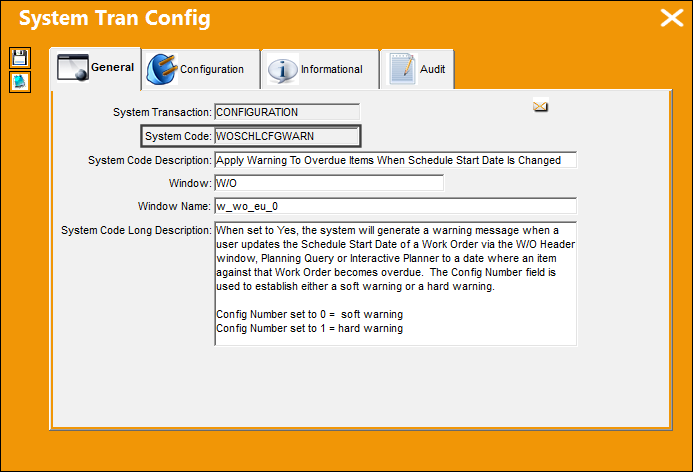
Switch Set to Yes:
When set to Yes, the system will generate a warning message when a user updates the Schedule Start Date of a Work Order via the W/O Header window, Planning Query or Interactive Planner to a date where an item against that Work Order becomes overdue. The Config Number field is used to establish either a soft warning or a hard warning.
Config Number set to 0 = soft warning
Config Number set to 1 = hard warning
The Config Other field can be used to customize the text verbiage of the warning. When Config Number is set to '0', system will add the text 'DO YOU WANT TO PROCEED?' at the end of the customize text.
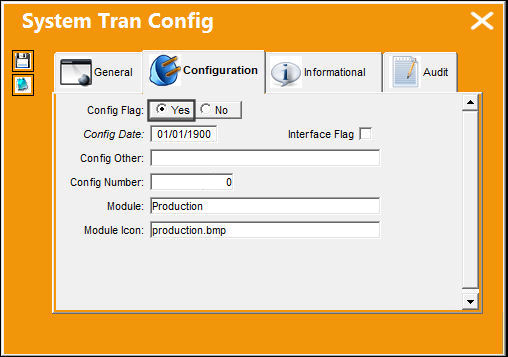
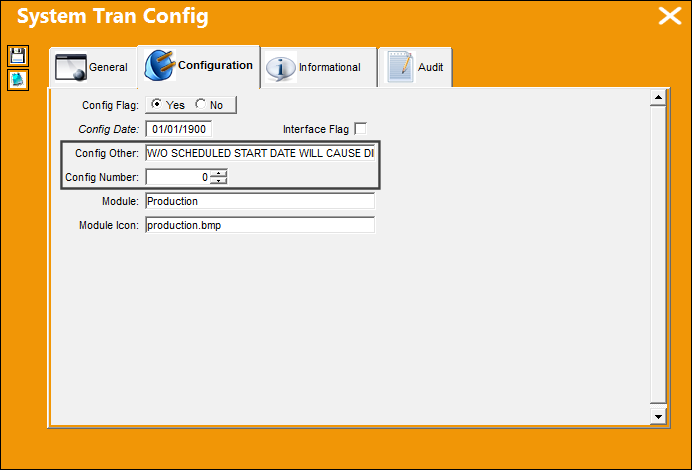
In the Config Other field, the following text is populated, "W/O SCHEDULE START DATE WILL CAUSE DIE DATE VIOLATIONS."
In the Config Number field, '0' is entered.
From the A/C Planning Detail window, select an E/C and add it to a Work Order.
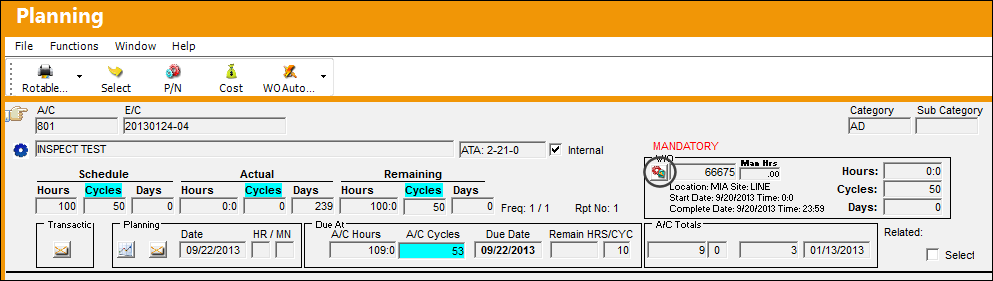
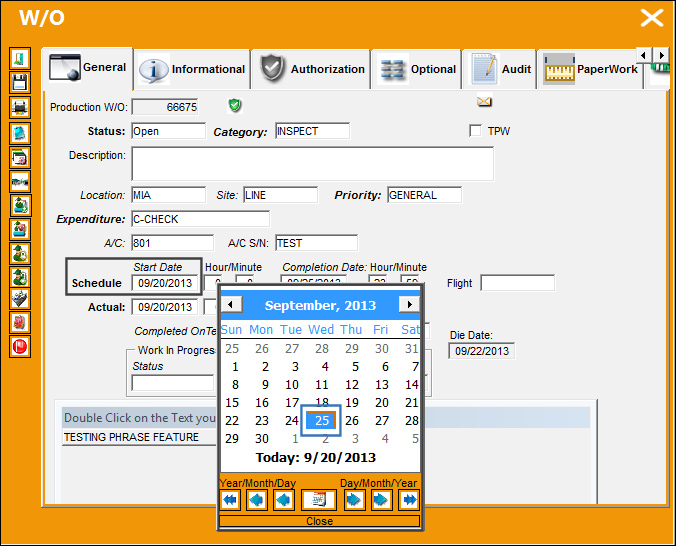
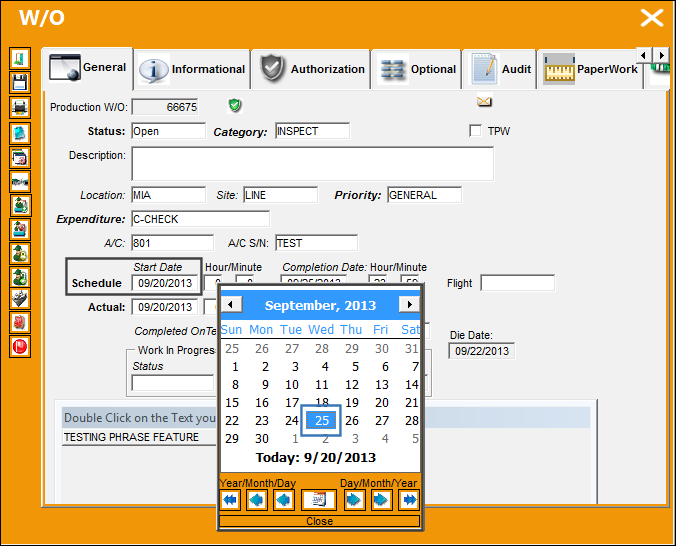
From the W/O window, change the Schedule Start Date from 09/20/2013 to 09/25/2013 and save the record. This new scheduled date will make the E/C overdue.
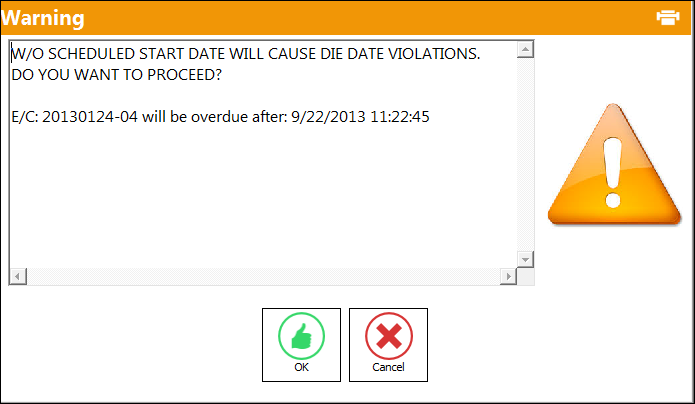
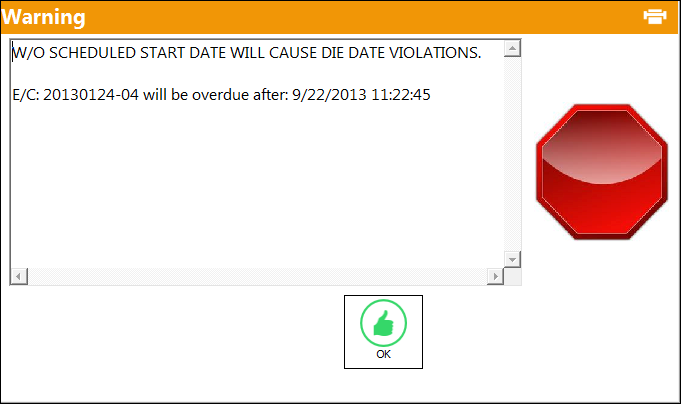
The following soft warning appears informing the user that the "Work Order Scheduled Start Date Will Cause Die Date Violations."
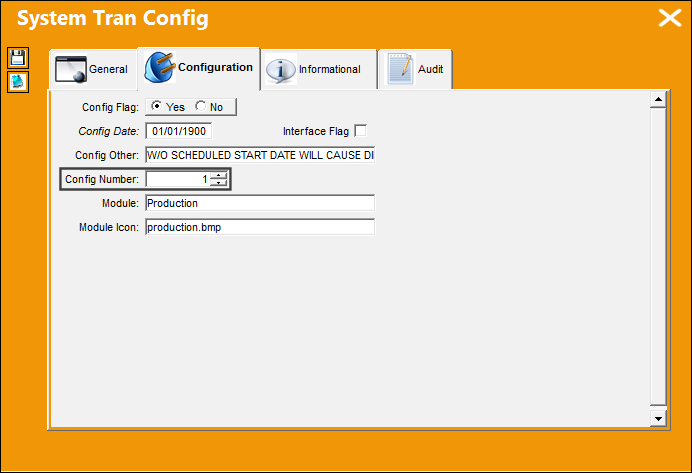
The Config Number field has been updated to '1.'
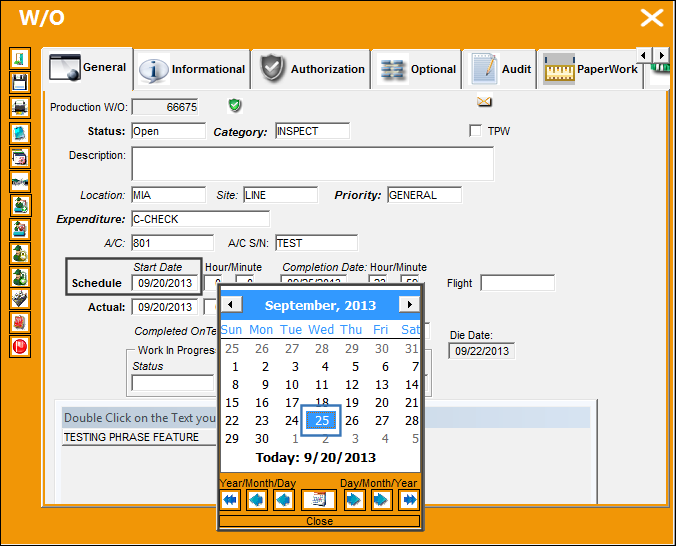
From the W/O window, change the Schedule Start Date from 09/20/2013 to 09/25/2013 and save the record.
The following hard warning appears informing the user that the "W/O Scheduled Start Date Will Cause Die Date Violations". The user is prevented from changing the Scheduled Date to a date in the future.
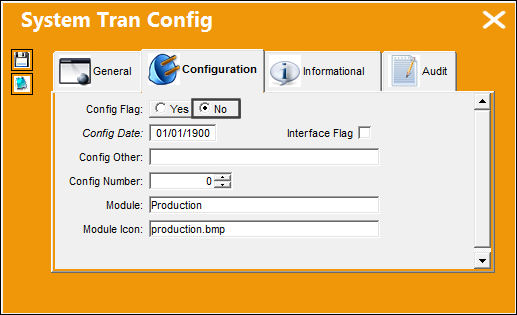
Switch Set to No:
When set to No, the system will not validate updates to the Schedule Start Date of the Work Order that conflict with an overdue item.
From the W/O window, change the Schedule Start Date from 09/20/2013 to 09/25/2013 and save the record.
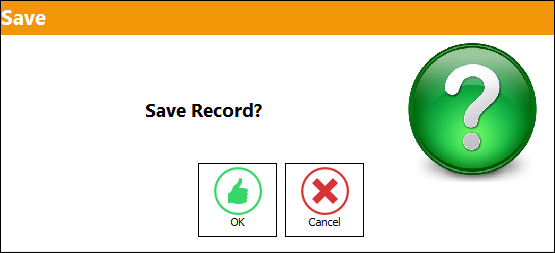
The user is able to save the transaction without any hard or soft warnings.
|
See Also Production Switches 3PTACVAL - Third Party W/O E/C Effectivity ACTWOPUB - Activation of W/O Publish ADDECNOT - Add E/C With No Task Cards ADDECNTC - Add Child E/Cs with no Task Cards ADDEFTCLEC - Allow to Add Defect to Multiple W/Os through Called On E/C ADDNONEFPN - Add Non-Effective Parts as Part Number Requirements for W/O Task Card ADDNXTDUE - Add Next Most Due information to the W/O Closing Notification ALLWOPACKP - Ability to Print All W/Os from a specific date range ASSIGNSEQ - Automatically Sequence W/O T/Cs Once the W/O Status Changes from Generation to Open ATOPRNWO - Auto Print Invoice On W/O Closing AUDITMOVE - Save the Reason for Moving in W/O Task Card Gantt AUTOCREATENRTCITEM - Auto create an item by default for a NRTC AUTONRLINE - Auto-Line W/Os will automatically add a N/R AUTOPAMP - Auto populate AMP information from A/C Type/Series to W/O AUTOPENDEF - Auto Populate Open On Time and Station From Defect Report Associated to Non-Routine Task Card AUTOPICKLIST - Generate Picklist from W/O Task Card P/N Window AUTOPNTC - Auto Create P/N Control Task Card through W/O Pack Print AUTOTCLINE - Prevent the Automatic Creation of a New (blank) Line Item in W/O Task Card Closing AVMSTR - Aviation Management Systems Export To File BLOBCLEAN - Cleans Blob files from closed W/Os CASCADCOMP - Parent W/O Completion Date Cascaded Down to Sub W/Os CCLISTCOND - Default X/O's Exchange Fee, R/N's Unit Cost, and S/O's Unit Cost CCPRODLOCOPT - Customer Contract Location Optional (Production) CCSHOPLOCOPT - Customer Contract Location Optional (Shop) CHOMITWOCA - Characters to Omit in Contractor Authorization Request Description CHECKTROUBLE - Do Not Display Ongoing Trouble Shooting Checkbox CHOMITWONOTE - Omit Characters in Trax Notes CLXECTERM - Cancel Terminated E/C on Open or Generation Status W/O CLOSEALLPOSTCOM - Activate the Database Job to Close All W/Os in Post Complete Status Monthly COATR - COA Import From Table COMPTECHLOGWOTC - Completed OnTech Log field Made Available in the W/O Task Card Window CONTRACTWO - Contract Work Order Billing Sequence CPCPIDNUM - Corrosion Prevention and Control Program Next Sequence Number CPCPVISIB - Make Corrosion Prevention and Protection Tab Visible/Invisible CRSCOMPATIBILITY - Checks if the Part's Certificate is Compatible with CRS Type of the W/O CUSTAUTHSEQ - Customer Authorization Sequence DAILYEOARCHIVE - Daily EO Will Be Archived at Compliance DEF3PTY - Default New Work Orders to Third Party DEFECTRT - Only Add Work Accomplished to Defect Resolution when Repeat is Complete DEFECTTC - Load Defect Text Into The Work Order Non-Routine Task Card DEFECTTS - Add Trouble Shooting to Non-Routine Task Card as Item DEFNRTCITEM - Default New Work Orders to Require having N/R T/Cs Items Before Printing DEFPROD - Default Work Order Task Card Defect Report Defect Type Code DERTCTSH - Deferred TC Items to Defect Trouble-shooting DFTCFMTC - Task Card Item from Deferred Task Card DONETGROVE - Use .NET version of GroveBuilder Entities Parser ECCBCDO - E/C Controlled by Calendar Days Override Reset Flag ECCBCDW - E/C Controlled By Calendar Days Warning ECCHLDTRC - Set One Time Plan to Checked status if Transferred/Canceled from a W/O ECCOMPRESEQ - Auto Re-sequence Compliance In Sequential Order by E/C ECMANTCR - Reset E/C If All Mandatory Task Cards Have Been Closed ENABLEPW - Enable fields in W/O, Paperwork tab GENCONTRACT - Validate Generic Customer Contract When Closing Work Order GENRECALTWO - Generate Recurrent Alert From Work Order HIDEDEFWARN - Hide Warning for Defects not linked to a Task Card or Work Order HIDENOTAPPTC - Hide Not Applicable Task Cards from Stylesheet INVORDTP - Customer Order Invoice Print Custom Datawindows LABORDATEVAL - Stop Validation of W/O Date on Manual Labor LABORTIM - Maximum Work Hours Allowed In The Work Order Manual Labor LABORTIMECTRL - Prevent Concurrent Man Hour Entry For The Same Time Interval and Set A Limit Per User Per Day LABORTIMEMAND - Defaults the Manual Labor's Time(hrs/min) based on the Start and End Times LBTCPRFX - Label Task Card Prefix and Sequential Number LIMITFURCRITERIA - Set First Schedule Parameter Limits for Follow Up Requirements (FUR) LINEMANDLOG - Log Page and Item # Mandatory for Line Work Orders LOCDAMAGEEDITCHK - Corrosion/Damage & Repair Location of Damage fields Validation MAINSKILLTOTC - Copy Main Skill From T/C Item To Skill Field On T/C MANDATAMP - AMP, Revision and Date Fields Mandatory MANTCDT - Mandatory Closing Time For W/O Task Cards MKLVLMD - Make Level Field Mandatory if the Corrosion is Selected MNWORKACC - Mandatory Work Accomplished at T/C and Item Level for Stop or Completed Status MSGRIID - 'Is RII required?' message appears when closing a W/O Task Card MULTITASKASSIGN - Select And Assign Multiple Task Cards In W/O Task Card Assignment NONRWOTCUPD - Prevent Closing of N/R T/Cs Using W/O Task Card Closing NR/TC-REF - Non Routine Task Card Reference NREDITOR - Defaults the W/O N/R Task Card Editor NRHDU - Multiple Users Cannot Edit same W/O Task Card Item Record at Same Time NRHWAC - W/O T/C Status Check in Add/Historical Work Accomplished Tab NRITEMDEFSKILL - Create Blank Line Item With Default Skill For NR TCs NRPRINTPROTECT - Prevent the Printing of a N/R T/C in Closed Status NRRELCATMD - Make Resolution Category Mandatory when Closing T/Cs (scheduled and NR) NRSELFASSIGN - Self Assign N/R T/C NRSVPAUTO - Non-Reserved Items Auto Print at Picklist Location Set Up Printer NRTCASC - ASC Field Mandatory in W/O N/R T/C, Optional 2 tab NRTCATA - ATA Chapter and Section (fields) Mandatory on Non-Routine Task Cards NRTCDEF - Auto Populate The Defect Description To The Task Card Description NRTCFRNO - Load Non-Routine Task Card from Issue W/O Not Parent NRTCPRAP - Non-Routine Task Card Protect After Printing NRTCPRFX - Non Routine Task Card Prefix NRTCTYPEMAND - Make Type Field Mandatory for W/O Non-Routine Task Card NRTCWAMP - Non-Routine Task Card Work Accomplished Mandatory NRTFRDEC - Allow Transfer of N/R T/C when Linked to E/C NR_MPD - W/O Non-Routine Task Card - MPD field Mandatory ONLYPEFFTCITEM - Only Print Effective Task Card Items PCWOFBR - Prevent Closed W/Os From Being Re-Opened PENDINGRII - Add Pending RII Status to W/O Task Cards at Task Card Completion PKLCANCEL - Picklists and Requisitions Canceled When Closing a Completed or Post Completed W/O PNLABORRESE - Auto Re-reservation Of Part And Labor If W/O Changes PNMANAGEDISSUE - Do Not Delete Managed P/Ns Once W/O Is Closed PNTCACVALIDATE - Validate A/C Effectivity Against P/N Task Cards POSTCMPLINEWO - Activate the Database Job MONTHLY_POSTCOMPLETE_WO PPCWOFBR - Prevent Post-Completed W/Os From Being Re-Opened PPONEJOB - Print W/O Pack Prints as a Single Print Job PREVASKTORESET - Prevent E/C Prompt 'Do you want to Put E/C at Do Not Reset' At Status Cancel And Automatically 'RESET' Linked E/C PREVDEFERTC - Prevent Message Regarding the Closing of a Child E/C PREVENTTASKCLOSE - Prevent Closing T/Cs When Un-sequenced T/Cs Are Against The W/O PRINTPDFJOB - Send one job to the printer when printing from the W/O Print PRTSKLTC - Protect Skill in Work Order Task Card Item Work RESEQWARN - Re-Sequence Warning When Opening Workpack Print RESETCEC - Update Reset Flag on Child E/Cs with No Task Cards RPTINSPP - Repeat Inspection Performed SCORECARDING - (No Longer in Use) SCTCMAN - Schedule Task Card Mandatory For Non-Routines Of Specified Defect Type SEPARATETCDOC - Print Task Card and Its Attachments in Individual Files When Using Email Function in Work Pack Print SIGNBREAK - To capture break and/or lunch for employee STOWOTASKONDB - Store The W/O T/C XML On Database SUBWOEDT - Sub WO Location/Site/Date Same as Parent WO SWACK - Shop Work Order Show Acknowledgment Button TCBIDSHT - Load Task Card Bid Sheet Notes TCCONFLICT - Conflict Task Card TCDEFBLB - Attach Task Card Images to Related Defect Reports TCDEFER - Work Order Task Card Defer Default Defect Type Parameter TCDEFEREXI - Exit Buttons removed from Defer Task Card Transfer To Defect Reports Window TCDESCRIP - Description field Open for W/O T/Cs and N/R T/Cs TCDFRSTS - Defer W/O Task Card Authorization Status TCDFTOPN - Keep Defect Open When Closing T/Cs Associated To W/O TCDFTOPNY - Completed_no on a Defect Report will be increased TCDUEPRT - Load Due Date into Task Card Print TCHMAP - Default Closed On (field) to Current Time of PC TCITEMCLOSEMDRY - Mandatory Item Select with W/O Task Card Item Close TCNRTCQTY - Default the Task Card P/N Quantity to 1 TCSTCHG - Change the Default Status at the Manual Task Card Closing TCVALMECHINSP - Same User Cannot Complete Mechanic and Inspector Work on a T/C Item TCWAMN - Task Card Work Accomplished Mandatory TCWORKACC - W/O TC/NRTC, Add/Historical Work Accomplished Tab TCWORKOOS - Work can be accomplished non-sequentially via W/O T/C Assignment Workshop TKCIWS - Accepted/Rejected prompt in W/O Task Card Assignment Workshop TRAXEOPARENTTAG - Generate TRAXEOPARENTTAG Tag When Printing STYLESHEET/TRAXDOC Task Cards UPDTDELPNREQ - Warning That Removal Of P/N Requirements With Active Picklist/Requisition Will Not Be Reflected On NRTC VALAUTONR - Validate Mandatory Fields For NR TC When Auto Created VLDGRDTM - Validate ground time for Work Orders WALLBEFTCCLW - Prompt Wall Password for Task Card Closing Window WARNIFPNRESERVED - Prevents Reserved P/Ns from being removed through W/O Task Card P/N WOACCOMPNOTEMPTY - Prevent The Post Completion Of A W/O That Has T/Cs With No Work Accomplished WOACTPW - W/O Verify A/C For Third Party Work Orders WOACTSEQ - W/O Actual Next Sequential Number WOACTSNG - Check if the Employee is Signed On WOACTUALOBJECT - W/O Actuals Calculation Function WOACTYPEMAN - A/C Type Mandatory in Work Order WOADTREC - Work Order Audit Recording WOAECDF - Defer E/C When Task Card is Deferred WOATHREL - Work Order Authorization By Step WOAUDITM - Populate W/O Task Card Completion Date WOAUTOSO - W/O Employee Auto Sign Off WOBIDNO - Work Order Bid Next Sequence Number WOCHECKSK - Validates Main Skill For TC Completion WOCHGAUTH - Re-Authorize W/O When Changes are Made to Mandatory Fields or Tasks are Added to W/O WOCHILDECDEL - Allow Deletion of Child E/C on a W/O WOCLOCHB - Make Print W/O E/C Checkbox Unchecked WOCLOSENR - Do Not Allow Edit of Non-Routine When W/O is in 'Closed' Status WOCLOSEPENDTOOL - Prevent Closing the W/O If Tools Are Not Returned WOCOMPSWP - Perform Sweep Function At W/O Post Completed Status WOCSTEXT - W/O Control Sheet Print Add Footer Description WOCUSTLOGO - Use Customer Logo for Third Party Work Order Task Card Prints WODDPLEC - Do Not Create a W/O Defer Defect When Deferring a Planned E/C WODEFER - Change Status of Parent E/C When Child E/C Is Deferred WODUEDATE - Display The Due Date Information For The W/O WOECCOMP - Write E/C Compliance from W/O Defer Defect WOECNORESETCANCELTC - W/O E/CS will be set to Do Not Reset on shared cancelled T/C WOECRESTDT - W/O Reset Date use W/O Start Date/ Time WOECXMLTAG - Generate TRAXWORKEOS Tag When Printing STYLESHEET/TRAXDOC Task Cards WOHRSBLANK - Populate W/O Task Card Hour/Minute field WOINSPRII - W/O and Task Card Inspection and RII check item and Route WOIRSDR - Do Not Display SDR and IR Creation Buttons in W/O N/R T/C Window WOLABOREFFEMP - Filter W/O Man Labor Efficiencies Report by Employee/User WOLABTCOPEN - Only Allow Labor For Open Task Cards WOLCSTEOPT - Make W/O Location/Site fields Mandatory WOLINEMULTI - Soft Warning when Multiple Line Status Work Orders are created WOLOCEMP - User's Location Must Match the W/O Location or T/C Closed Station when Closing WOMANHRSPRTFIELD - Allows for Query by A/C, Location, Site, and Date fields in W/O Print WOMNLINVREF - Manual Customer Invoice Reference WONRMANDSC - NRTC Source Code Field Mandatory WONRMAP - Populate Open On Time/Location from Server Time and W/O Location WONRPROD - Make the Open On, Hour/Minute, By, and Open Station fields Mandatory WONRSCHDEF - Make Schedule Task Card and/or Defect field Mandatory WONRTCAP - Append Accomplished Work Entries for W/O Non-Routine Task Cards via Add/Historical Work Accomplished Tab WONRTCRII - W/O N/R Task Card RII Checkbox Selection WONRTDISPATCH - W/O Non-Routine T/C Dispatcher Notified Resolution Mandatory WOPICK1 - Create One Picklist Per W/O On Reservation WOPICKPRIO - Picklist Priority Updated when W/O Priority Changed WOPKLNLA - Automatic Picklist/Requisition Creation for Missing NLA Components WOPOSCMINSERV - Set the A/C OOS status to 'In Service' when W/O is set to Post-Completed Status WOPOSTCM - W/O Post Completion Close Material and Automatic Closing WOPPIDMR - File Path Setup for W/O Pack Print - Send to IDMR WOPPTRAXDOCREV - Work Pack Print TraxDoc Supporting Documents WOPRINTCLEAR - Clear W/O Print history on location update WOPUDTMD - Date Required Field Mandatory For Pop-up Located in Requisition Via W/O WOPUPRMD - Make Priority Field Mandatory for W/O Location prompt WOPURSVRQ - Display Pop-up For Requisition Location After Location Pop-up WOPUTPMD - Make Type Field Mandatory for W/O Location prompt WORELAPP - Make Approval Mandatory in Work Order WORELFORM - W/O Release Form Status WORESC - Display Message to Reschedule the Task Card WOSCHBUFFER - Set a Buffer to Calculate the W/O Auto Schedule Start Time After Flight Arrivals WOSCHEDULE - Show Men Available for Work by W/O Header Schedule WOSCHTCAP - Append Accomplished Work Entries for W/O Schedule Task Cards via Add/Historical Work Accomplished Tab WOSCOPEDAYS - Specify Number of Days Used to Calculate T/Cs Displayed in W/O Scope Analysis, Time & Materials tab WOSEQ - Work Order Next Sequence Number WOSEQPFX - W/O Task Card Sequence Prefix WOSTATGEN - Set the Default Status of new W/O's to Generation WOTCCHECKITEMS - Check for Missing Items when Adding a Task Card to a W/O WOTCCLOSINGSTATS - Default Status on W/O T/C Closing Window WOTCCMPM - Work Order Task Card Completion Information (fields) Mandatory WOTCCTLDT - Work Order Scheduled Start and Close Date and W/O Task Card Closed Date WOTCDTALL - Date (field) Mandatory when Status All button Selected to Close W/O Task Card WOTCESIGN - Create an Electronically Signed PDF for Work Order Task Cards at Closing WOTCGRP - W/O Task Card Work Group Sequence WOTCIMDEL - Delete Task Card Images When Closing W/O WOTCITDL - W/O Task Card Item Delete Blob Data WOTCREASONMANDATORY - Work Order Task Card Reason Mandatory WOTCITEMCL - W/O Task Card Items Closed through T/C Work WOTCITEMEDIT - Do Not Allow W/O T/C and N/R Items to be Edited WOTCMATCHSKILL - Have W/O T/C's Main Inspector Skill Match the Skill Selected in the Optional 2 Tab WOTCRATIO - Calculate W/O Actuals Hours using a W/O Task Card Item Total Hours Ratio WOTCREOPEN - Allow Re-opening of Task Cards previously closed against a Work Order WOTCRIIINSP - Display pop up to Accept or Reject a T/C when status is Pending RII WOTCSCHEDPROTC - W/O Task Card Schedule Fields Protected WOTCVEFSKL - W/O Task Card Verify Employee Skill WOTPWXOAUTO - Enable Auto XO to function with Multi-Company WOTSKNWAUT - Send new tasks assigned to Work Order Authorization WOUSERETOPS - Same User Cannot Complete ETOPS Work on Both Engines for ETOPS A/C WOVEFSK@CM - Validate Skill Only at Completion in W/O Task Card Work in Progress WOVEFSKL - Verify Employee Skill in W/O Task Card Work in Progress WRKTOSEQ - Work Turnover Sequence WTMSKILLVAL - Work Order Manual Labor Will Validate Employee Skill WTUSKILLVAL - Work Order Task Card Closing Will Validate Employee Skill WTUSKILLVALEXT - Extends Functionality of WTUSKILLVAL to Other Windows and Employee Skill Status |
|

 Share
Share
 Print
Print


